
Zack Design’s durable-auth is passkey sign-in for apps built on Cloudflare Workers. Accounts, passkeys, sessions and one-time recovery codes all live in a single Durable Object’s SQLite. There is no auth service, no user database and nothing to set up in a dashboard. Anyone can create an account with Face ID, a fingerprint or a security key. Nobody types a password, and nobody types a username to sign in. An optional recovery email gets them back in after losing every device. It’s the sign-in behind Rampset, and it pairs with durable-sync. MIT licensed, on npm.
This post covers why a Durable Object suits sign-in, the security decisions and the code behind each, how it’s tested with real passkeys, and what it deliberately doesn’t do.
npm → durable-auth · Example app → examples/basic
Where it came from
Rampset started behind Cloudflare Access: a dashboard list of allowed emails in front of the whole Worker. That works for a household. It doesn’t work for an app anyone should be able to open and use. The usual alternatives each cost something on an all-Cloudflare stack. Hosted auth is another vendor, and your users live there. Auth libraries want a database and an adapter, which on Workers means D1 and migrations, just to sign someone in.
Rampset already ran a Durable Object per user for sync, and a Durable Object has the one property sign-in needs most: it handles one request at a time, with its own SQLite. So sign-in moved into one more of them, and once it had run in production, it came out as a library.
Atomic without trying
The store is plain synchronous SQL. That’s enough because nothing else can run between two statements in a Durable Object. A code check is a read and then a delete, and no second guess can land in between. The header of src/server/store.ts says so:
Every method is synchronous — a Durable Object runs one request at a time, so a read followed by a write here is atomic without a transaction, which is exactly what “check the code, then burn it” and “check the challenge, then consume it” need.
Every account lives in one instance, idFromName("auth"). Sign-in is rare and small next to an app’s own traffic, and one instance turns “an email recovers exactly one account” into a UNIQUE column instead of a distributed problem.
Secrets never reach the database in the clear. Session tokens are 32 random bytes, and only their SHA-256 is stored. Codes are hashed with what they’re for. Passkeys are stored as public keys, which aren’t secret. A copy of the whole database signs nobody in.
A cookie isn’t the person
The gap I’d left open in Rampset was this: a session is a year-long cookie. Whoever holds it is “you”. That might be someone who borrowed your unlocked phone, or someone who lifted the cookie. They could delete everything, or quietly put their own email on the account and recover it later.
So every session remembers when it last proved its user, either with a passkey or with an emailed code. Four actions need that proof to be under five minutes old: deleting the account, changing the recovery email, adding a passkey, and removing one.
/** Sensitive actions want the user, not just their cookie: a passkey or an
 * emailed code within the window. The client answers `reauth: true` with
 * the reauth ceremony and retries (see the client's `withReauth`). */
function requireFresh(s: Session): void {
  if (now() - s.verifiedAt > reauthWindow) {
    fail(403, "Confirm it's you to continue", { reauth: true });
  }
}
The client handles it so the app never has to. A 403 with reauth: true triggers one passkey prompt, limited to the account’s own passkeys. Then the call is retried exactly once:
async function withReauth<T>(run: () => Promise<T>): Promise<T> {
  try {
    return await run();
  } catch (e) {
    if (!(e instanceof AuthError && e.body.reauth === true)) throw e;
    await reauth();
    return run();
  }
}
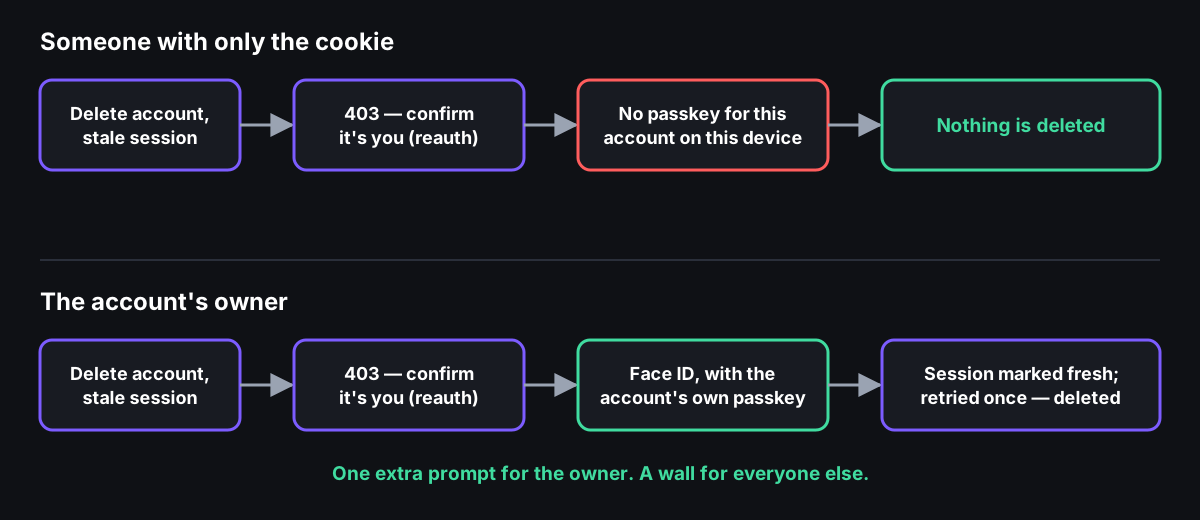
Retrying is safe because every gated route checks freshness before it does anything.
Losing a phone
Recovery is where most homemade sign-in gets weak, so each piece of it is deliberate:
- Six digits, enough guesses to be useful and no more. A code allows five guesses, an email allows ten wrong guesses a day, and there’s a thousand a day across every email. That last cap stops an attacker trying ten guesses at each of a hundred thousand known addresses. Codes are rejection-sampled, because
n % 1e6over a 32-bit number favours the low codes. - Recovering assumes the phone was stolen. It signs every device out and revokes every passkey, including the one on the lost phone, which could otherwise sign straight back in. The client then adds a passkey for the device in hand.
- It never says who has an account. “Send me a code” answers the same way, in the same time, whether or not the email exists. The lookup and the send happen after the response:
// The same answer, in the same time, whether or not the email has an
// account: this endpoint must not tell a stranger who uses the app. So
// the lookup and the send happen after the response.
const work = (async () => {
  const account = await store.accountByEmail(email);
  if (account) await sendCodeFor(email, "recover", account.id);
})();
if (options.waitUntil) options.waitUntil(work.catch(() => {}));
else await work;
return Response.json({ ok: true });
Adding a recovery email that already belongs to someone else works the same way. It answers “sent”, sends nothing, and counts against the same hourly cap. Otherwise the point at which the cap kicks in would give the game away.
Reviewed before it shipped
Before the first release, an adversarial review went through every route looking for ways in. It found four medium issues and a handful of low ones, none critical. These are fixed, each with a test:
- A stale session could add a passkey to an account that had none.
- The hourly cap on adding an email answered differently for a taken address.
- Rolling a deploy back would have marked the schema older, so the next upgrade re-ran its
ALTERs and the Durable Object would never start again. - The global cap on code guesses didn’t exist yet.
- Sign-up didn’t keep the name it was approved under.
- An old recovery email kept working for ten minutes after it was changed.
Two are trade-offs rather than bugs, and the README says so: a stranger can spend an email’s guess budget, and the profile is the user’s to write.
Tested with real passkeys
Three suites, each catching what the one before can’t. The unit suite runs the store on node:sqlite and every route with the passkey cryptography stubbed, so it tests everything around the signature check. The integration suite drives the real Durable Object on workerd’s own SQLite, where BLOBs, NULL bindings and the schema upgrade’s ALTERs behave as they do in production. The end-to-end suite is the one that matters most.
The end-to-end suite runs the example app under wrangler dev. Each test “device” is a browser context with Chrome’s virtual authenticator, so registration and sign-in are real WebAuthn, checked by the real verification code. The journeys:
- sign up, stay signed in, sign out and sign back in with no username;
- lose a device, recover by email on a new one, and confirm the lost one is locked out, passkey included;
- ask for a code for an email nobody uses, and get the same answer;
- delete an account from a stale session, which triggers the passkey check first;
- try to remove the only passkey, and get refused;
- sign out other devices, with a passkey synced to a second device the way iCloud Keychain does.
Rampset’s own end-to-end journeys run against it too.
What you write
import { AuthDurableObject, createAuth, cloudflareEmail } from "durable-auth/server";

export class Auth extends AuthDurableObject {}

const auth = createAuth({
  store: env.AUTH,
  rpName: "My App",
  sendCode: cloudflareEmail(env.EMAIL, { from: "[email protected]", appName: "My App" }),
  waitUntil: (work) => ctx.waitUntil(work),
});

const handled = await auth.handle(req);       // everything under /auth/*
const account = await auth.account(req);      // who's signed in, for your routes
import { createAuthClient } from "durable-auth/client";

const auth = createAuthClient();
await auth.register("Sam");    // passkey prompt, account, signed in
await auth.signIn();           // passkey prompt, no username
Recovery emails go out through Cloudflare Email Sending, with the wording (“123456 is your My App verification code”) that mail apps look for when offering a one-tap Copy code. Onboarding a domain only adds records on a cf-bounce subdomain, so a domain whose mail lives on Gmail keeps working.
When to use something else
durable-auth knows accounts, not organisations: no roles, teams or invites beyond an allowSignup hook. There’s no social login and there are no passwords, and both of those are deliberate. Whoever controls the recovery inbox can recover the account. If that’s not acceptable, leave email out, and a second (or synced) passkey becomes the only way back in. The guess caps that make codes safe can also be spent by a stranger to pause one email’s recovery for a day, which is the trade for codes that can’t be brute-forced. And every account lives in one Durable Object, so auth.session() is a round trip to it. That’s plenty for thousands of active users; past that, cache sessions in your Worker for a few seconds.
All three pieces are open source and fit together: Rampset, the app; durable-sync, its offline-first sync; and durable-auth, its sign-in. Together they’re a Cloudflare app with no database server, no auth vendor and no container.