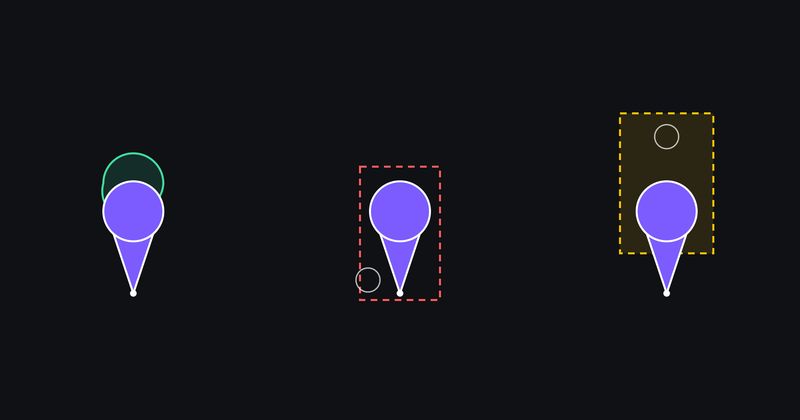
CamperMate is a map. Its users are looking for a campsite in a pack of forty pins around Queenstown, and the whole product is the tap that opens the right one. From the first React Native build, that tap was wrong in a way we could describe but not explain: on iOS, in a dense pack, the pin you got was the one next to the one you touched. On Android it was the one underneath. On the website, on Mapbox, a finger in the empty corner beside one pin’s pointer opened a different pin whose head was under that corner. We had followed the documentation for react-native-maps, for MapKit, for the Google Maps SDK and for Mapbox GL. None of it was wrong exactly. None of it described what the SDK hit-tests.
We had lived with it for a year. What changed was that we started using Claude Fable 5.1 on the codebase and had it read the SDK sources instead of the docs, and then build something we had never had: a test rig on each platform that puts real fingers on real pins and reads the pixels back to see what actually happened. That rig is the story. Our own theories about the bug were wrong twice, and it was the rig, not the reasoning, that said so. Along the way it gave us a tap rule in JavaScript that decides against the pin as drawn and in the order it is painted, three bugs in react-native-maps on the new architecture, an Android tap that the app now hears about 22 ms after the finger lifts instead of 649 ms, and, when the same rule was ported to the website’s Mapbox map, a warning that our port had got draw order wrong while every test passed.
The question the SDKs do not answer
The app’s map is react-native-maps 1.29 on Fabric, React Native’s newer rendering layer. On iOS the map is MapKit and every pin is a live React Native view inside an MKAnnotationView, MapKit’s container for a pin. On Android it is Google Maps and every pin is a bitmap, drawn natively from the same geometry so the two look identical. The website is mapbox-gl 3.29, with the pins drawn by Mapbox itself from a list of points (a symbol layer over a GeoJSON source).
When a finger lands on a cluster, the app needs one answer: which pin did the user put their finger on? Each SDK answers a different question.
- MapKit tests the whole rectangle the pin is drawn in. A pin is a circle on a pointer, so most of that rectangle is empty space either side of the pointer. Tap the empty corner beside pin A’s pointer and MapKit reports A, even when your finger is visibly on the head of pin B behind it.
- Google Maps tests a zone that does not line up with the pin at all. For custom marker images the zone is bigger than the image and shifted upward, a long-standing SDK defect that is worse on real phones than on the emulator. Measured later on a Samsung A13 with real touches: a finger placed dead-centre on pin b was reported as the pin beside it, and a tap on empty map well above a pin counted as a tap on that pin.
- Mapbox GL tests the rectangle it uses to stop labels overlapping, the “collision box”. For our pins that is the whole image the pin is drawn in, including the transparent margin reserved for badges, so the clickable area is half as wide again as the pin you can see.
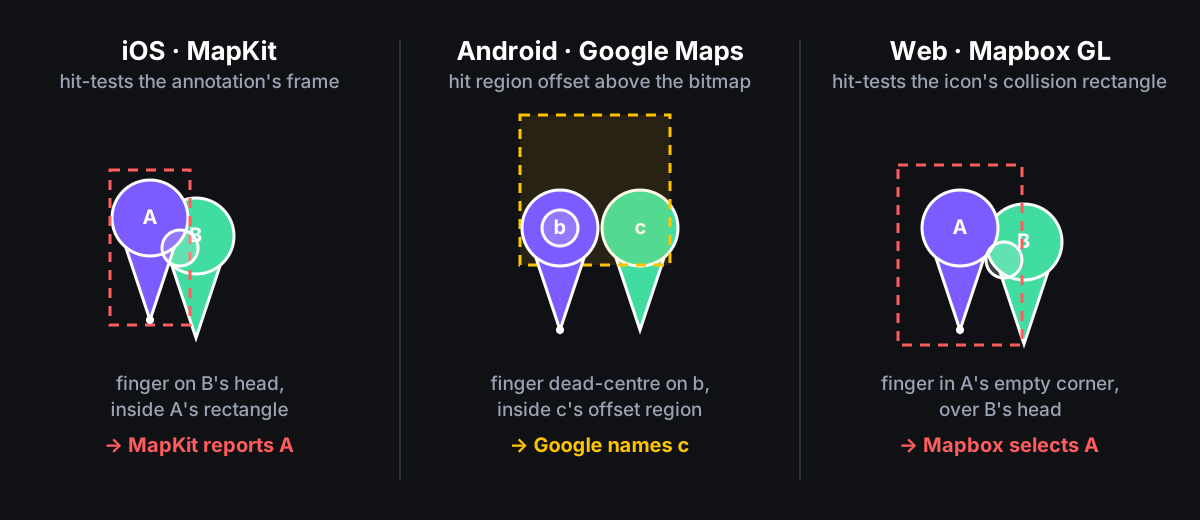
Three SDKs, three rectangles. The react-native-maps documentation says a marker has an onPress. MapKit’s says an annotation view is selected on tap. Google’s says onMarkerClick fires for the marker that was clicked. Mapbox’s says queryRenderedFeatures returns the features at a point. All true. All silent on the shape being tested. That silence was the whole bug.
Deciding it ourselves
The fix is the same on every platform: stop asking the SDK which pin, ask it where the finger was, project the nearby pins to the screen, and decide against the shape we actually draw, in the order we actually paint.
That needs two things the SDKs do not hand over by default: the finger position and an agreed shape.
The finger position. On Android, the library’s marker-click event reports the marker’s position, not the tap’s. The patch reports the tap location instead, which the touch handler already captures, the way presses on polygons and lines already do. On iOS it took two small patches, both upstream bugs on the Fabric path:
RNMapsMarkerView.mmbuilt the press event’s position by reading anxand ayout of a dictionary that only holds latitude and longitude. There is noxoryin it, so every marker press on the new architecture reported its position as zero, zero: the top-left corner of the screen.AIRMapMarker.mmeasured the finger relative to the pin’s callout view. With no callout open that view does not exist, which also gives zero, zero. It now measures the finger relative to the map ([recognizer locationInView:marker.map]).
On the web the position is free: the click event has it. Mapbox is only asked for the list of pins drawn in a box around the click, a little bigger than a pin so that a pin whose edge is near the click is included, and the decision is made from there.
The shape. One small file describing the pin as a circle sitting on a pointer, every measurement taken from the tip, which is the point that sits on the map coordinate:
{
  "circleCenterAboveTip": 26,
  "circleRadius": 15,
  "pointerTopAboveTip": 17,
  "pointerHalfWidth": 12,
  "containerWidth": 40,
  "containerHeight": 45
}
The JavaScript hit test reads it. The Android code that draws the pin is tested against it pixel by pixel. The iOS view is rendered into a bitmap and compared to it. The website’s pinGeometry.json now carries it verbatim, and a browser test (Playwright) draws the web pin on a real canvas and checks every pixel’s transparency against the same shape rule. The file exists because the first version of the hit test shipped with a hand-copied rectangle describing a pin the app no longer drew: the renderer had moved the circle two pixels and nothing tied the two together. Now they cannot disagree without a test failing.
The silhouette test is small:
export function isInsideMarker(dx: number, dy: number, g = MARKER_PIN_GEOMETRY): boolean {
  const fromCentreY = dy + g.circleCenterAboveTip
  if (dx * dx + fromCentreY * fromCentreY <= g.circleRadius * g.circleRadius) {
    return true
  }
  if (dy <= 0 && dy >= -g.pointerTopAboveTip) {
    const taper = -dy / g.pointerTopAboveTip // 1 at the top edge, 0 at the tip
    return Math.abs(dx) <= g.pointerHalfWidth * taper
  }
  return false
}
A circle plus a tapering pointer, not a rectangle drawn around the whole thing. A rectangle is exactly how you get “the touch target is wider than the marker”.
The other half of the rule is which pin wins when silhouettes overlap. The original code picked the nearest tip. That is structurally wrong: a pin’s circle sits about 26 pixels above its own tip, so when you tap the circle you can see, you lose to whichever pin has its tip under your finger, and that pin’s circle is usually hidden behind the one you aimed at. That was Android’s “selects the one underneath” in its entirety. The rule is now: among pins whose silhouette contains the tap, the one painted on top wins, because that is the one the user can see. What decides “on top” is the search itself: every place comes back from search with a relevance score, the more relevant place is drawn over the less relevant one, and the same number that sets the drawing order is the number the tap rule reads. If those two ever disagreed, the user would tap the pin they can see and get the one behind it.
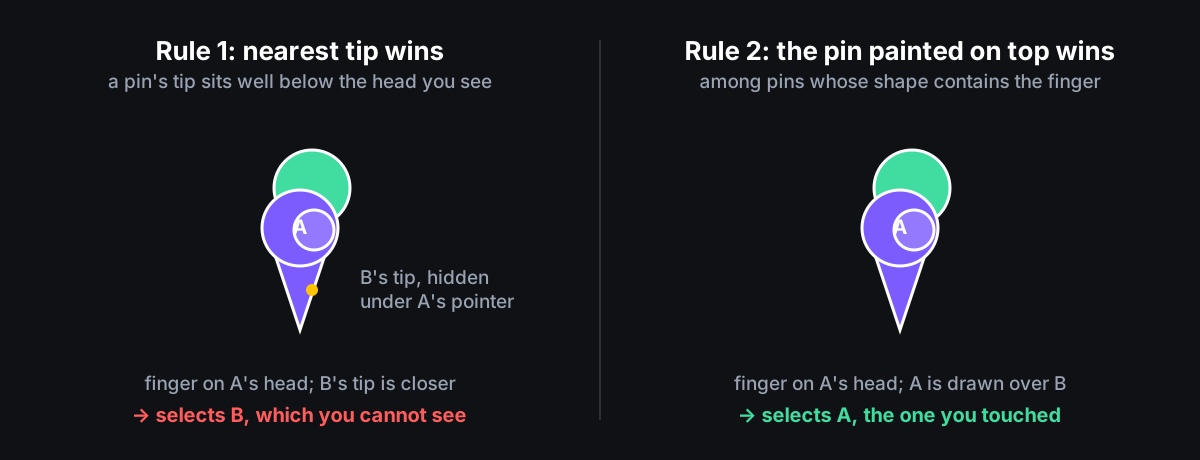 If the finger misses every pin outline, the nearest pin within about twelve pixels wins. That allowance exists because a fingertip is about 7 mm wide and the pointer is only three pixels wide near its tip, so a tap that is clearly at a pin often lands just outside its outline.
The first version made it worse
The first build with the new rule went out to a phone and came back with one line: “categorically worse behaviour.” Pins with nothing near them opened a different pin on Android, and some pins on iOS stopped responding at all. The rule was right. Four things it depended on were not.
| What the user saw | What was actually happening | What fixed it |
|---|---|---|
| Android: a lone pin opens a different place | Two places sat at the same coordinate. We assumed Google draws them in the order we sent them; Google’s documentation says the order is arbitrary, and it was. Our rule picked the one we thought was on top, Google had drawn the other one on top. | Every pin gets its own stacking number, built from its search relevance with its position in the list as the tiebreak, and both the drawing and the tap rule use that same number. |
| iOS: the same, in dense packs | Our stacking numbers had a fraction in them to keep them unique. iOS stores that number as a whole number, so the fraction was silently thrown away and pins tied again. | Whole numbers only. |
| iOS: a pin lights up and immediately goes dark | iOS reported each tap twice, once from the pin and once from the map. The second report deselected what the first had selected. | The first report of a tap wins; any repeat at the same spot within half a second is ignored. |
| iOS: some pins ignore taps | A finger just outside a pin’s outline used to be handled by MapKit’s rectangle. We had replaced that with nothing. | The nearest pin within about twelve pixels wins, which is also how a fingertip 7 mm wide actually lands. |
None of these were visible in the unit tests, because the unit tests encoded the same assumptions we had. Every test we could write would agree with us. We needed a judge that could not: the pixels on the screen, and real touches, on the real app.
The test rig: trust nothing but the screen
The ask was explicit: “set up a test harness against native code and JS code together without needing a sim.” The requirement underneath that message is the one that matters. Every layer between our code and the screen had an opinion about what a tap meant, and every one of them had been wrong at some point. The rig had to run the real app, use the real SDK, put a real finger down, and take its answer from the only place none of those layers could edit: the screenshot.
It ended up as four layers of tests, each catching something the one below could not.
1. Draw the Android pin on a laptop and check every pixel. No phone, no emulator. The code that draws the Android pin is run on an ordinary computer using Robolectric, a tool that lets Android code run outside a phone, and the result is compared pixel by pixel with the shape file at the three screen densities our test phones have. A second test goes further: it saves the drawn pins as images and runs the tap rule itself over them, so the code that draws and the code that decides are checked against each other in one place.
2. Run Apple’s real map code inside the real app. Apple’s map classes, and the layer of react-native-maps that sits on them, cannot be tested on their own; they only compile as part of the app. So the iOS tests live in a separate project that loads the actual CamperMate build and drives its map objects directly: create a pin, remove it, reuse it, tap it, ask where its frame is. Three more tests go one level up and mount a second, test-only screen inside the running app’s own React Native instance, then read back what JavaScript received. Every patch we made to the SDK is checked by undoing it and confirming exactly one test fails.
3. Put real fingers on real pins, where the test says they are. On iOS a test places three pins on the live map, writes their on-screen positions to a file, and waits. A script reads the file and uses Maestro, a tool that taps a phone’s screen from a script, to tap the map above pin a, the centre of pin b, and the empty corner beside pin c. The test then checks what JavaScript was told. One thing this taught us: touches never arrive at a test window unless it has a root view controller, the iOS object that owns what a window shows.
4. Real fingers on Android, inside the running app, judged by a screenshot. An Android test mounts the same test-only screen inside the app, works out where each pin’s image is from Google’s projection and the pin’s anchor, and injects real touches at those points. Android has no way to ask which pin it drew on top, so the test reads the screen: it takes a screenshot, looks at the pixel at the centre of the selected pin, and checks that it is the brand yellow before and after the tap. Three things this taught us: the standard automation click never reaches this window, the app has no keyboard focus for about ten seconds after the screen mounts, and two touches on one spot within 0.7 s count as a double-tap zoom.
Asked at the end of that day whether all this was “a sad indictment” of the developer experience, the summary we wrote down was: three layers of software that never agreed on what a tap meant, and the only description of the truth was the pixels on the screen.
What the screen showed
The rig disproved our best theory and found the real one. That sentence is the reason this post exists, so here is exactly how it happened.
The report was vivid: “I’m literally clicking one POI a very long way away and an iOS marker on the other side of a mountain range turns on.” The theory was view recycling: Fabric reuses the native view behind a pin for a different pin, and if the old pin’s annotation was still on the map, a tap on it would be reported under the new pin’s name. We patched the recycling hook, prepareForRecycle, to disconnect the old annotation and take it off the map. Plausible, checked by reverting it and watching a test fail, and wrong. A test that creates and destroys pins twelve times over through the real renderer, with that patch reverted, left no stale annotations behind. The patch stays in as a precaution.
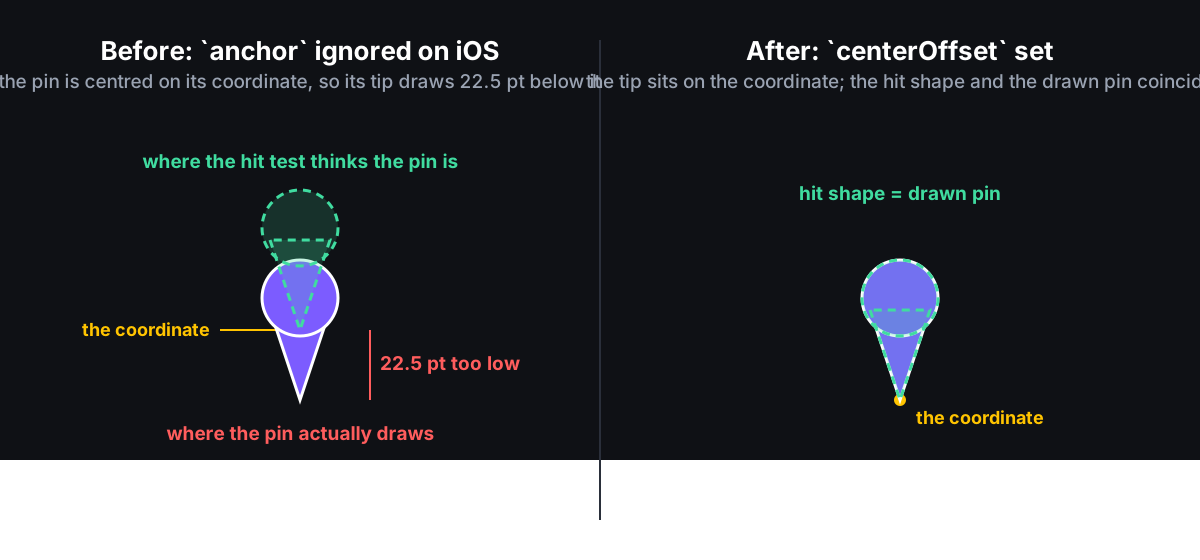
The test that checks where each pin’s frame sits found the actual bug. On Apple Maps the anchor prop does nothing, and the docs do say so in one line we had never read: “iOS: Google Maps only. For Apple Maps, see the centerOffset prop.” We had passed anchor on both platforms for a year and nothing at runtime warned. We had asked for the pin to hang from its bottom centre (anchor {0.5, 1}). The Fabric marker in react-native-maps ignores that and reads only centerOffset, which was left at zero, so every pin, 40 points wide and 45 tall, sat centred on its coordinate with its tip drawn 22.5 points too low. The JavaScript hit test assumed the tip was on the coordinate, so the shape it checked floated 22.5 points above the pin the user could see. Empty map above a pin selected it. A tap on the drawn circle mostly missed and fell through to the nearest-pin fallback. The info window’s iOS lift had been “tuned on device” against those low-drawn pins. The fix is one constant, {0, -containerHeight / 2}: shift the view up by half its own height. Every iOS pin moved up to where its coordinate is, in line with Android.
Other findings, in the order the screen gave them up:
- Every pin blinked on every selection (iOS). A frame-difference filter over a cluster far from the tapped pin showed every other pin blanked for two frames. Fabric treats a change to a pin’s stacking number (
zIndex) as a reorder of siblings, which it does by removing and re-inserting the view, and MapKit lays out every annotation again on any add or remove. Raising the selected pin by 1,000 instead of 999,999 flashed just the same. A separate overlay marker mounted on top did not. Base pins now never change props when selected; the highlight is its own marker on both platforms. - The peek took forever to disappear. JavaScript dismissed it within 50 ms of the map reporting a press. The wait came before that: on both platforms the single-tap recogniser waits to see whether a second tap follows before it reports the first. The peek now hides the instant a finger touches the map, and the selection clears once the tap is confirmed.
- The invisible strip under the card. The tappable area of the info window included an invisible strip, the full width of the card, between the card and the pin, so tapping the gap opened the place on both platforms. The tappable area is now the card itself.
- On Android, showing an info window overrides the stacking order.
react-native-mapscallsshowInfoWindowon every tapped marker whenmoveOnMarkerPressis off, and Google draws the marker whose window is showing above every other marker whatever its stacking number. An empty window still counts. That is why the selection overlay had been rendering perfectly and invisibly, underneath. The patch shows a window only for a marker that has one; proven by reading the pixel at the circle centre. - A tap on empty sea opened a random POI (Android). When the finger missed every pin outline and no pin was within the twelve-pixel allowance, the code still selected whichever marker Google had named. Android’s finger is exact now, so a miss there is a background tap. iOS keeps its fallback because MapKit’s frame is at least the pin’s own box.
- An invisible dev-only control. A 96-by-72-pixel button for triggering end-to-end tests rendered in every dev build, transparent, in the left-middle of the map, eating taps. “This popup broke marker clicks” was true and the popup was innocent.
Dense packs, with real data
Three pins on a test screen is not what users see. Around every popular tourism town, Queenstown, Wellington, Byron Bay, CamperMate shows a dense pack of pins all the time, and that is where the wrong-pin bug lived. So the tests use the real data: a script pulled the 250 places nearest to each of six such towns, 1,266 in all, straight from the production search index. A test lays each scene out on a phone screen at four zoom levels, in the app’s paint order, then simulates a tap every three pixels across the whole pack, tens of thousands of taps per scene. The hit test must return the pin painted at every pixel; the geographic pre-filter must never drop it; every pin with any ink must be tappable; one tap over the densest pack stays under 2 ms.
It found a real flaw on its first run. The nearest-pin fallback kept a running best and let near-ties drift along a chain, B to C to A, each within the tie band of the last, until it could answer a pin farther than the nearest, or one beyond the twelve-pixel allowance entirely. Ties are now relative to the minimum distance and the slop is a hard limit on the answer.
On device, 160 real Wellington places at suburb zoom with four real touches: iOS four of four, Android four of four, each checked against the pin the operating system actually painted on top. On iOS that is decided by each layer’s stacking position; the system’s own hit-testing walks the view tree in a different order, so it cannot be used as the answer key.
Then Android was correct and slow
With both platforms resolving the right pin, the next report was about feel: “on Android it’s nowhere near as fast as iOS when switching between info windows. Noticeably bad. There’s a huge lag.”
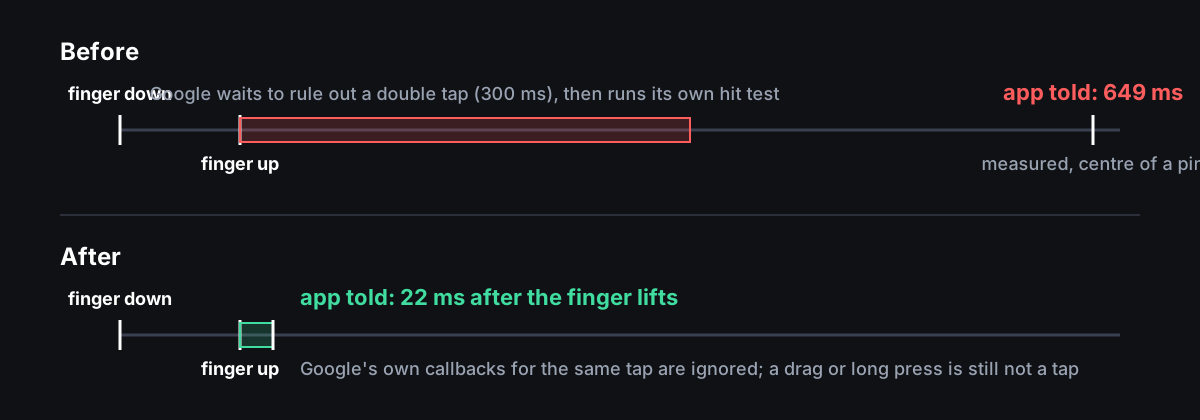
Every Android tap was waiting on Google. When a finger lifts, the Google Maps SDK holds the event for 300 ms to see whether a second tap follows, because two taps mean zoom. Only then does it run its own marker hit test and call the app. iOS pins have their own tap recogniser and never waited. Measured on the arm64 emulator, from the moment the finger touched the screen to the moment the app’s JavaScript heard about it:
| tap | before | after |
|---|---|---|
| empty map | 295 ms | 21 ms |
| centre of pin b | 649 ms | 22 ms |
| dead corner of pin c | 709 ms | 22 ms |
The patch listens for the finger lifting on the same gesture detector that already sees every touch before Google does, and tells the app right then, with the finger position. Google’s own callbacks for that same lift are then ignored, using a flag set when the fast path fires and cleared when the next finger comes down. A long press or a drag Google consumed is never also a tap. The tap’s screen position is converted to a map position once and reused, where before it crossed between native code and JavaScript three times in a row.
The same change made Android pins fade in over 250 ms once their bitmap lands, which also hides Google’s red default pin while a cold bitmap decodes. The old native app had the same entrance.
Code review caught what the harness had not: a pin whose image failed to load could be left fully transparent, invisible but still tappable, so both failure paths now fall back to Google’s default pin. And Google’s My Location button became a map press in the location picker, dropping the pin under the button; the screen has its own button, so Google’s is off.
One accepted behaviour change: a double-tap to zoom with a peek open now closes the peek on the first tap. Same as iOS, new on Android.
The website had the same bug, and two of its own
The website’s map had the identical complaint, and the ask was direct: “look at how we did marker hit box and cleanup fixes for 5.6.1 in campermate-react-native. we are struggling with the same tap targets on mapbox in mobile / desktop views on campermate.com.” Followed three minutes later by: “clicking on different markers shows the infowindow photo for the previous marker.”
Reading mapbox-gl 3.29 rather than its docs produced the same class of defect. Mapbox resolves a symbol-layer click against the icon’s collision rectangle, the whole padded canvas including the transparent badge margins, so a tap in the dead corner of one pin’s box over the visible head of a lower pin selected the wrong pin. Worse, two handlers answered every click: the layer’s handler set the selection, then a map-level handler re-queried one pixel and cleared it if the query disagreed. A finger 5 px off a 36 px head was a background click that closed the panel. The stale photo was simpler: the panel’s image element had no React key, so React reused the same element and only changed its address, and the browser kept painting the previous place’s photo until the new one downloaded.
The port was almost verbatim. lib/Maps/markerHitTest.ts on the web is the app’s hit test; pinGeometry.json started as a model of the app’s geometry and, a day later, became a copy of it, with the app’s Android rasteriser constants alongside so the web pin is the app’s pin to the pixel. One click handler owns the click. Mapbox lists the pins drawn in a box around the click, each is converted to a screen position, and the same rule decides: the pin whose outline holds the click, topmost first, then the nearest pin within about twelve pixels, otherwise the click was on the background, exactly as on Android, because a mouse pointer is exact. The dense-pack sweep was ported with its six fixtures. A Playwright test bundles the real renderer, draws the pin on a real canvas and checks every pixel’s transparency against the shape rule, the web’s counterpart of the Android laptop test. Another drives the real desktop map with a mouse: on the Queenstown pack there are 44 points where Mapbox’s rectangle names the wrong pin and the silhouette names the right one.
Then the web had two surprises the apps did not.
Mapbox’s query order is not its paint order. The first version trusted the order queryRenderedFeatures returns as the draw order, and the PR description said so, “verified in the 3.29 source”. That holds only for layers Mapbox sorts by screen position, top to bottom. With a sort key set, which the pin layer uses so that the same search relevance as in the app decides what draws on top, mapbox-gl never records its draw order at all and returns results in the reverse of the order the data arrived, unrelated to what it drew. So the wrong pin could still win whenever results arrived most-relevant first, which is the common case, and the test’s answer key shared the assumption, which is why everything passed. Paint order now comes from each feature’s own sort key with the query index as the source-order tiebreak, the test’s answer key applies that rule independently, and the pointer cursor is driven by the same resolver, because until then the cursor promised a click on the rectangle’s corners that the silhouette then read as background.
map.project returns one world copy. A pin drawn on a wrapped copy of the world, any low zoom with copies rendered or a Chatham Islands viewport, projected a world away from the click and read as background. Each candidate is now projected three times, at its own longitude and one full world width to the east and to the west, and the copy nearest the click is kept. The info window’s own placement had the same seam bug, fixed by reusing the helper.
The port also exposed a regression nobody had noticed: the info window’s tail, the small triangle pointing at the pin, had disappeared in April when the card stopped being part of a DOM marker and became an absolutely positioned element lifted a flat 18 px, over the head of its own pin. Tapping pins had been unreliable enough that nobody saw where the card landed. The tail is back, the lift comes from the shared geometry, and the placement rule is the app’s: above, below when there is no room, beside at the edges, tail always on the pin.
One thing did not port. icon-size is a layout property in Mapbox, not a per-feature one, so the app’s iOS sprout animation is not available on a symbol layer. Opacity is per feature, so the web pins fade in over the app’s 150 ms, Android’s entrance.
Would this have been easier without React Native in the way?
A fair question, because the six upstream issues below are all react-native-maps bugs, and it would be easy to read this post as “React Native made maps hard”. The honest split is about a third and two thirds.
The part the SDKs own, which native would have hit just the same. The CamperMate apps that came before React Native used the Google Maps SDK on both platforms, and both took the SDK’s answer as the answer: the iOS app’s didTapMarker: and the Android app’s OnMarkerClickListener each opened whichever marker Google named, with no hit test of their own. So the Google Maps hit zone, bigger than the icon and shifted upward, was in those apps for years. Google’s 300 ms wait before reporting a single tap, to rule out a double tap, was there too, since the native apps waited on the same callback. Arbitrary draw order for two markers at one coordinate, showInfoWindow pulling a marker above every stacking number, and the fact that no SDK will tell you which marker it painted on top: all of that is the SDK, and a native app that wanted the right pin would have needed the same silhouette, the same paint-order rule, the same finger-up dispatch, and a screenshot to check its work.
The part React Native added. Every bug in the “finger position” half of the fix was the bridge: a press position read out of a dictionary that only holds latitude and longitude, a finger measured against a callout view that did not exist, Android reporting the marker’s position instead of the finger’s. A native app gets the touch point from the gesture recogniser or the motion event and never has this problem. anchor doing nothing on Apple Maps is a leak in an abstraction; the old iOS app set groundAnchor itself, in one line. Whole-number stacking numbers, the annotation remount and blink when one pin’s zIndex changes, the tap reported twice: all artefacts of the layer in the middle. And most of the days went on the rig, because with three layers between the finger and the SDK, the only way to test was to mount a screen inside the running app and inject touches from outside it. Natively that is an ordinary XCTest or Espresso test with the views in hand.
One caveat cuts the other way. Native would have made it easier to not notice. The hit-test defect was tolerable in the native apps for years precisely because there was no framework amplifying it into “a marker on the other side of a mountain range turns on”. React Native made it bad enough to force the fix; the fix itself, silhouette plus paint order plus finger position, is the same on every platform and would have been worth doing natively too.
What we would tell someone starting this
- Build the rig before the theory. Every explanation we reasoned our way to was wrong, including one we had already patched and mutation-tested. The test that took a screenshot and looked at a pixel was right every time, and the one web test that shared our assumption instead of checking the screen passed for a day while being wrong. When the layers below you disagree with each other, the screen is the only witness they cannot argue with.
- No map SDK answers “which pin did I tap”. MapKit tests a frame, Google tests an offset region, Mapbox tests a collision rectangle. Their documentation describes the event, not the shape. Read the source. Then decide it yourself, from the finger position, against the shape you draw, in the order you paint.
- Put the pin’s geometry in one file and test every renderer against it, pixel by pixel. Our first hit box described a pin nobody drew any more.
- Paint order is part of the hit test. Make it unique, make it an integer, read it from the same field on both sides, and never take a query’s result order as the draw order without checking which sort the layer uses.
- On Apple Maps,
anchordoes nothing andcenterOffsetis the whole story. The docs say it in one line; nothing at runtime does. ChangingzIndexremounts the annotation and lays out every other one again. Highlight with a separate marker. - Mutation-test the patches. A hunk that stays green when reverted is decoration. One of ours was.
The react-native-maps changes that are general rather than CamperMate-specific are now filed upstream with their diffs: the Fabric press position and the nil callout view (#6002), the callout z-position boost that never applied (#6003), the blink when one pin’s zIndex changes (#6004), Android reporting the marker’s position instead of the finger’s (#6005), showInfoWindow raising pins above every zIndex (#6006), and the finger-up dispatch with its latency table (#6007). The Mapbox finding went onto the existing report of query order ignoring symbol-sort-key (mapbox-gl-js #10800). Everything else here is the shape of the work: a year of following the docs, then a few days of reading what the SDKs actually do and building something that could tell us when we were wrong.