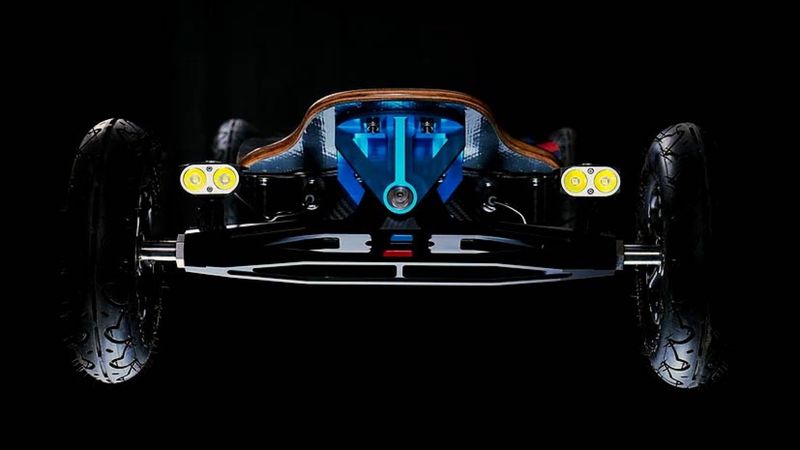
Zack Design has published vesc-workbench, a set of make targets that script VESC Tool, the desktop program for configuring a VESC motor controller (an open-source electronic speed controller, ESC, used in electric skateboards and bikes), over the phone app’s Bluetooth bridge. That lets a controller sealed inside a skateboard deck be read, written and verified from a laptop with no USB cable. It exists because a FOCBOX Unity, a two-motor VESC, flashed to firmware 7.00 stopped talking to the DAVEGA X, the small display bolted to the deck, over two bytes: the telemetry packet the display draws (COMM_GET_VALUES, 25 fields) is byte-identical between VESC firmware 6.00 and 7.x, and the only difference on the wire is the major version number.
This post walks through the mechanisms: why VESC Tool’s command line cannot connect over the network and why a script loaded into it can; a 178-line script in LispBM, the small Lisp interpreter that runs on the controller, that rewrites those two bytes and recomputes the checksum; a serial-port call that silently switches the throttle input off and saves that to permanent storage; the display’s own interactive prompt and the settings file that had it under-reading speed by 18%; a screen where a draw call costs 2.9 ms whether it covers 4 pixels or 9,600; and the test that caught every curve about to reach the screen with its colours reversed.
MIT licensed.
Source → github.com/isaacrowntree/vesc-workbench (MIT)
Change a number, ride, forget what it was
Everyone who runs a VESC ends up in the same loop. Change a current limit. Ride. Change the throttle curve. Ride. Was that better, or was it a headwind? What was it set to three weeks ago?
VESC Tool is a graphical program. You click through tabs, hope you typed the number into the field you meant, and when you are done there is no record of what changed. Exporting an XML backup is a manual step you take instead of riding, so nobody does it every time. And on a sealed skateboard enclosure the USB port is behind screws, so all of this happens on a phone in a driveway.
The repo is that loop, scripted:
make pull      # read both motor sides' configs to XML
make apply     # write them back, then verify by reading them again
Settings are text files. Run git diff on a tuning session, review it before it goes near the motors, revert it in one command. apply reads the settings back after writing them, because the write call with its verify flag off (setMcconf(false)) accepts a write and discards it; only the flagged version asks the controller to check and confirm. That one took an afternoon.
The command line only talks over a cable; the scripting runtime does not
VESC Tool ships a command-line mode, and I expected it to solve this. Its port option (--vescPort) goes straight to the serial-connection code and takes a serial device, full stop. An address and port (--vescPort 192.168.1.100:65102) is rejected. A fake serial port bridged to the network socket (a socat pseudo-terminal) opens, and then the handshake never completes: VESC Tool drives the port directly and the fake does not behave like a real one. I wrote that down as impossible.
It isn’t. VESC Tool also accepts --loadQml, which loads a script written in QML, Qt’s user-interface language, and a script loaded that way runs inside the application, with VescIf in scope. VescIf is the one object that holds the whole connection and configuration interface, and its connectTcp() method can be called from the script. The phone app has a Wireless Bridge to Computer (TCP) mode on its Start page, listening on port 65102, one client at a time. The laptop talks to the phone over Wi-Fi and the phone talks to the controller over Bluetooth, the link it always uses.
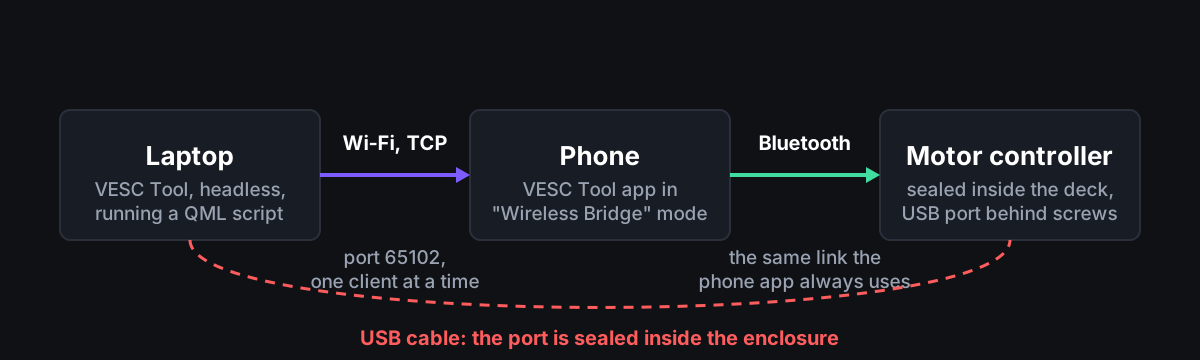
The entire minimum viable version, from docs/connecting.md:
import QtQuick 2.7

Item {
    id: root
    property int ticks: 0

    Component.onCompleted: VescIf.connectTcp("192.168.1.100", 65102)

    Timer {
        interval: 500; running: true; repeat: true
        onTriggered: {
            root.ticks++
            if (root.ticks > 60) { console.log("timeout"); Qt.quit() }
            if (!VescIf.isPortConnected()) return

            // Firmware params arrive AFTER the socket connects. Until they do,
            // getFirmwareNow() returns "x.x" and every config read is garbage.
            var fw = VescIf.getFirmwareNow()
            if (fw.indexOf("x.x") >= 0) return

            console.log("connected, fw " + fw)
            VescIf.disconnectPort()
            Qt.quit()
        }
    }
}
"/Applications/VESC Tool.app/Contents/MacOS/VESC Tool" --offscreen --loadQml connect.qml
--offscreen keeps the window from opening and console.log goes to standard output. From there the motor configuration, the app configuration and the command interface (VescIf.mcConfig(), VescIf.appConfig() and VescIf.commands()) are all yours. You do not need the rest of the repo; take the file.
The "x.x" check is load-bearing. The connected flag goes true as soon as the socket is up, several seconds before the controller has sent its parameters, and a configuration read in that window returns defaults that look exactly like a controller that has wiped itself. Every target in vesc/qml/ waits for a real firmware string for that reason.
Diagnostics that tell two failures apart
Half of tuning is working out what is wrong, and a still bar in the GUI does not say why it is still.
make ppm-watch    # live remote readout — prints only on change
make ppm-cal      # guided calibration: neutral, full throttle, full brake
make probe        # connect, report firmware and LispBM state
make check        # is the bridge up? is desktop VESC Tool holding it?
PPM is the pulse signal the hand remote sends, and ppm-watch distinguishes the remote is not transmitting from the controller is not decoding it, which look identical in VESC Tool and have different fixes. make check is a port probe against the bridge plus a check for a running desktop VESC Tool, which would be occupying the bridge’s single client slot; it answers in a second instead of a two-minute timeout.
make motors-off   # kill motor output, no config write, display stays live
make motors-on
motors-off tells the controller to stop driving the motors (app-disable-output), which is not a configuration change, so nothing needs undoing and nothing is left in a strange state if you walk away.
The controller reports accurately and points at the wrong thing
docs/findings.md is the document I wanted and could not find. Every entry has the same shape: the firmware does something reasonable, reports it correctly, and the report sends you somewhere else.
| What you see | What is happening |
|---|---|
| Throttle dead after a script ran; a reboot does not fix it | Starting the serial port from a script (uart-start) permanently saves “no throttle input” to the controller’s settings |
| Remote-control settings go in and come back wrong, so you suspect the remote | The remote-control settings refuse to be written while the control type is set to “off” |
| “did you forget to upload the code” | The obvious upload call (lispWriteCode()) does not actually store a script; the code-loader path (CodeLoader.lispUploadFromPath) does |
| A config that looks corrupted | A read taken before the controller finished booting |
The first one is the one to know before running any script. From bldc/lispBM/lispif_vesc_extensions.c, ext_uart_start:
if (appconf->app_to_use == APP_UART ||
        appconf->app_to_use == APP_PPM_UART ||
        appconf->app_to_use == APP_ADC_UART) {
    appconf->app_to_use = APP_NONE;
    conf_general_store_app_configuration(appconf);   // written to FLASH
    app_set_configuration(appconf);
}
The setting app_to_use says which input drives the motor. If it is any of the three modes that include the serial port, “serial only” (3), “remote and serial” (4) or “analogue and serial” (5), then uart-start writes “none” to permanent storage and the throttle is gone. It also explains config writes that “do not persist”: they persisted fine, and the next uart-start overwrote them. make upload-lisp now searches the script for uart-start, reads the setting, and changes “remote and serial” to “remote only” (4 to 1) and “analogue and serial” to “analogue only” (5 to 2) before uploading, since the firmware is going to clear the serial half either way. Verified on the board: set to “remote only”, the decoder reads a live pulse of between 1.4990 and 1.5020 ms; set to “remote and serial”, it reads nothing at all.
There is a correction in there too. The esk8 forums say VESC traction control interferes with braking. I enabled it and then read applications/app_ppm.c: traction control lives entirely in the non-brake branch, mc_interface_set_brake_current is called before that branch is reached, and it disengages on any fault. What it does do is taper drive current smoothly to zero as the two wheels’ speeds drift apart, reaching zero at a configured difference (tc_max_diff), measured in electrical revolutions per minute, the motor speed as the controller counts it. On this board, with seven magnet pole pairs, a 4.2-to-1 gear ratio and 200 mm wheels, the default of 3,000 is about 3.8 km/h of difference between the wheels, tight enough that normal grass slip keeps triggering the taper, which is the “power surging” people describe and probably where the folklore comes from. Doubling it to 6,000 (about 7.7 km/h) is what runs here, confirmed in motion.
Two bytes stood between the display and firmware 7
All of this exists because of a smaller problem. I have a LaCroix Nazaré electric skateboard with a FOCBOX Unity sealed in the enclosure, ridden on grass at a golf course, and I wanted it on firmware 7 for its newer motor-control code and for LispBM scripting. The DAVEGA X display refused:
Unsupported VESC FW: 7.01
Supported VESC FW versions: 3.48 - 6.x
DAVEGA closed in May 2024. Everyone downgrades. I checked whether that was true first: the vendor’s update index at davega.eu/fw/index_v5.json still lists a v5.07rc3, dated 2025-03-11, newer than the v5.06 the changelog stops at, released after the shop closed and never announced. It carries the same gate strings as every version before it. No firmware DAVEGA shipped accepts VESC 7. docs/firmware-archive.md records all eight images and their SHA-256s, since the endpoints will not answer forever.
What did not change is the protocol. lisp/tests/protocol-diff.sh fetches the two firmware source files that define the telemetry reply (comm/commands.c and datatypes.h) from the upstream bldc repository at tag 6.00 and at master, extracts the lines that append each field to the reply, and compares them: 25 fields, same types, same order. The display is not failing to parse anything. It reads two version bytes, sees a 7, and declines to have the conversation.
One thing I got wrong on the way. I claimed the firmware-version reply was structurally identical too. It is not: 7.x appends a four-byte hardware checksum (buffer_append_uint32(send_buffer, main_calc_hw_crc(), &ind)) that 6.00 lacks. It does not break anything, because the display reads the major and minor version at fixed positions, bytes 1 and 2, and the length byte accounts for the extra word, but my first version of the comparison script only matched three of the four ways the firmware writes into a reply and missed it. The script now compares the appended fields in that reply too, and the test fails the build only on the packet that matters.
VESC firmware 6.06 lets a LispBM script hand a packet to the firmware’s own command decoder (cmds-proc) and receive the reply as an event (event-cmds-data-tx). So a script on the controller can take over the serial line the display is wired to, hand every packet to the real handler, and rewrite one reply on the way out. From lisp/src/proxy.lisp:
(defun fixfw (d) {
    (var n (bufget-u8 d 1))
    (if (and (= (bufget-u8 d 0) 2) (= (bufget-u8 d 2) 0)) {
        (bufset-u8 d 3 6)               ; FW_VERSION_MAJOR -> 6
        (bufset-u8 d 4 0)               ; FW_VERSION_MINOR -> 0
        (bufcpy p 0 d 2 n)
        (var c (crc16 p n))
        (bufset-u8 d (+ 2 n) (shr c 8))
        (bufset-u8 d (+ 3 n) (bitwise-and c 255))
    })
    d
})
The rewrite is 27 lines; the whole shim, serial reader and debug counters included, is 178. The checksum function takes no start offset, which is why the payload is copied into its own buffer first. Everything else passes through untouched.
Three things made it harder than the listing suggests. Thirteen commands (numbers 62, 66 to 72, 80, 83, 90, 116, 125 and 158) are handled on a separate blocking thread and reply through a different path, never through the event the shim listens to; forward one and no reply ever comes, and the firmware is left marked as busy. So the shim answers those itself, and answers the ping over the CAN bus (the wire between the Unity’s two halves) with a precomputed reply. The first read loop asked for both header bytes in one call and dropped any payload that arrived short, which cost whole round trips: reading the header and then the payload separately took the reply rate from about 6% to about 70%. And the safe reader was not free until it was made so. Measured on the Unity over three windows of 40 to 45 s each:
| Reader | Frames read per second | Telemetry replies per second | Interpreter CPU |
|---|---|---|---|
| Original (one 2-byte header read, short reads ignored) | 12.3/s | 5.1/s | 5.5% |
| Byte-at-a-time start hunt | 11.3/s | 4.5/s | 7.9% |
| 2-byte fast path, explicit recovery | 11.8/s | 4.8/s | 7.3% |
| Current (as above, plus one read for the frame body) | 12.0/s | 5.0/s | 5.6% |
lisp/tests/bench_reader.lisp counts serial-port calls, which is what the interpreter pays for. The shipped reader was spending three reads per frame when the length byte already said how much was coming; fetching the body in one call took it to two, and the CPU cost of the framing guarantees came back to noise.
If you have a DAVEGA and want to keep its own firmware, that shim is the whole answer and you can stop reading here.
Test the Lisp in the interpreter that runs it
If you do anything custom on a VESC, LispBM is where it happens:
make upload-lisp LISP=path/to/script.lisp   # upload and run
make lisp-stats                             # heap, CPU, globals
make lisp-stop / lisp-erase                 # stop, or back to stock
make test-lisp                              # run it in the real interpreter
test-lisp runs the scripts in the upstream LispBM interpreter’s own command prompt, in Docker, with stand-ins for the VESC-specific functions, rather than in a Python re-implementation. LispBM names are case-insensitive, so a function W collides with an alias w and silently calls itself. t is a special symbol that never resolves from the environment, so declaring a variable named t kills the script that uses it. The serial read function takes its timeout as the fifth argument, and the serial write function takes no length and writes the whole array. The real interpreter catches all of these; a reimplementation catches none.
Upload happens in 384-byte chunks with a one-second timeout per chunk, which is why lisp/minify.py exists and why the shim is written as tightly as it is.
The shim is retired now. The script slot on the controller runs a flight recorder instead: the session’s peak values, the first fault along with the voltage, motor speed, duty cycle and current that explain it, and traction-control engagements, which nothing on the controller reports today. It runs for hours on a board someone rides, so “probably fine” was not an answer. The whole ride plays through the real interpreter at three lengths and the heap is compared: identical after 500 ticks and after 25,000, about eighty minutes, with every high-water branch taken. The soak also found uptime accumulating 0.2 per tick into a float and reading 5000.18 s after exactly 5000; it is derived from the sample count now.
The display is a small computer you can log into
The shim treats the DAVEGA as something to lie to. That stopped being true once I looked properly.
Its firmware is closed, but the X is an ESP32, the same Wi-Fi microcontroller found in a lot of hobby electronics, running MicroPython, a small Python for microcontrollers, with a USB-to-serial chip behind the micro USB port. Hold UP and DOWN at boot and the startup script enters WebREPL, an interactive Python prompt over Wi-Fi, before any user code runs. From there the filesystem is in front of you. Settings are a plain /config.json, which is how I found the display configured for 175 mm wheels on a 72-tooth to 16-tooth gear pair when the board runs 200 mm wheels on 84 to 20. It had been under-reading speed by 18% for as long as I had owned it. make davega-settings fixed it.
It also means the screen is programmable. The startup script names its boot steps in order, and one of them runs a user-supplied /start.py before the stock app starts. A replacement dashboard is one file you can delete, and holding UP at boot stands it down. The version check lives in the stock app, not in the class that talks to the controller. A dashboard I wrote reads firmware 7 directly, and the shim stops being necessary at all.
Ten dashboards for a panel that cannot draw a curve
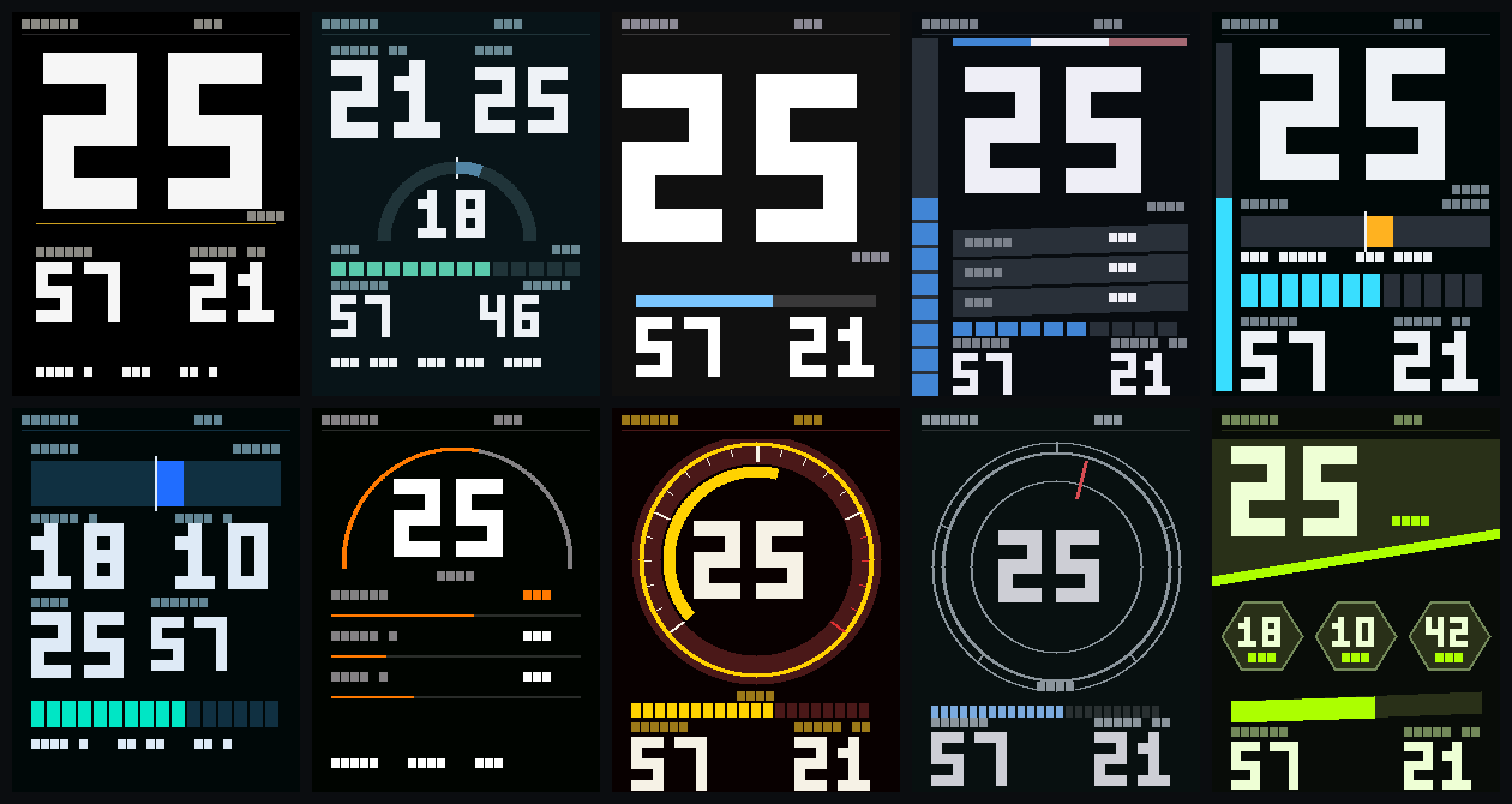
Ten themes, each with its own layout rather than its own palette: a full analogue tachometer, hexagonal shards on a diagonal split, three hairline arcs, one enormous numeral, concentric rings with a single red hand, a shift-light rail you read peripherally, a power-flow meter that treats current as more important than speed. The default takes one idea from each. Every picture in this post is the real screen code run through a host stand-in for the panel, rendering the pixels it produced.
The pictures are not the interesting part. The panel cannot draw a curve. The driver for its controller chip (an ILI9341) offers three operations, fill a rectangle, set a pixel and write a block of pixels, and no line, circle or polygon. I expected cost to scale with pixels. Measured on the device:
| Primitive | Measured |
|---|---|
fill_rectangle |
2.9 ms per call, independent of size |
pixel |
2.29 ms per call |
print (8×8 char) |
8.6 ms per character |
writeblock, 240×40 |
12 ms for 9,600 pixels |
| free heap | 98 kB; a 200×100 RGB565 buffer (40 kB) fails to allocate |
A draw call costs the same whether it covers nine pixels or nine thousand. So the obvious way to draw an arc, one thin rectangle per column, costs 481 ms for an arc 96 pixels in radius, four times the budget for a whole frame, to draw one gauge.
The way through is the third operation. davega/gui/bands.py draws the curve into an in-memory pixel buffer and pushes it to the panel in one block write. There is not enough memory for a buffer the size of the screen, so the screen is painted in horizontal bands with one small buffer reused all the way down.
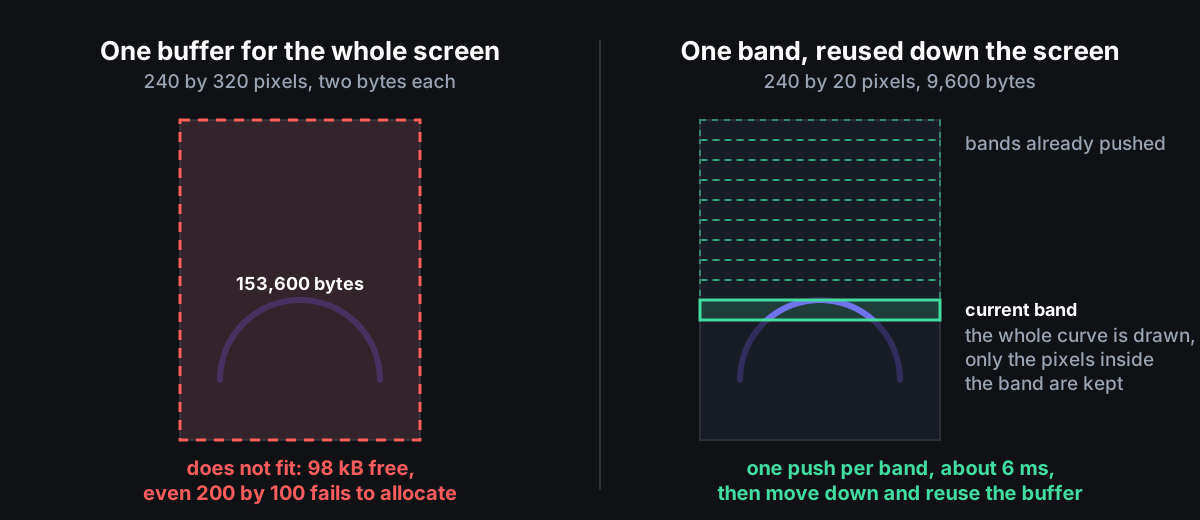
The dial face, bezel and tick marks are composed once, as furniture; the moving sweep is composed the same way into a band that covers only the dial.
I tried the cleverer version first: repaint only the wedge between the old angle and the new. It is cheaper and it is wrong. An arc drawn in three pieces lands on different pixels from the same arc drawn in one, because each piece rounds its own start angle to a pixel, and a partial repaint that disagrees with a full repaint is worse than one that costs a few more milliseconds. Arcs repaint whole; everything straight still repaints only its tip. All 810 transitions between test frames and themes now agree exactly.
Measured on the panel with five screens live, before the curved layouts landed, against telemetry arriving five times a second:
| What is painted | Time |
|---|---|
| Everything, from blank | 472 to 763 ms |
| One settled frame, digits through the character path | 82 ms |
| One settled frame, digits through the panel’s own 3-by-5 number routine | 23 to 29 ms |
The panel’s own number-drawing routine is native and about three times cheaper than drawing digits as text characters; that change alone took a settled frame from 82 ms to 25 ms.
The harness lied first
A 2.8-inch screen bolted to a deck is a bad place to iterate a design. So before the first dashboard there was davega/harness/display.py: a stand-in for the panel that records every draw call, writes the result out as a PNG using nothing but Python’s standard library, and models the panel’s measured cost per call. A screen is a function of three inputs, the display, the current telemetry frame and the board’s configuration, with no hidden state, so the same code runs on the device and in continuous integration, and make gui-test runs 642 checks with no hardware.
Four things it catches that looking at the screen cannot:
- Anything drawn outside the 240-by-320 screen fails the build rather than being clipped where you might not notice.
- Reference images for every frame in the test set: standstill, full throttle, hard regenerative braking, a thermal power cut, battery empty, battery full, a fault at speed. The frames are generated from the board’s verified configuration (a battery of twelve cells in series and four in parallel, 17 Ah; 80 A per motor; 30 A out of and 8 A back into the battery per side; 4.2-to-1 gearing; 200 mm wheels), so extremes a ride rarely produces are covered on purpose.
- Partial redraw against a full repaint across all 810 transitions. Partial redraw’s failure mode is stale pixels, and the two paths must agree byte for byte. This caught the fault banner staying on the screen after the controller recovered.
- Fixed labels against live regions. A label is drawn once; a region repaints when its value changes; the panel’s font paints its own background. A label inside a region’s box is erased the first time that value moves and never comes back.
That last test exists because the harness was flattering the design. Its print drew glyphs without their backgrounds, while the real font fills the whole character cell, so labels that punched holes through their own gauges looked perfect in every render. Modelling the panel honestly made four themes fail at once. A parity test also asserts every colour declared in themes.py appears in the rendered mockups; it immediately found five fault colours that existed only in code.
Running the same code in the display’s own Python
All of that runs under desktop Python, which does not tell you whether the code will start on the board. make test-device builds MicroPython 1.14, the version the DAVEGA reports, with the pixel-buffer module compiled in, and drives the real gui package through a whole ride: boot, telemetry replayed from two frames recorded off the Unity, every screen, the buttons through their real 50 ms press-settling delay, the menu, a controller that stops answering, and the recovery.
It earned its keep on the first run. A colour on this panel is two bytes. MicroPython writes those two bytes in the processor’s native order, low byte first, and the panel expects the high byte first, with the block write streaming the buffer to it unchanged. Every curve would have reached the panel with its colours reversed. Red drawing blue. It could not show up off the device because the pure-Python stand-in writes the high byte first directly: the harness and the hardware disagreed and only the hardware was right. The two bytes are now swapped on the way into the native drawing path, the byte order is probed rather than assumed, and the two paths render side by side and compare byte for byte.
The other thing it watches is memory use, because 98 kB of free memory and a two-hour ride is a bad combination. It measures two consecutive windows of 400 frames each, since one window cannot tell a leak from a warm-up; caches fill and animations settle in the first. Absolute byte counts are reported rather than asserted, because this is MicroPython built for a 64-bit laptop, where every reference is twice the width it is on the board. Only the drift between the two windows counts.
Which is exactly the limit that bit me twice on the board. Switching theme killed the dashboard and handed the screen to the stock app’s “initializing”; the error file on the display named the allocation, 19,200 bytes in the band painter, claimed fresh on every call at the moment memory was at its worst. Then, with that fixed, a cold boot failed the same way asking for 9,600 bytes at the first curve, because the menu now remembers the rider’s choice and it had been left on a layout with a semicircular gauge. The buffer is now claimed at boot, before any screen exists, and the reserve routine takes the largest band it can get, falling back through 20, 12, 8 and 4 rows. A layout too heavy for what is left drops back to the default arrangement and writes that choice down, so the next boot does not fail the same way. Verified on the board from a clean start: every layout boots with about 31 kB to spare. A dead screen on a deck is worse than the wrong colours.
What the board does now
Telemetry is live. A DAVEGA X running a dashboard I wrote reads a FOCBOX Unity on firmware 7.00 directly, no version spoofing in the path. Two things the reference firmware could not have told me: the serial port transmits on pin 17 and receives on pin 16, the reverse of what the reference code’s attribute names suggest, and a firmware-7 reply is 79 bytes, not the 70 the reference buffer allows. And MicroPython’s serial read blocks for the port’s whole timeout when nothing has arrived, so asking whether anything is waiting before reading made a real difference:
| Serial polling | Per read | Full pass over both controllers |
|---|---|---|
| Read straight away | 211 ms | 320 ms |
| Ask whether data is waiting first | 17 ms | 123 ms |
A Unity is two controllers in one case and the standard reply carries only the one that answered, so davega/gui/vesc.py asks the near side over the wire and the far side through it over the CAN bus, then combines them the way DAVEGA’s own Unity code does: battery current and energy summed, per-motor figures averaged, distance counted once. Temperature is the one divergence; it takes the hotter, because an average hides the controller about to cut its power.
Charge and range use an internal-resistance model rather than intuition. The pack’s resistance is measured as the slope of voltage against current once 8 A of spread has been seen, and the method recovers 0.0400 ohms on a simulated 40-milliohm pack. A twelve-cell pack resting at 48 V and pulling 28 A through 40 milliohms reads 46.9 V at the terminals; a gauge that reads the terminal voltage calls that 41% and the truth is 51%. That ten-point swing is the whole “battery drops when I accelerate” complaint. Range is worked out by draining the modelled pack step by step rather than dividing remaining energy by today’s consumption rate: at a measured 18.7 Wh per km from 45.8 V that is 15.2 km rather than 18.0, shorter, which is the uncomfortable direction and the right one.
The dashboard ships pre-compiled. MicroPython compiles a .py file every time it imports it, and on this ESP32 that compile was most of the wait between switching on and seeing a number: 154 kB of source against 62 kB of compiled .mpy files. start.py stays plain source, because an escape hatch that depends on the build tools having run is not one.
The board is tuned for grass at 80 A a side, traction control on, and it has been ridden. Speed, current, charge and range on the screen, both controllers read, at 40 km/h on grass. Hardware coverage is one FOCBOX Unity, one board, one display; the connection layer and the config workflow are not Unity-specific, but nobody has proved that on other hardware yet. vesc/profiles/ holds connection details only, deliberately not current limits or gearing. Copying a stranger’s motor tuning is how packs and motors get damaged.
Three things I would tell myself at the start. Read the dependency before probing it: the VESC serial protocol is written down in the reference DAVEGA code (janpom/davega), and an evening guessing at its function signatures was worth ten minutes of reading. Test in the interpreter that will run the code, because the two bugs that would have reached the deck, reversed colours and a 9,600-byte out-of-memory error, were invisible under desktop Python by construction. And when a device you have not touched disagrees with a value you typed in, the device is the better witness; the DAVEGA’s battery-capacity setting said 17,000 mAh for months before I stopped believing the pack had six cells in parallel.
If you have a VESC and a scripting habit, start with docs/connecting.md. Even if you use nothing else, having your board’s configuration in git is worth the twenty minutes.