
Zack Design’s romp is a TypeScript library for videos made in code that makes them move and sound hand-animated. Characters that fall, pile up or get knocked over are rigid bodies in a physics world baked once at 240 Hz, so every frame reads the same motion whether the film plays live in a browser or renders frame by frame in Remotion. Every landing is recorded with its speed, and that one number sizes the squash on screen and the boing on the soundtrack. A motion check steps every frame and fails the build on pops, strobes, teleports, kinks and characters cropped by the frame. The sound is synthesised in Web Audio, with nothing to license. MIT licensed.
This post covers:
- why videos made in code look made in code, and the rules romp encodes against it;
- baking a physics scene once and reading poses as a pure function of time;
- impacts as the shared event for the picture and the sound;
- the motion check: what a pop, a strobe, a teleport, a spike and a crop are, and what’s exempt;
- sound that belongs to the picture: one schedule, played live or rendered offline;
- trying it.
Why it exists
Promo videos, app previews and explainers made in code tend to fail the same ways. Things ease in on a straight line, pop into frame at full size, change speed with a jerk where two moves meet, and play over silence or a stock track that ignores what’s on screen. You don’t see most of it at 30 frames a second until a viewer does.
The fixes are old animation rules: anticipation, squash on landing, follow-through, things that fall actually falling. They’re slow to keyframe by hand. romp makes them the default and checks them.
Bake once, read every frame
Anything that falls, piles up, hops or gets knocked over is a body in a planck.js world (a JavaScript port of Box2D). A scene is simulated once, in fixed 240 Hz steps, and one pose per frame is stored:
import { Stage, Body, poseAt, impactResponse } from "romp/core";

const stage = new Stage(); // screen space; new Stage({ yDown: false }) for three.js
stage.ground([{ x: 40, y: 200 }, { x: 40, y: 1830 }, { x: 1040, y: 1830 }, { x: 1040, y: 200 }]);
stage.add(new Body({ id: "hero", x: 540, y: -100, w: 150, h: 150, spawn: 10, vy: 900, spin: 0.3 }));
stage.bake({ frames: 200, fps: 30 });

const pose = poseAt(stage.get("hero"), frame); // { shown, x, y, angle }
Reading a pose is then a pure function of the frame. That matters because a video is played in more than one way: a live viewer scrubbing back and forth, a renderer that captures frames out of order and in parallel, and a check that steps through every frame. All of them see identical motion.
Choreography still decides where and when: a body has a spawn frame and a launch velocity. Physics decides how. Collision layers keep a falling pile from landing on a title, and a SpringyBody welds itself to its shelf where it lands, so a letter can be knocked over and wobble back upright.
Impacts drive the picture and the sound
Each body records its impacts as it’s baked: the frame and the speed into the contact. impactResponse() turns them into the character’s reaction: squash about the feet, eyes shut on contact, a hat or antenna that lags and settles, all sized by how hard it actually hit and decaying on its own curve. jiggleParts() gives several parts (a hat, its pompom, an antenna) their own lag, so they follow through one after another instead of as a block.
The soundtrack reads the same list. A boing is scheduled on the impact’s frame, a frame early because a sound reads as late otherwise, and it’s louder and lower for a harder, heavier landing. Retime a scene and the sound moves with it, because there’s no second timeline to keep in step.
The motion check
romp check plays a composition frame by frame in headless Chromium, follows every element you mark with track("name"), and flags five things:
- pop: appears or vanishes in frame at 30% or more of its largest size, and opaque. It should grow, fade or fly in.
- strobe: moves more than about 100 px in one frame (scaled to the frame width from 886 px). At 30 fps that reads as a jump, not motion.
- teleport: jumps more than about 300 px while visible on both frames.
- spike: its acceleration jumps far above its neighbours’: a kink where two moves don’t match speed.
- cropped: shown and on screen, but more than a quarter of its own box is outside the frame for more than half a second: a character’s head cut off by the edge. Entering or leaving the frame is fine.
Real impacts aren’t spikes, entrances and exits that fade, grow or shrink aren’t spikes, and you can mark deliberate fast moves (whips) and frames where a transition covers the picture, and let a deliberate close-up crop (track("name", { allowCrop: true })). It exits non-zero on any issue, so it runs in CI. --arg passes JSON to an entry that exports a function, so one entry file can check every variant of a composition: romp check check.tsx --arg '{"lang":"zh"}'. For three.js, motionReport() does the same from named objects and a camera, and analyze() takes plain per-frame rows from anything else.
Sound that belongs to the picture
The voices are synthesised in Web Audio, with no samples: marimba, bells, plucked strings (Karplus–Strong), an FM electric piano, upright bass, a light kit, whooshes, and a set of cartoon voices: plops (a sine swept up, the way a bubble actually sounds), boings, slurps, dings, and gibberish character voices with their own pitch and pace. The mix has music, drums, effects and voice buses with a shared room, a high-pass at 70 Hz and a glue compressor, and keeps its energy between 200 Hz and 6 kHz so it survives a phone speaker.
A soundtrack is one schedule function. Played live, a Clock drives the picture from the audio clock so the two can’t drift, and starting from 12 seconds in skips everything before it. Rendered offline, the same schedule goes through an OfflineAudioContext to a WAV, and romp sound normalises it to −16 LUFS. Every voice takes a seed, so two renders are identical and no two boings are.
Trying it
romp isn’t on npm yet. Install it from GitHub:
bun add github:isaacrowntree/romp planck
bun add -d esbuild playwright   # for the CLI
bunx romp check check.tsx --public public
bunx romp sound soundtrack.ts --out public/sound.wav
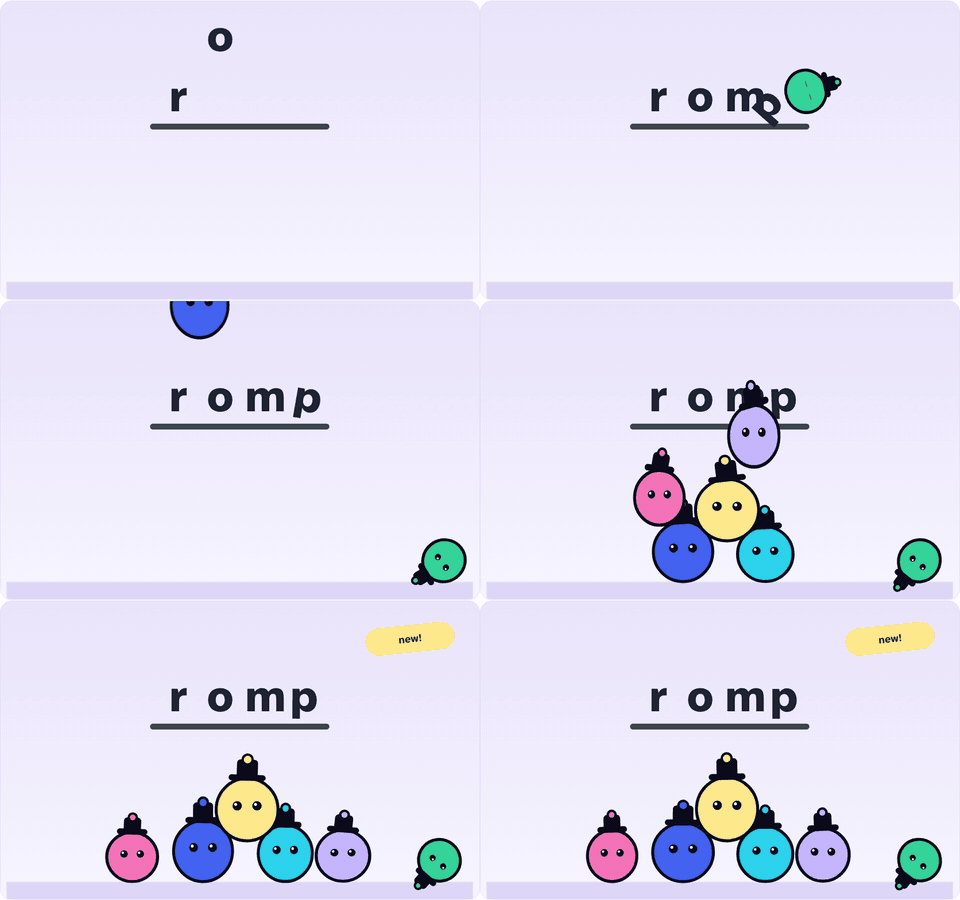
The docs site has guides, the API reference and a live demo built with romp itself. The wordmark lands on a shelf, a flung character knocks the p over and it springs back upright, then five characters in hats drop into a pile, their hats following through. You can play it with sound, which follows the audio clock, scrub it, render the same soundtrack offline to a WAV, and run the motion check on the real elements. Tick “plant a bug” and a sticker pops in at full size, and the check catches it.
Header photo by CHUTTERSNAP on Unsplash.