
Zack Design has published local-llm-coding-guide — a guide to running the open-weight Qwen and Gemma models as a coding assistant on your own hardware: an RTX 4070 Ti graphics card with 12 GB of memory, and an M3 Pro MacBook with 36 GB, using the inference engines llama.cpp, Ollama’s MLX backend (MLX being Apple’s machine-learning framework), mlx-lm, ExLlamaV3 and TensorRT-LLM. An earlier version of this guide listed Qwen3.6-35B-A3B at “about 30 to 38 tokens per second” on the 4070 Ti (a token is roughly three-quarters of a word). Measured with the repo’s own benchmark.sh on 25 July 2026, it generates 113 tokens per second when the conversation is empty and about 27 once 16,000 tokens of conversation are loaded. Both are real; the guide had published one without saying which.
That is why the guide is now structured as rules rather than model names, with every number regenerated on your own hardware. This post covers the three rules, the measured tables from both machines, the Claude Code harness that scores a model on whether it finishes a task rather than how fast it types (the incumbent mixture-of-experts model passed four tasks out of four; both August releases that beat it on published benchmarks passed none), the --bare flag that cuts what Claude Code sends with every request from 20,240 tokens to 663, and the reasoning setting that never reaches a local model.
Why run a model locally at all
On a flight, behind a client VPN, on code you cannot send anywhere, or past a monthly token budget, a cloud model is not available. A 9-billion-parameter model with its weights compressed to 4 bits fits a 12 GB card and handles “reformat this, add a docstring, write a test”. The 35-billion-parameter mixture-of-experts models — models where only a fraction of the weights, here 3 billion, are used for any one token — benchmark in Sonnet 4.5 territory: Qwen3.6-35B-A3B reports 73.4% on SWE-bench Verified and 37.0% on MCPMark, and can hold 262,000 tokens of context natively.
Three rules instead of a model name
Model names go stale in weeks, so the guide’s recommendations are rules, and a dated “Current picks” block names what satisfies them today.
- Budget is the graphics card’s memory on NVIDIA, or the machine’s unified memory minus about 8 GB for the operating system on Apple Silicon.
- Goal: for quality, the mixture-of-experts model with the most total parameters that fits at 2-bit compression or better with a usable amount of context; for speed, a mixture-of-experts model with few active parameters at 4-bit; for long context, the model whose working memory for the conversation (the KV cache) fits beside the weights at your context length with the cache itself compressed to 4 bits. Generation speed is limited by memory bandwidth, so smaller weights buy you more context.
- Engine follows from platform: llama.cpp as the universal default on NVIDIA, ExLlamaV3 with TabbyAPI for the fastest single user, TensorRT-LLM for serving many users; Ollama (MLX) on Apple, mlx-lm for the fastest single stream, vllm-mlx for a server that speaks the Anthropic API natively.
Then run ./benchmark.sh and do not trust the tables below.
What the two machines measured
RTX 4070 Ti with 12 GB, llama.cpp build 0893f50f2, flags -ngl 99 -fa 1 -ctk q4_0 -ctv q4_0 (every layer on the GPU, flash attention on, the conversation cache compressed to 4 bits), medians over 7 runs because WSL2 (Linux running inside Windows) shows high run-to-run contention as the Windows desktop intermittently takes the GPU. “Prefill” is how fast the model reads the prompt; “decode” is how fast it writes the answer.
| Model (GGUF file) | Prefill, tokens per second | Decode, empty conversation | Decode at 16,000 tokens | Peak GPU memory |
|---|---|---|---|---|
| Qwen3.6-35B-A3B UD-IQ2_M | 3,392 | 113 | about 27 | 11.9 GB |
| Gemma 4 E4B Q4_K_M | 7,049 | 93 | about 78 | 4.2 GB |
| DeepSeek-R1-Qwen3-8B Q4_K_M | 5,246 | 76 | — | 5.6 GB |
| Qwen3.5-9B Q4_K_M | 4,531 | 67 | — | 6.2 GB |
| Qwen3-14B Q4_K_M | 2,910 | 53 | — | 9.4 GB |
| Devstral-Small-2 24B IQ2_M | 1,646 | 46 | — | 8.6 GB |
A peak of 11.9 GB means the 35B-A3B fits a 12 GB card with almost no room to spare. It loads, answers one tiny prompt, then runs out of memory and exits on Claude Code’s system prompt or during a CUDA graph capture, and llama_memory_breakdown shows free = 0. The fix is --n-cpu-moe, which keeps some of the experts in ordinary system memory instead of on the card:
Experts kept on the CPU (-ncmoe) |
GPU memory at 128,000 tokens of context | Decode, tokens per second |
|---|---|---|
| 16 | about 8.8 GB | about 40 |
| 8 | about 10.6 GB | about 77 |
Fewer experts on the CPU is faster and uses more GPU memory, and the trade is cheap for a mixture-of-experts model because only about 3 billion parameters are active per token.
M3 Pro with 36 GB, measured 24 July 2026:
| Model | Tokens per second | Memory |
|---|---|---|
| Qwen3.6-35B-A3B Q4_K_M (Ollama MLX) | about 35 | about 22 GB |
| Qwen3.6-35B-A3B 4bit (mlx-lm) | about 48 | about 20 GB |
| Gemma 4 26B-A4B Q4_K_M (Ollama MLX) | about 33 | about 17 GB |
| Qwen3.5-9B Q4_K_M | about 20 | about 7 GB |
| Qwen3.5-27B Q4_K_M (dense) | about 9 | about 18 GB |
| Gemma 4 31B Q4_K_M (dense, Ollama MLX) | about 6 | about 18 GB |
Raw mlx-lm generates about 30% faster than Ollama’s MLX backend on the same weights; Ollama spends that on its compressed conversation cache and serving convenience, and reads prompts much faster. The dense 31B thrashes the swap file at about 18 GB of weights on a 36 GB machine. On unified memory the failure mode is swapping, not an out-of-memory error: the 5-bit version of the 35B-A3B (26.5 GB) loaded only by evicting the file cache and background apps, so the Mac’s ceiling for a model running alone is the 4-bit version at 22.1 GB.
Why a mixture-of-experts model is faster on a Mac
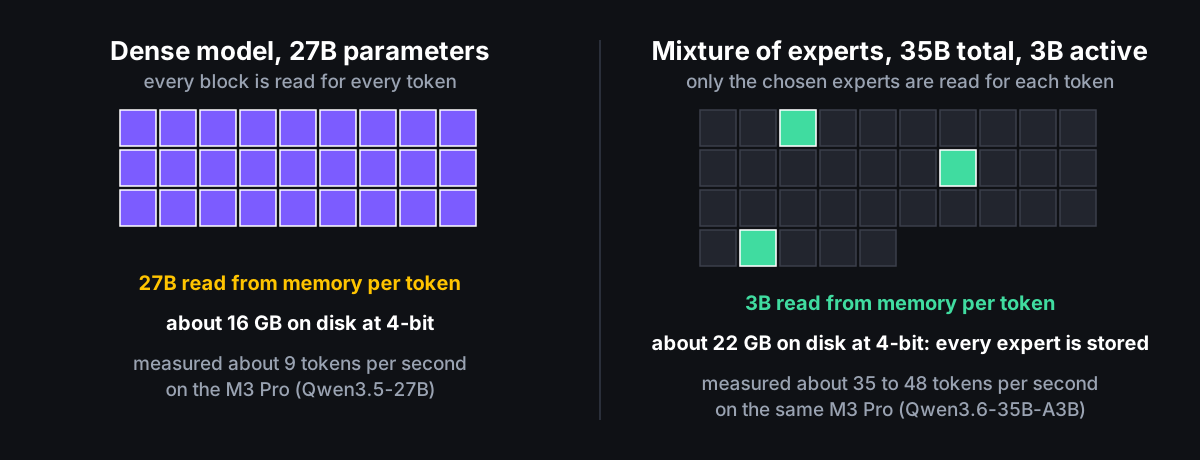
A dense 27B model reads all 27 billion weights from memory for every token and saturates the unified-memory bandwidth. Qwen3.6-35B-A3B reads 3 billion active parameters per token from a pool of 35 billion, so it is faster than the 9B dense model (29 against 20 tokens per second on the 3.5 generation) and smarter than the 27B. The cost is disk and memory: 22 GB at 4-bit against 16 GB for the dense 27B, because every expert is stored even though only a few run.
Speed is not the number that matters; finishing the task is
bench-claude-code.sh drives Claude Code itself against a local model, through Ollama’s native Anthropic-compatible endpoint, and scores four tasks that pass or fail by an external check the model never sees: fix a bug with the tests checksummed so that “fix the test instead” fails; a rename across several files; add a --json flag while keeping the existing output byte-identical; and find a value hidden in a 30-file codebase. M3 Pro with 36 GB, 25 August 2026:
Model                              01-fix-bug      02-refactor     03-add-feature  04-codebase     Pass  Eff tok/s
gemma4:26b-a4b-it-q4_K_M           PASS 89s        PASS 118s       PASS 195s       PASS 96s         4/4       13.0
muse-glimmer:30b-q4_K_M-dflash     FAIL 232s       FAIL 247s       FAIL 316s       (abandoned)      0/3        1.5
qwen3.8:27b-mtp-q4_K_M             TIMEOUT 905s    (not run)       (not run)       (not run)        0/1          -
The incumbent won, and it was not close. Qwen 3.8 27B is dense, and from llama-server’s own timing logs it lost on both counts:
| Qwen 3.8 27B (dense) | Gemma 4 26B-A4B (mixture of experts) | |
|---|---|---|
| Reading the prompt, tokens per second | about 82 | about 720 to 830 |
| Time to read Claude Code’s 21,000-token opening prompt | about 262 s | not measured separately |
| Writing the answer, tokens per second | about 5 | about 25 |
| First task | timed out at 900 s | finished in 89 s and 6 turns |
Its 4-bit build with multi-token prediction fits in 18 GB, which turned out not to be the problem: multi-token prediction speeds up writing, and this workload is limited by reading the prompt first and by a five-times gap in writing speed second. Muse Glimmer did not fail slowly, it failed inertly — one or two turns, zero tool calls, and to the fix-the-tests prompt it replied “Hi! How can I help you today?”, which looks like a problem with Ollama’s chat template for that model rather than a verdict on the model.
I first blamed prompt caching. The server logs disproved it: created context checkpoint 1 of 32 (n_tokens = 21316, 233 MiB) on turn one, cached n_tokens = 21824 on turn two. The 262 seconds is paid once per session.
Two things Claude Code’s interface implies that are not true with a local model
claude --bare cuts the input for a trivial prompt from 20,240 tokens to 663. Capturing the HTTP request shows why: a 6,646-character system prompt and 28 tool definitions, and every MCP server installed (a plugin that gives Claude Code more tools) adds more. Asked to check email, a 26B model instead announced “Security Audit of Codebase”, called a mobile-automation tool, and finally recited its own tool list. That is what a small model does when the menu outweighs the request. --bare keeps the file and shell tools (verified: it created a file correctly in 3 turns at 2,218 input tokens), skills still resolve by name, and --disallowedTools or --mcp-config are the finer controls. Every harness result above ran with the full 21,000-token opening, so at 82 tokens per second a --bare run would cut Qwen 3.8’s cold start to about 27 seconds; the verdict on dense models is provisional until it is re-run that way.
Claude Code also shows “medium effort” and sends "thinking": {"type": "adaptive"} on every request. Gemma 4 26B-A4B, which Ollama reports as capable of reasoning before answering, returned thinking_tokens: 0 in all seven runs, including a 17-turn refactor. Ollama’s Anthropic-compatibility layer does not map that field onto its own think mode; turn reasoning on at the Ollama layer instead. Two more integration facts: Claude Code speaks only the Anthropic API, so Ollama and vllm-mlx work directly while llama.cpp, TabbyAPI and TensorRT-LLM need a LiteLLM proxy in between to translate; and Claude Code offers WebSearch and WebFetch as server-side tools whose type is not function, which llama-server rejects with a 400 error until you disable them with --disallowedTools.
What changed since March
The repo went from a llama.cpp walkthrough to the framework above: Qwen 3.6 (April) as the first Sonnet-class model to fit 12 GB, via 2-bit compression; Gemma 4 via Ollama MLX after llama.cpp bug #21321 left it emitting only <unused25> thinking tokens (since fixed upstream); vLLM on Metal via Docker Model Runner; the RTX 4070 Ti and M3 Pro benchmark runs; the Claude Code harness; a remote setup restricted to the local network with per-user keys and PowerShell scripts for native Windows; and a distributed setup that splits one model across both machines over llama.cpp’s RPC for a model larger than either. TurboQuant, a 3-bit compression for the conversation cache, is tracked: the Hadamard rotation step it needs has been merged upstream and the 3-bit types work on CUDA via forks, with the caveat that symmetric compression hurts Qwen’s key cache, and a mixed 8-bit-keys, 4-bit-values configuration measured a 0.23% increase in perplexity (the standard measure of how well a model predicts text; lower is better).
What was learned
A tokens-per-second figure without its context depth is half a number, and a benchmark table copied from someone else’s graphics card is not a measurement. Prompt-reading speed decides whether an agent loop is usable at all; writing speed decides whether it is pleasant; a mixture-of-experts model with 4 billion active parameters beat a 27B dense model by about ten times on the first and five times on the second on the same machine. And a local model’s worst enemy is the tool list the client sends it. Everything here regenerates from benchmark.sh and bench-claude-code.sh; per-run JSON, error output and verifier output land in bench/results/. Read it on GitHub.