Zack Design has published ledger — a terminal-first personal finance tool that reads bank statements from eight Australian sources into a SQLite database (a database that lives in one file), categorises transactions with pattern rules, and renders a tax return view laid out the way the Australian Taxation Office (ATO) wants it, plus a net worth dashboard, on localhost:5050. It replaced a spreadsheet I rebuilt every July. It also, for a while, booked every deposit on an HSBC everyday account as spending, and read six rows of loan interest with the wrong sign, which understated one year’s rental interest deduction by about $3,746 before tax. Both bugs came from the same place: a PDF flattened to text has no columns, and a $10 fee and a $10 deposit are byte-identical once the columns are gone.
This post walks through the rule that stops a parser from writing anything it cannot account for, the layout parser that recovers the debit and credit columns from where each number ends on the page, the two sign bugs above and how each was found, the PayPal export that spells “Authorisation” with an s, and the two reconciliation checks that turn a silent gap into a named transaction.
The spreadsheet it replaced
Every mid-year: paste in ING, paste in PayPal, paste in the Bankwest card, categorise by hand, remember which expense belonged to which business, double-count the $200 that appears on both the card and the account that paid it, hand it to the accountant. Ledger is the version of that I should have built five years ago. The first commit shipped six parsers and 74 tests; the repo now collects 661 tests across 43 files, and a private corpus of 276 real statements must ingest with zero failures before anything merges.
Parsers describe, the engine decides
The first design let each parser invent its own conventions: how a transaction is identified, which way a balance points, whether an unsigned amount is a charge or a credit. The engine trusted whatever it was handed. Every defect below came from that. etl/contract.py now has a parser describe a statement and nothing more — its period, the balances it prints, which way they point, and its rows — and etl/engine.py owns three things. Identity: a transaction’s ID is derived from its own fields, never the filename, so a statement downloaded again under another name cannot be counted twice. Repeatability: ingesting the same or an overlapping statement again inserts only what is new. Validation: a statement whose rows do not add up to the difference between its own printed opening and closing balance is refused outright rather than partly loaded:
  ! balance_mismatch: rows sum to -1,234.56 but opening 1,000.00 -> closing 2,204.58 implies -1,204.58 (-29.98)
  REFUSED -- statement does not account for its own printed balances; nothing was ingested.
That is almost always a parser bug, and the answer is to fix the parser, not reach for --force.
Reading columns from where numbers end, not where they start
CBA, Bankwest and HSBC everyday statements print debits and credits in separate columns as bare positive numbers. pdfplumber, the Python library that pulls text out of a PDF, welds those columns into one string when you ask it for plain text. etl/parsers/pdf_layout.py keeps each word’s horizontal position on the page instead.
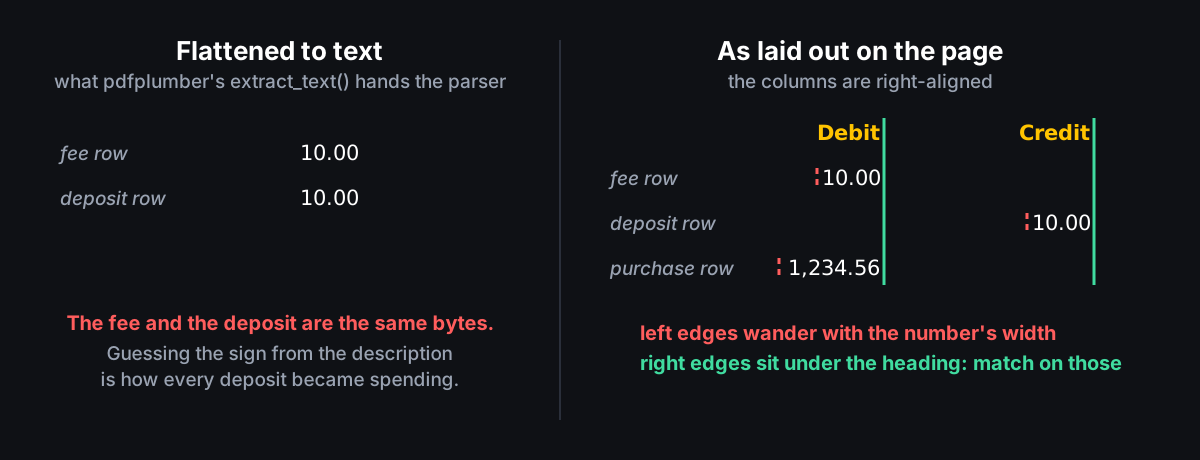
# ...keep each word's horizontal extent so a parser can recover the column by
# matching a word's *right* edge against the column heading's right edge
# (the columns are right-aligned, so left edges drift with the number's width
# while right edges stay put).
parse_amount deliberately returns a size with no sign; the sign comes from which column the word sits in. The column positions are read from each statement’s own header row, because HSBC alone has shipped at least two sets of labels (“Debit”/”Credit” and “Debits/Withdrawals”/”Credits/Deposits”) at different positions, and hard-coded positions would serve one of them. Statements are assigned to an account by the folder they are dropped in, not by filename, because CBA names every download Statement<date>.pdf and the Bankwest home loan and offset account share a layout.
Every HSBC deposit was booked as a withdrawal
The HSBC everyday parser went through the flat-text path. When a line held two amounts it resolved the ambiguity with “assume expense unless the description suggests income”, so every deposit on those statements was stored as spending. The safety net that should have caught it was dead: detect_convention() and resign_unsigned_rows() take a row’s sign from how the balance moved, but the parser built each row without a balance, so both did nothing, and the engine’s running-balance check had nothing to check. A user reported it; the fix was to move the account statements onto the column-position parser and carry the printed balance through. The same report turned up a repayment HSBC had only scheduled, printed with a date after the period end and read as money that had moved; the table now ends at the account’s “Transaction Total” line. Card statements are untouched — they have no debit and credit header to anchor to — and the layout pass only runs when the text says “Balance Brought Forward”.
Letting the rows vote on which way a balance points
ING loan statements were being read as everyday accounts. Which way a statement’s balances point was decided by majority vote across its rows, and on a new loan’s first quarter the interest and fee rows outnumber the repayments and outvote the correct reading. Because the rental report sums signed amounts, six interest rows with the wrong sign cancelled out real interest: about $3,746 before tax off the 2024 financial year’s deduction. Detection now reads the statement header (“Loan statement”, “Loan type:”) and looks only at the first 15 lines. An earlier attempt searched the whole document and matched an “Orange Advantage” product footer printed on an everyday statement, classifying a transaction account as a mortgage and inverting every amount on it. The line limit is the point, not an optimisation.
PayPal spells Authorisation with an s
PayPal’s export writes a “Shopping Cart Item” line for every payment with the same transaction ID, the same amount and the opposite sign — a line item, not a second payment — and an authorisation hold beside each settled payment. The skip list held the US spelling “General Authorization”; the Australian export writes “Authorisation”. Eleven Uber purchases were stored twice, once as the hold and once as the settlement. Fixing it removed 17 spurious rows and replaced 11 holds with their settlements.
Reconciling against the balances the bank printed
ledger reconcile checks the ledger against the balances statements print, which is what catches a gap that duplicate detection cannot. The first check requires the transactions between two consecutive statements to account for exactly the change in printed closing balance: a shortfall means missing rows, an excess means double-counting, and it works for sources that print no balance per row, which are exactly the ones where a gap is otherwise invisible. The second check, for sources that do print a balance on every line (ING, the Bankwest CSV), requires each row’s balance to equal the previous balance plus that row’s amount, which pins a break to one transaction; a row stored with the wrong sign shows up as a drift of exactly twice its amount. Transactions are attributed to statements by file, not by date, because banks post with a lag. The same purchase seen from two accounts (a PayPal purchase that also appears on Bankwest as PAYPAL *MERCHANT) is resolved by etl/dedup.py, which keeps the side with more merchant detail — PayPal at priority 10, ING at 5 — and marks the other as a transfer.
Sources supported today
| Source | Formats |
|---|---|
| ING Australia | PDF statements, CSV export |
| CBA | transaction account PDF, credit card PDF |
| Bankwest | credit card PDF, home loan / offset PDF, CSV |
| HSBC | credit card PDF, everyday account PDF, CSV |
| Coles Mastercard | PDF, CSV |
| PayPal | CSV activity download |
| Amex | CSV download |
| Airbnb | CSV payout report |
| CommSec | PDF contract notes, into a capital gains schedule |
Adding a bank means implementing BaseParser in etl/parsers/ and registering it in etl/cli.py. A bank’s PDF and CSV describe the same transaction with different text and often a different date, so the two formats cannot be matched against each other; ingest one format per period and clip at the boundary with the --from and --until flags.
What it does beyond ingestion
Pattern rules on the merchant name assign categories and learn from manual overrides; tags (flight, biz-hosting, rental-income) sit alongside categories rather than replacing them. tax.yaml holds businesses with percentage split rules, rental properties with ownership and rental-week fractions, depreciation and work-from-home rules. The dashboard renders the ATO return sections (salary, rental schedule, business schedule, deductions), a financial-year view with tabs for outgoing, incoming, rental and work trips, net worth from statement-sourced balances, shared household expenses split with a partner by rule, recurring schedules, a depreciation register, a capital gains schedule from CommSec contract notes, and an archive of returns already lodged. The Flask API behind it is sixteen endpoints, from GET /api/ato/return?fy=2025 to PATCH /api/transactions/<id>/split.
Why local-first
Because the data is mine. There was a Basiq open-banking integration for a while; it was removed in July 2026. SQLite sits in a folder, the dashboard runs on localhost, and a backup is one file.
Quick start
git clone https://github.com/isaacrowntree/ledger.git
cd ledger
python3 -m venv .venv && source .venv/bin/activate
pip install -e .

cp config/accounts.yaml.example config/accounts.yaml
cp config/categories.yaml.example config/categories.yaml
cp config/tax.yaml.example config/tax.yaml

ledger init
mkdir -p staging/ing staging/paypal
# Drop PDFs/CSVs into those folders
ledger ingest
python -m api
# Open http://localhost:5050
What was learned
A statement carries its own proof — opening balance, closing balance, sometimes a balance per line — and a parser that is not held to it will be wrong quietly, which in tax software is the expensive kind of wrong. Signs should come from where a number sits on the page or from how the balance moved, never from words in a description. And a corpus of real statements with no allowance for expected failures found every bug above; unit tests with invented rows found none of them. If you are in Australia with more than one bank account, a side business, and an accountant who gets a spreadsheet every July, the source is on GitHub.