
Zack Design has published audio-analysis-and-recut — a single 275-line Python script plus FFmpeg that takes a 1 minute 56 second phone recording of a band playing “Ya Te Olvide” live, works out which five sections of the 4 minute 40 second studio original they played and in what order, and cuts those sections out of the studio track so you get the live arrangement at studio quality. The first version’s joins were slightly wrong, because it handed FFmpeg the same file five times with a seek and a duration for each piece, and an MP3 can only be seeked to the nearest compressed frame; the fix was one input and FFmpeg’s sample-accurate atrim filter.
This post walks through the matching: a filter that keeps only the 200 to 4,000 Hz range so the vocals dominate and the crowd does not, a sliding comparison of 5-second chunks against the whole original done with the fast Fourier transform and normalised by local loudness, grouping the matches into sections wherever the offset stays constant, the two-and-a-half-second boundary uncertainty that a 5-second window buys you and the two manual overrides it needed, and the FFmpeg filter graph that does the cut.
Two recordings of one song
The studio recording is the one on Spotify. The live recording has the arrangement the band actually plays — the pre-intro skipped, the breakdown compressed, a different ending — and also crowd noise, the sound of the venue’s speakers, and a phone microphone’s idea of bass. Dancers at Havana on the Hastings rehearse to the studio version and perform to the band’s, and a choreography that works to one does not line up with the other. The recut is the live structure with clean audio to cue on.
Compare only the vocal range
Both files are decoded by FFmpeg to mono 16-bit samples at 22,050 per second and read straight from its output into NumPy. The band-pass filter is the bluntest possible one: transform to frequencies, zero everything outside the range, transform back.
def bandpass(audio, sr, low=200, high=4000):
    freqs = np.fft.rfftfreq(len(audio), 1.0 / sr)
    spectrum = np.fft.rfft(audio)
    mask = (freqs >= low) & (freqs <= high)
    spectrum[~mask] = 0
    return np.fft.irfft(spectrum, len(audio))
That is crude, and for matching it does not matter: the point is to make the comparison depend on the melody and words rather than on room rumble and cheering. The average level is subtracted from both signals afterwards.
Finding where each five-second chunk sits in the original
The question for each short piece of the live recording is “where in the studio track does this sound most like?” Sliding the piece along the whole original and scoring every position is called cross-correlation, and doing it directly is slow. The fast Fourier transform turns that sliding comparison into one multiplication: the original is transformed once, padded with zeros to the next power of two. Each 5-second chunk of the performance, taken every half second, is reversed, transformed, multiplied against the original and transformed back, which gives its match score at every possible position in one pass. The best position’s score is normalised by the chunk’s own loudness and by the original’s loudness over that same window, and the window loudness comes from a running total rather than a loop:
orig_sq = orig_bp ** 2
cs = np.insert(np.cumsum(orig_sq), 0, 0)
...
window_energy = cs[top_lag + chunk_n] - cs[top_lag]
ncc = corr_valid[top_lag] / (chunk_norm * np.sqrt(window_energy))
Each chunk yields a time in the performance, a time in the original, a normalised score, and the offset between the two.
Grouping into segments
A verse played straight through produces a run of chunks that all agree on the same offset. detect_segments walks the results and starts a new segment whenever the offset moves by more than 3 seconds; anything shorter than 2 seconds is dropped as noise. On this recording that produces five segments:
SEGMENT MAP:
  1  0:00-0:19  |  Orig 0:12-0:30  |  18.5s  (intro/verse start)
  2  0:19-1:04  |  Orig 0:50-1:35  |  44.5s  (verse/chorus)
  3  1:04-1:36  |  Orig 2:44-3:15  |  31.5s  (montuno section)
  4  1:36-1:46  |  Orig 4:13-4:23  |   9.5s  (ending)
  5  1:46-1:48  |  Orig 4:33-4:35  |   2.0s  (final tag)

Skipped from original:
  0:00-0:12  (11.8s) - pre-intro
  0:30-0:50  (20.1s) - transition/repeat
  1:35-2:44  (69.1s) - repeated verse section
  3:15-4:13  (57.9s) - extended montuno/breakdown
  4:23-4:33  (10.3s) - outro padding
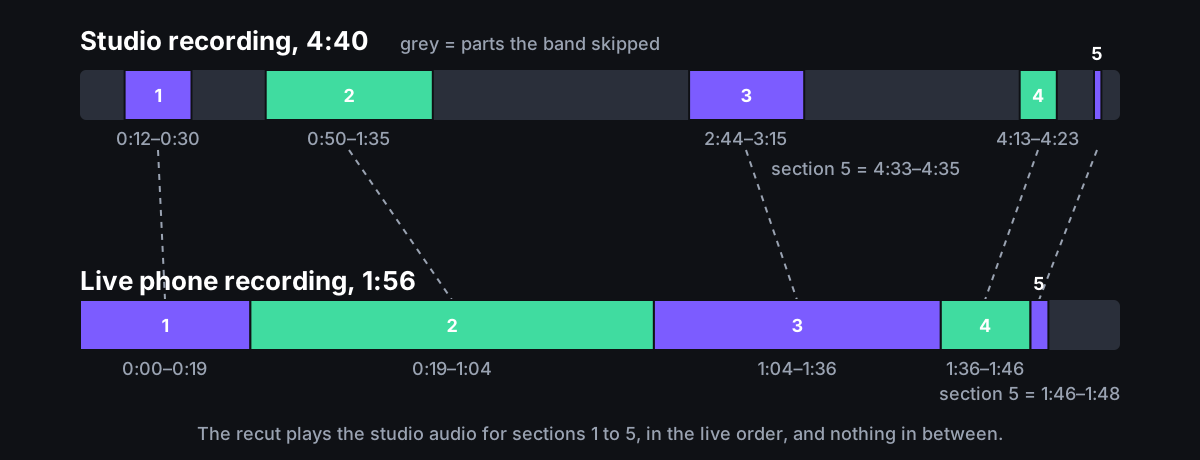
The map reads like a cut list: the band skipped the pre-intro, dropped a repeated verse and most of the breakdown, and landed on a different ending.
The cut points were off by up to two and a half seconds
A 5-second window locates a section, not a downbeat. Each boundary can be wrong by up to half the window either way, and listening to the first output made that audible at the first cut. The script carries two hand overrides, found by listening and by using the loudness profile to find a natural phrase boundary:
OVERRIDES = {
    0: {"orig_end": 25.0},      # Cut 1 exit: 0:30.29 -> 0:25.00
    1: {"orig_start": 45.0},    # Cut 1 entry: 0:50.41 -> 0:45.00
}
I did not solve this generally. A second pass with a shorter window around each boundary, or beat tracking, would; the tool as published is tuned to one song, with the file names and these two overrides hard-coded in analyze.py.
Cutting all five pieces from one decoded file
The first build_recut passed the original to FFmpeg once per segment, using -ss to seek to the start and -t for the length, and joined the pieces. Each seek decodes the MP3 independently and lands on the nearest compressed frame, and the commit that replaced it records the joins landing on those frame boundaries rather than at the analysed times. The second version decodes the file once and trims each piece out of that one stream:
f"[0:a]atrim=start={seg['orig_start']:.3f}:end={seg['orig_end']:.3f},asetpts=PTS-STARTPTS[s{idx}]"
...
filter_complex = ";".join(trim_parts) + f";{concat_inputs}concat=n={idx}:v=0:a=1[out]"
One decode, trims accurate to the sample, and asetpts=PTS-STARTPTS on each piece to restart its clock at zero so that concat sees pieces that follow on from each other. The output is written as output/ya_te_olvide_recut.wav in 16-bit PCM; the README still says .mp3, which was the first version.
Usage
cp original_song.mp3 staging/original.mp3
cp performance_recording.mp3 staging/performance.mp3
python3 analyze.py
Dependencies are Python 3 with NumPy and an FFmpeg with ffprobe on $PATH.
What was learned
Keeping only the vocal range and normalising by local loudness was enough to match a phone recording to a studio master through crowd noise; the Fourier transform does the heavy lifting and there are no learned components. Window size trades reliable detection against precise boundaries, and at 5 seconds the boundaries need a human ear. Seeking an MP3 per segment is not sample-accurate; trimming a single decoded stream is. The repo is two commits and one file, and generalising it to a song that is not “Ya Te Olvide” means lifting the constants and the overrides into arguments. Source on GitHub.