Zack Design has published clean-backdrop, a free tool that removes cast shadows, scuffs and paper texture from studio portrait backdrops without touching the subject. It went through three versions in the three days between the first commit and the last: v1 healed blemishes with LaMa, a neural network that fills in masked-out regions of a photo (inpainting); v2 limited LaMa to small isolated marks; and v3 removed LaMa entirely because it smudged. What shipped is two Gaussian blurs and a distance map on a mask of the subject produced by BiRefNet-Portrait, a neural network that separates a person from the background, run on the GPU through ONNX Runtime. It is a free alternative to Retouch4me Clean Backdrop.
This post walks through why the inpainting model was the wrong tool, the shadow-lift formula, the mask-weighted blur that keeps the subject from bleeding into the background, the floor detector that fired wrongly on headshots and had its threshold moved from 60 to 100, the two soft-edged masks that removed the “bar” artefacts, and the cuDNN detail (NVIDIA’s neural-network library) that decides whether segmentation runs on the GPU at all.
Start with the AI, because that is what everyone does
The first version, still in the repo as clean_backdrop.py, followed the obvious recipe. Separate the subject from the background with rembg, build a mask of blemishes from a stack of heuristics (fine detail above a threshold, pixels darker than their wide surroundings, detected edges, vertical seams, dark bars where the wall meets the floor), grow the mask outward a little, and hand it to LaMa:
lama_model = torch.jit.load(model_path, map_location=device)
lama_result = inpaint_lama(current, lama_mask, lama_model, device)
It has a --sd flag that also runs Stable Diffusion inpainting to remove rigging and light stands, with a colour correction afterwards because Stable Diffusion shifts the colours. There is a safety cap that tightens every threshold when the combined mask covers more than 45% of the frame, which tells you how often it did.
The results looked healed and felt wrong. Inpainting invents plausible pixels; on a backdrop the plausible pixels are a smear of the neighbours, and a smear next to untouched paper reads as smudging. v2 tried to contain it, “LaMa only on small isolated areas (<5%)”, and added the Flask web interface so the detection could be tuned with sliders and previewed. That helped less than moving the sliders suggested it would. The v3 commit message is the conclusion: “Removed LaMa inpainting entirely (caused smudging artifacts)”.
What a backdrop actually is
A lit studio wall is a smooth, slowly changing gradient plus fine, fast-changing noise. The gradient is the lighting and is wanted. The noise is scuffs, creases, paper grain and footprints and is not. Cast shadows are a third thing: a local darkening of the gradient, wide and soft. Two operations cover all of it, and neither needs a model.
Shadow lift (shadow_lift in app.py) takes the clean wall colour to be the median of the brightest 20% of background pixels, then measures how far each pixel sits below that brightness:
darkness = clean_brightness - gray
max_depth = clean_brightness * 0.5
shadow_amount = np.clip(darkness / max(max_depth, 1), 0, 1) * strength
shadow_amount is blurred over a window 6% of the image’s short edge wide (at least 51 pixels) and used as a per-pixel weight for blending toward clean_wall. Because it is a blend toward one colour and not a flat fill, the wall keeps its gradient; a pixel that was only slightly dark moves only slightly.
Texture smoothing (freq_separation, so named because it separates the fine detail from the smooth base) is one heavy Gaussian blur, with a radius of one fortieth of the short edge and never less than 10 pixels, and a blend from the original toward the blurred copy. The one detail that matters is the weighting. A plain blur near the subject averages skin and hair into the wall, so the image is multiplied by the background mask before blurring and then divided by the blurred mask:
weighted = img_f * wm[:, :, np.newaxis]
low_freq = cv2.GaussianBlur(weighted, (ksize, ksize), sigma)
low_weight = cv2.GaussianBlur(wm, (ksize, ksize), sigma)
low_weight = np.maximum(low_weight, 1e-6)
low_freq = low_freq / low_weight[:, :, np.newaxis]
That is a normalised convolution: only background pixels contribute to the estimate of the background’s smooth base. The commit “Fix freq_separation broadcast error” exists because the first cut divided a three-channel array by a two-channel one; NumPy told me at runtime.
The floor detector fired on headshots
Studios are not all seamless paper. Some have a wood or tile floor that meets the wall, and smoothing a floor deletes texture that is supposed to be there. detect_floor compares the background’s median colour in two bands of the frame, and if they differ enough, scans the bottom half row by row for the steepest darkening and calls that row the floor line.
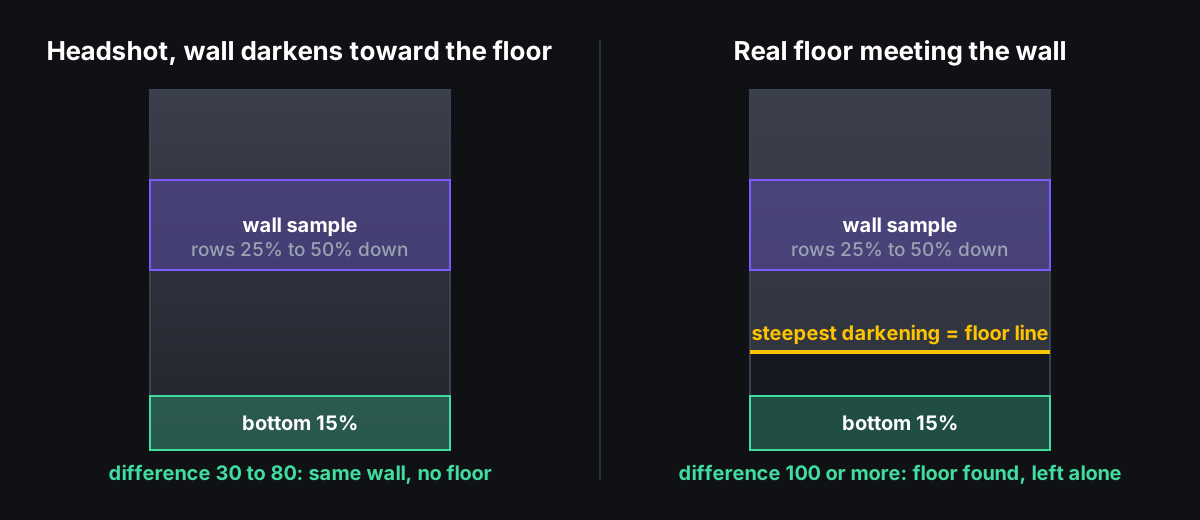
The first threshold was a colour difference of 60 (the straight-line distance between the two RGB colours). On a headshot against a plain wall that falls off toward the floor, the bottom of the wall is routinely 60 units darker than the middle, and the detector declared a floor, excluded it from cleanup, and left a black bar under the subject. The fix commit says exactly that: “Floor was falsely triggering on headshots where the wall just gets darker at the bottom, creating black bar artifacts.” The threshold is now 100, with the reasoning inline:
# Gradient darkening on the same wall is typically 30-80, real floor change is 100+
if diff < 100:
    return floor_mask, floor_start
and batch.py gained --no-floor for the cases where the heuristic is still wrong. Those 30 to 80 and 100+ figures are from the images I had, not a survey.
Two masks, both with soft edges
With LaMa gone the remaining visible artefact was a hard edge wherever a mask stopped. There were two of them.
The subject boundary used to be a hard on-or-off mask softened with a three-pixel blur. It is now a distance map, in which each pixel holds its distance from the subject’s edge, scaled so that the cleanup ramps up from nothing to full strength over a band 2% of the short edge wide (at least 15 pixels) instead of switching on:
dist = cv2.distanceTransform(1 - subj, cv2.DIST_L2, 5)
feather_px = max(int(min(h, w) * 0.02), 15)
return np.clip(dist / feather_px, 0, 1).astype(np.float32)
The floor boundary was a hard cut at one row and produced a seam where cleaned wall met uncleaned floor. The last commit turns the top of the floor mask into a gradual ramp over 5% of the image height (at least 30 pixels), and both passes multiply their working mask by one minus the floor mask instead of zeroing it. Floor texture and the contact shadow under the subject’s feet sit below the ramp and are left alone.
GPU, but only if the cuDNN library can be found
rembg runs BiRefNet-Portrait through ONNX Runtime. With onnxruntime-gpu installed it uses the CUDA execution provider, which needs the libcudnn.so.9 library to be on LD_LIBRARY_PATH, the list of directories the system searches for shared libraries. If the library is missing you get a libcudnn.so.9: cannot open shared object file error and segmentation falls back to the CPU; the run still completes, only slower. The README documents the find /usr -name "libcudnn.so.9" and LD_LIBRARY_PATH steps because the failure is easy to read past. The model itself is about 928 MB and downloads on first run. I did not measure the CPU-versus-GPU time per image; batch.py prints a per-image average at the end of each run if you want yours.
Running it
pip install -r requirements.txt
pip install onnxruntime-gpu  # for GPU segmentation
python app.py
# Open http://localhost:5000
The web interface has two sliders (defaults: shadow lift 70%, texture 50%), an “Exclude floor” checkbox, and four tabs: Original, Shadows, Texture and Preview. The Shadows tab paints every pixel the lift changed orange and the Texture tab paints what the smoothing removed blue, so you can see where each pass acted. Preview processes the full image and shrinks the result to 1200 pixels on the long edge for display; Save writes the full-resolution result next to the original with a _clean suffix, copying the colour profile and camera metadata across, because cv2.imwrite strips the profile and the result shifts colour in every viewer.
python batch.py "D:\Photos\Export\My Shoot" --lift 70 --texture 50
python batch.py /path/to/folder --no-floor
batch.py accepts Windows paths and rewrites D:\... to /mnt/d/..., because the tool runs under WSL against photos on the Windows side.
What I would tell someone starting this
The inpainting model was not a bad model; it was solving the wrong problem. A backdrop does not need pixels invented, it needs its fine detail toned down and its shadows blended toward a colour that is already in the frame. Once the problem is stated that way the tool is cv2.GaussianBlur, cv2.distanceTransform and a median. The two bugs that shipped in between, an array-shape mismatch and a floor threshold tuned on the wrong photos, were both cheaper to find than a single smudged headshot was to explain. Source, before/after images and the docs site are in the repo, MIT licensed.