Zack Design has published color-grade-ai — a Claude Code skill that takes one video frame, measures what is wrong with its colour, and writes a correction as a LUT (a look-up table: a file that says, for every input colour, what output colour to show) in the .cube text format that DaVinci Resolve, Adobe Premiere Pro and ffmpeg -vf lut3d all load. From the day auto_grade.py landed in April until August, the headline command told you to warm up a scene that was already too warm. The analyser reports a gain per colour channel, computed as green’s average divided by that channel’s average, so a gain below 1 means the channel is already too strong. The code read it the other way round. A synthetic warm cast measured a red gain of 0.800 and a blue gain of 1.391 and was told to apply warm_shift. Nobody noticed because the summary loop crashed with a KeyError on any frame that had a cast, after printing the report.
This post covers what the analyser measures at each step of the correction chain, why tone curves moved from HSL lightness to true luminance (14 of the 27 shipped LUTs changed, and saturated colours moved by up to 0.37 on a 0-to-1 scale), the solver that re-measures after each candidate correction and the eleven-defect evaluation set that scores it (81% of each defect removed on average, 60% in the worst case), the two ways real footage broke it, and the honest list of what a preset can and cannot fix.
What a frame is measured for
The pipeline is Python for measurement and Ruby for LUT generation, with no Ruby gems and only Pillow, NumPy and PyYAML on the Python side. A grade is a chain of steps, which Resolve calls nodes, and auto_grade.py reports one measurement per node using classical colour science and no machine learning:
- Exposure: where the darkest, middle and brightest parts of the picture sit, against targets of blacks near 3%, highlights near 92% and the median near 45% of full brightness.
- White balance: the “Shades of Gray” estimate (Finlayson and Trezzi 2004, using a generalised average with exponent 6 that leans toward brighter pixels), cross-checked against the “White Patch” estimate from the brightest 1% of pixels, and reported as a gain per colour channel.
- Skin: a detector for skin-coloured pixels in the YCbCr colour space, shared with the solver, measuring the average hue of skin against the line, at roughly 20 degrees, along which real skin tones sit.
- Saturation: the Hasler–Süsstrunk colourfulness measure, reported only when it leaves a plausible band.
- Black level: the brightness of the darkest 5% of pixels, shadow noise from their spread, and a check that the shadows are neutral rather than tinted.
python3 footage_type.py frame.png                 # log or display-referred?
python3 auto_grade.py frame_709.png --emit fix.cube
python3 match_grade.py reference.png shot.png --emit match.cube
python3 sample_clip.py clip.mov --emit fix.cube   # fit across a clip, not one frame
ruby generate_chain_lut.rb studio_balanced.cube \
  [email protected] [email protected] [email protected] [email protected]
The @0.8 suffix is each node’s strength, and the chain is baked into one .cube that loads as a single LUT in any editor.
The white-balance advice was backwards
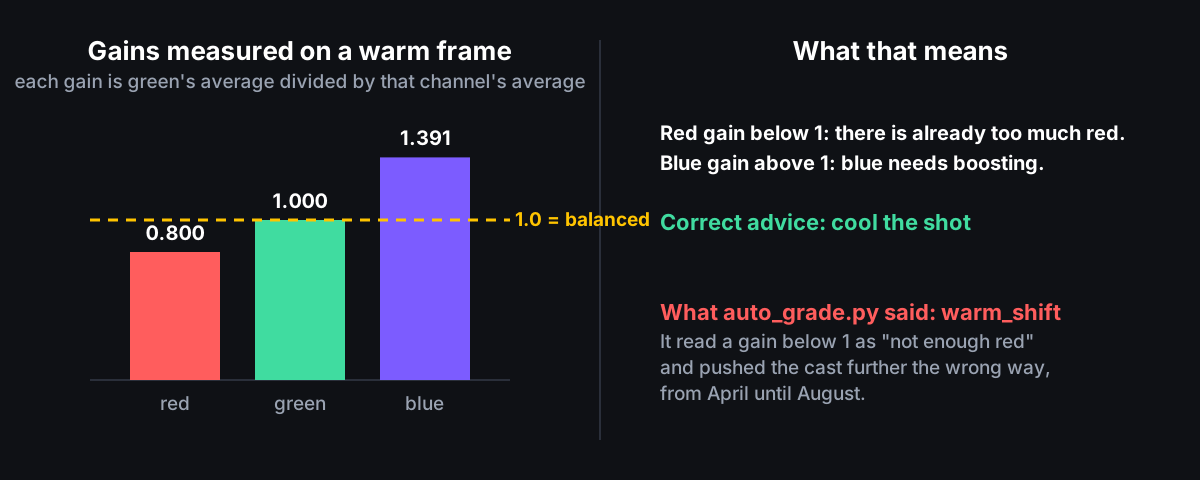
That is the whole of the April-to-August bug, and it survived because the report printed first and the crash came after.
Tone curves were applied in the wrong colour space
Version 1 applied every tone curve to HSL lightness — the L in hue, saturation, lightness, defined as the average of a pixel’s brightest and darkest channel — on gamma-encoded Rec.709 values (Rec.709 being the standard colour encoding of HD video). That is wrong twice. HSL lightness is not how bright a colour looks: a fully saturated red has a lightness of 0.5 but a Rec.709 luminance of 0.21, so a saturated colour and a grey that look equally bright were adjusted by different amounts, and colours drifted relative to greys. And rewriting the lightness and then converting back through hsl_to_rgb does not preserve hue or saturation. Meanwhile auto_grade.py measured true Rec.709 luminance, so the analyser and the generator disagreed about what “luminance” meant.
Version 2 in generate_lut.rb first undoes the display encoding with the BT.1886 curve (a pure power of 2.4, not the sRGB curve), applies the tone curve to Rec.709 luminance, and scales red, green and blue by the same ratio, which keeps hue and saturation unchanged by construction. Where brightening pushes a colour outside the representable range it is desaturated toward its target luminance rather than having each channel clipped separately. Greys come out bit-identical to version 1. Saturated colours move by up to 0.37 at the most saturated grid points; 14 of the 27 shipped LUTs changed and the 13 that only adjust hue or saturation did not. --legacy reproduces version 1 exactly. test_luts.rb checksums every generated LUT against reference_checksums.yml — a 4 KB file of SHA-256 hashes rather than 25 MB of reference LUTs — so any change to the maths is a failing test until you regenerate on purpose.
Fitting the correction by re-measuring
Strengths used to be guessed with constants like deviation * 10 and abs(gamma - 1) * 5, with no feedback. solve_grade.py applies a candidate correction, measures the frame again, and keeps the value that leaves the least error. The preset library turned out to be too gentle to choose from: cool_shift moves a channel by 4% at full strength, and no combination of presets neutralises a 22% tungsten cast. The first solver picked presets, ran out of strength at 1.0, and still failed. White balance, exposure and black level are now fitted directly from the measurement and baked into a LUT via bake_lut.rb; skin stays on the tuned red_skin_fix preset because it is a correction of shape, not of magnitude.
eval_scenes.py applies known defects to a synthetic scene and test_eval.py asserts how much of each defect the grade removes:
| Case | Defect applied |
|---|---|
warm_tungsten |
channel gains (1.22, 1.0, 0.78) |
cool_daylight |
channel gains (0.80, 1.0, 1.20) |
green_led |
channel gains (0.93, 1.12, 0.94) |
magenta_stage |
channel gains (1.14, 0.88, 1.10) |
underexposed / overexposed |
gamma 1.55 / gamma 0.62 with highlight gain 1.08 |
milky_blacks |
black lift 0.16 |
warm_and_dark, cool_and_milky |
combinations of the above |
washed_out / oversaturated |
saturation 0.32 / 1.95 |
Every case must improve, at least 40% of its defect must be removed, and the three colour casts must cut white-balance error below 60% of the original. On average 81% of a defect is removed; the worst case is 60%. Building the set exposed that the “pristine” scene did not itself measure as correct — some defective versions scored better than it — so it was rebuilt to sit exactly on the targets. The greedy stage-by-stage search finished behind the plain un-searched fit on two of nine cases, so the solver now computes both and returns whichever measures better.
Saturation is deliberately not fitted toward a number. A grey warehouse is legitimately drab and a fruit market legitimately vivid; the evaluation scene measures 63.8 against the analyser’s long-standing target of 45, and the old advice at the saturation node on that scene was sat_reduce — desaturate a correct scene. The metric now stays silent anywhere inside a 25-to-95 band, and both the report and the solver read the same constant.
Real footage broke it twice
Every synthetic case is display-referred Rec.709, meaning the pixel values are already the ones a screen should show. Handed log footage — a camera’s flat, low-contrast encoding that keeps more dynamic range for grading later — the analyser read the lifted blacks and flat contrast as defects and fitted a plausible-looking wrong grade with no complaint. footage_type.py now measures which encoding it is looking at and states it on every run. Detection has three outcomes, not two: a heavily flattened, lifted, desaturated display grade is indistinguishable from log by shape alone, so ambiguous holds tone fitting back and asks, and --transfer overrides. The one discriminating signal is where the median sits within the frame’s range — rescaling a display image leaves it untouched and every display case sits at 0.446, while a log curve moves it. Of two real frames, one cleared that bar and one sat at 0.494 and is reported ambiguous rather than pretended certain. White balance and skin still run on log; a cast is a cast whatever the curve.
Sparse skin dominated the score. On one real frame, 1,763 skin pixels — 0.021% of the image — drove 58% of the total error, while the solver ignores skin below 1% of the frame. The optimiser was being graded on a term it was forbidden to touch, which is why it removed only 23% of the defect on real footage against 79% on synthetic. The reporting and fitting thresholds are now one constant, and the skin term is weighted by how confident the detector is.
Skin detection itself was rewritten: the old rule was a box of hue, saturation and value ranges (hue 0 to 50, saturation 0.10 to 0.70, value 0.20 to 0.90) that also selects wood, khaki and amber lamps. The new YCbCr region is generous toward flushed and sunburnt skin, which is what red_skin_fix corrects, and tight toward the wood direction, and test_eval.py asserts it rejects wood and terracotta and accepts the full range of skin tones. Excluding skin and saturated props from the grey-world white-balance estimate dropped the pristine scene’s white-balance error from 0.10 to 0.0003.
Interactive preview
preview.html (639 lines) and pipeline.mjs (451 lines) are a JavaScript port of the Ruby LUT engine: drag in a frame, load a conversion LUT, dial six nodes, and export the chain you are looking at. node --test test_pipeline.mjs checks the port against Ruby run live, not against committed outputs, after the committed ones drifted. Serve it with python3 -m http.server 8080.
As a Claude Code skill
Clone it to ~/.claude/skills/color-grade (or .claude/skills/color-grade in a project), or install it as a plugin via .claude-plugin/plugin.json, and ask Claude to grade a frame or fix red skin. SKILL.md documents every preset, chain node and creative preset, and the docs site is generated from it by generate_docs.rb — a hygiene test now fails CI if the published site drifts from SKILL.md, which it had.
What was learned
Two entry points in this repo were broken for months and no test noticed: the inverted white-balance branch, and analyze_frame.rb, which piped a Python script’s error output into its normal output so a Pillow deprecation warning landed on top of the JSON. Ten test suites (three Ruby, six Python, one Node) and a closed-loop evaluation set now exist because “the grader got better” needed to be a number. If you only want the LUTs, correction_luts/ holds all 27 pre-baked, regenerated from manifest.yml and checked for drift in CI. Source on GitHub, full docs at isaacrowntree.github.io/color-grade-ai.