
Zack Design has published deflicker-runner — a Python pipeline for removing the flicker that a camera records under overhead LED panels. LED drivers switch the light on and off very fast (pulse-width modulation, or PWM), and a rolling-shutter camera, which reads its sensor out one row at a time rather than all at once, catches that switching as a slow pulse in brightness. The pulse is only about 2% of frame brightness, but it sits at about 20 beats per second, which the eye sees clearly, and it repeats every three frames at 59.94 frames per second. The naive fix — for every pixel, take the median of its value across the clip — needs the whole clip decoded, which for 4K (3840 by 2160 pixels) is about 18 GB of memory. The streaming version keeps five small greyscale frames in a queue, about 2.6 MB of measurement data, and runs on a full-length clip in a few hundred megabytes.
This post goes through the arithmetic that turns a 100 Hz light into a 19.88 Hz flicker, the median-then-ratio loop at the centre of the tool, the two-decoder design that lets it stream, the resize call that was the bottleneck until scipy.ndimage.zoom was swapped for cv2.resize, why filament bulbs need a separate full-resolution path, the measured reduction on two festival clips, and the modes that did not earn their place.
Why a 100 Hz light shows up as a 20 Hz flicker on video
LED panels on 50 Hz mains pulse 100 times a second, once for each half of the mains cycle. A camera sampling 59.94 times a second cannot follow that, and what it records instead is the beat between the two rates: twice the frame rate is 119.88, and the difference between that and 100 is 19.88 pulses per second. Every third frame lands on nearly the same point of the pulse, so the footage carries a three-frame cycle. The rolling shutter adds a top-to-bottom gradient on top, because the bottom rows are read out later than the top rows. It shows up in two shapes:
- Whole-frame pulsing on the walls, ceilings and dark surfaces that reflect the panels. The panels themselves are saturated white and look fine.
- Spot flicker on filament bulbs, fairy lights and other point sources, which are 2 to 5 pixels wide at 4K.
diagnose.py runs three checks — for banding down the frame, for beating between the top and bottom of the frame over time, and a dump of per-row brightness to tmp/ — and tells you which shape you have before you spend GPU time.
The median of five frames is the un-flickered picture
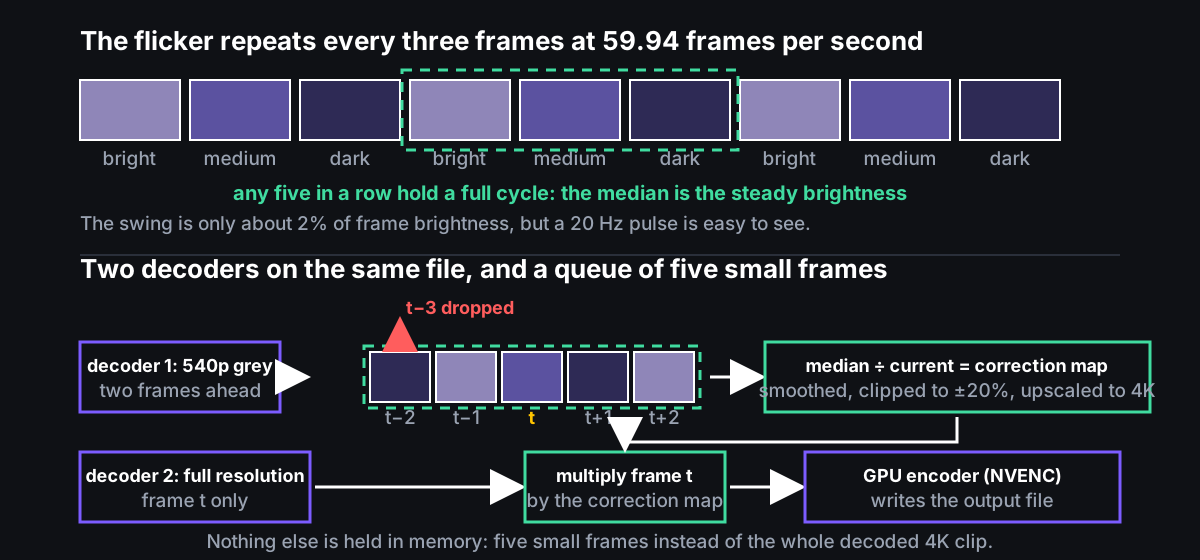
A five-frame window (--radius=2, meaning two frames either side of the current one) always contains at least one full three-frame cycle, so the per-pixel median across the window is the un-flickered brightness, with nothing to tune. The correction is a ratio applied to the frame, not a replacement of it, so fine detail survives. From apply_temporal_median_streaming in deflicker.py:
window = np.stack(list(meas_window)).astype(np.float32)
current = window[current_pos]
target = _fast_median(window, axis=0)

safe_current = np.maximum(current, 1.0)
corr = target / safe_current
# ... dark-floor ramp below brightness 25, where noise dominates
corr = gaussian_filter(corr, sigma=2.0)
corr = np.clip(corr, 0.80, 1.20)

corr_full = _upscale_correction(corr.astype(np.float32), h, w)
result = np.clip(frame.astype(np.float32) * corr_full[:, :, np.newaxis], 0, 255)
_fast_median uses np.partition, which is about twice as fast as np.median for a window this small. The correction is computed on a 540p (960 by 540 pixel) greyscale copy of the frame, smoothed, limited to plus or minus 20%, and only then enlarged to full size and multiplied into the full-resolution frame.
Streaming: decode the file twice and keep five frames
The streaming path runs two ffmpeg decoders on the same file — one scaled down to 540p greyscale for measurement, one at full resolution — and NVIDIA’s hardware encoder, NVENC (h264_nvenc, constqp, qp=10, preset p4), on the output. The measurement decoder runs two frames ahead of the full-resolution one. For each frame: the small copy joins the queue, the full-resolution frame is read, corrected and written, and the small frame that has fallen more than two frames behind is dropped from the front of the queue. Nothing else is buffered; the bottom half of the figure above is the whole design. This is why the input needs an ffmpeg with CUDA hardware decoding and NVENC: the pipeline is a GPU decode and a GPU encode on either side of a CPU NumPy loop.
The non-streaming modes (running-mean, fft-notch, bcc, physical-model, global-row) still read the whole clip at 540p into memory, but as per-row averages or 8-bit greyscale, which is the cheap part.
The upscale was the bottleneck
The median with a radius of two runs at about 41 frames per second and was never the problem. Enlarging the 540p correction map to 4K every frame with scipy.ndimage.zoom took 83 ms — 12 frames per second, slower than every other stage in the chain.
| Method | Time per frame | Equivalent frames per second |
|---|---|---|
scipy.ndimage.zoom (order=1) |
83 ms | 12 |
cv2.resize (INTER_LINEAR) |
0.4 to 0.9 ms | 1,100 to 2,500 |
That is a 96 to 211 times speedup from one function call. The two outputs differ by at most 0.05 (0.007 on average), which is invisible under a correction that is itself only about 2%. OpenCV is optional and the code falls back to SciPy. With it, the stages measure as follows on 4K footage at 59.94 frames per second:
| Stage | Frames per second | What limits it |
|---|---|---|
| Reading the 540p measurement copy | about 200 | CUDA decode |
| Median over five frames | about 40 | the NumPy partition |
| Applying the correction to the full frame | about 20 | converting a 24 MB frame to floating point |
| NVENC encode | about 100 | the encoder |
Filament bulbs vanish at low resolution, so they get their own path
A filament two pixels wide at 4K does not exist at 540p, so the whole-frame path cannot see it. spot-replace scans the top third of each frame at full resolution for pixels brighter than 150 whose brightness varies over time with a standard deviation above 40, pads each cluster of them by 30 pixels, and takes a temporal median inside each box only. The first version stored the correction for the whole frame: 301 frames by 720 rows by 3,840 columns by 4 bytes is 3.2 GB, almost all zeros. Storing per box — two boxes by 301 frames by roughly 60 by 100 pixels by 4 bytes — is about 50 MB, a 64 times reduction with identical output. Converting only the scanned top rows to floating point rather than the full 4K frame cut that step from 96 MB to 32 MB per frame.
auto runs the spot detector first and picks spot-replace if it finds anything, otherwise temporal-median.
Measured
test_deflicker.py generate writes reference corrections from two clips shot at the Port Macquarie Latin Festival 2026, and verify checks later runs against them to four decimal places.
Whole-frame flicker, clip C1608, temporal-median --radius=2:
| Region | Reduction in brightness spread | Reduction in brightness range | Three-frame oscillation removed |
|---|---|---|---|
| Ceiling | 57% | 58% | 85% |
| Wall | 66% | 58% | 76% |
Spot flicker, clip C1595, spot-replace --radius=2: both filament bulbs, at 4K coordinates (24, 1406) and (8, 1760) in the top crop, were detected and corrected with the fixed thresholds.
What did not earn its place
hybrid (a notch filter plus a running mean) can introduce artefacts and is marked not recommended. physical-model fits a formula for the light’s brightness over time, L(t) = 1 + A(|cos(2π·100t + φ)|^c − mean), against the rolling-shutter row timing using the Nelder–Mead general-purpose optimiser, and is the most theoretically correct mode; in practice it is fragile and needs good bright-row data to converge. fft-notch removes exactly the 19.88 Hz component and nothing else, so any drift from camera movement is left alone, but it only ever removes the roughly 2%. running-mean over a 300-frame window is fast and good enough when per-pixel precision is not needed. All of them are defined in presets.yml with their parameters, and command-line flags override the preset defaults.
What was learned
The memory problem was never the median; it was holding decoded 4K in memory, and the answer was to decode twice at two resolutions and keep a window of five. The speed problem was one library call. The streaming path’s own docstring estimates about 200 MB against about 18 GB for the batch version; the repo description says about 400 MB; I have not measured the peak on a full-length clip, and the number in the title should be read as an order of magnitude. Sketched in docs/performance.md but not built: a GPU median using CuPy (NumPy’s GPU counterpart) for large windows, measured at 89 to 433 times faster on the GPU but not needed at a radius of two, and a path that decodes, processes and encodes entirely on the GPU, which would remove two memory copies per frame. A SKILL.md lets Claude Code run the sequence itself: diagnose the clip, pick an approach, process it, verify the result. Source on GitHub.