The companion piece to clickup-cli — slackbuzz-cli is a Triptech Travel open-source project, authored and released by Isaac Rowntree in his Triptech engineering capacity and cross-posted here on the Zack Design blog. It is a command-line Slack client, written in Go: it reads your mentions, replies to threads, uploads files, sets your status and searches the workspace from a shell. On 9 May 2026 version 0.11.0 replaced the third-party slack-go library with a client generated from Slack’s published OpenAPI spec (the machine-readable description of Slack’s HTTP API) — 174 methods, 70 files, 41,621 lines added — and slackbuzz file upload broke the same day, because Slack had switched off the old files.upload method and every fresh request now returned method_deprecated.
This post covers the mechanisms worth stealing: how each command picks between the two kinds of Slack token (and why a direct message to yourself has to go out as the bot), the two holes in Slack’s own spec that the generator has to patch, an app permission list derived by reading the source code for slackapi.<Method>() calls so the permissions can never drift from the code, the three-step upload flow that replaced the one Slack removed, and the outgoing-text clean-up that message edit skipped for a month.
Why yet another Slack client
The Slack desktop app takes over the whole screen and the whole of your attention. A terminal client flips the relationship: Slack comes to you when you choose to check it, in the shell you are already in, with output you can pipe into jq (the standard JSON filter), grep and fzf (a fuzzy picker). Every list and view command takes --json, --jq and --template, which is what makes it usable by Claude Code, Copilot and Cursor.
Two kinds of token, chosen per command
Slack gives an app two credentials: a bot token (starting xoxb-) that acts as the app, and a user token (starting xoxp-) that acts as you, and they are allowed to do different things. Search, direct messages, saved items, your status and posting as yourself need the user token; reading channels, reactions and rich-format notifications go through the bot. Each command declares which it needs with a NeedsBotToken or NeedsUserToken pre-run hook in pkg/cmdutil/auth_check.go, and a missing token produces a targeted message (“this command requires a user token (xoxp-). Run ‘slackbuzz auth login –user-token’ to add one”) rather than a raw Slack error string. --as-bot on message send, edit and delete overrides the choice.
One case is not obvious. A direct message to yourself, sent as yourself, produces no notification, so it is useless as a reminder. pkg/cmd/message/send.go therefore works out who the target is before sending, and if it is you, sends as the bot:
if api.LooksLikeUser(opts.channel) && !opts.asBot {
    if selfID, _, _ := auth.ResolveUserID(); selfID != "" {
        targetID := resolveTargetUserID(resolver, opts.channel)
        if targetID == selfID {
            if botClient, botErr := opts.factory.BotClient(); botErr == nil {
                client = botClient
Getting that to work needed the im:write permission on the bot and a direct-message channel re-opened through the bot client; both were separate follow-up fixes.
Generating the client from Slack’s spec, and patching the spec
make api/specs/slack_web.json downloads slack_web_openapi_v2.json from Slack’s slack-api-specs repository, and cmd/gen-api walks it and emits internal/slackapi/{types,operations,scopes}.gen.go: 174 methods with typed parameters and responses. The Makefile’s first job is to scrub an example xoxb- token that Slack’s own spec embeds in the oauth.v2.access example, because GitHub’s secret scanner blocks the push and does not care that it is documentation.
The spec is not complete. The user object, objs_user, is defined with no type and no properties, so a naive generator emits an untyped blob (json.RawMessage) for every user and users.list returns nothing you can read a name out of. cmd/gen-api/patches.go builds a User type from the fields the commands actually read and points users.list and users.info at it. A channel’s topic and purpose are written out in place rather than referenced, and are rewritten to reference the sibling definition so they come out as typed fields instead of map[string]any. Slack’s named errors become Go sentinel errors (slackapi.ErrMissingScope, ErrChannelNotFound, ErrRatelimited) matched with errors.Is. One earlier bug in the same layer: the transport treated every HTTP 401 (unauthorised) as “your login has expired” and threw the body away, hiding the permission errors Slack also reports as 401.
Permissions derived from the code’s own calls
Slack apps fail late: a missing permission (Slack calls them scopes) shows up as an error at the moment a user runs the one command that needs it. cmd/gen-manifest removes the human from that loop. It parses the Go source under pkg/cmd/ and finds every slackapi.<Method>(...) call, looks each method’s required scopes up in the spec, and writes pkg/cmd/app/manifest.go as the union of them plus a small baseline for name resolution and the login handshake. The generated file lists the sixteen methods it covers, from chat.delete to users.list. CI runs make verify-gen and fails the pull request if anyone adds a call without regenerating. When a release does add scopes, slackbuzz app update pushes the manifest to Slack’s apps.manifest.update and walks you through reinstalling and getting new tokens.
The day Slack switched off the upload endpoint
The version 0.11.0 code carried this comment on UploadFile: newer code should target files.getUploadURLExternal, but the legacy files.upload still works, switch when Slack actually deprecates it. Slack did, and version 0.11.1 shipped the same afternoon with the three-step flow that replaced it.
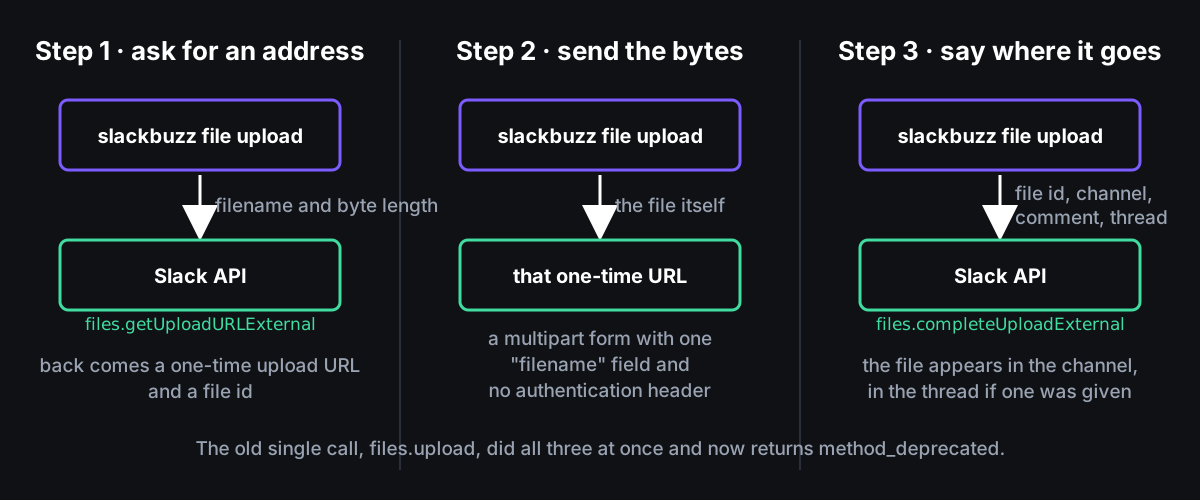
The public slackapi.UploadFile signature is unchanged, and the response is reshaped to match the old one so no caller moved. The manifest generator’s handAugmented map had assumed one Go function maps to one Slack method; it now maps UploadFile to both endpoints so both sets of scopes land in the manifest. Four httptest tests cover the happy path, sharing to several channels, and error propagation from steps 1 and 3, and it was verified end to end against live Slack.
Cleaning up text before it reaches Slack
Anything typed on a zsh command line arrives with the shell’s own escaping artefacts in it: hello world\!. internal/text/outgoing.go strips them before Slack sees them, protecting a deliberately escaped backslash first:
const placeholder = "\x00BACKSLASH\x00"
text = strings.ReplaceAll(text, `\\`, placeholder)
text = strings.ReplaceAll(text, `\!`, "!")
text = strings.ReplaceAll(text, `\?`, "?")
text = strings.ReplaceAll(text, `\n`, "\n")
text = strings.ReplaceAll(text, `\t`, "\t")
text = strings.ReplaceAll(text, placeholder, `\`)
The same pipeline converts Markdown to Slack’s own markup, called mrkdwn (a - bullet becomes •, because Slack renders a leading hyphen literally), turns @name into Slack’s <@U0123456> user reference with first-name shorthand for dotted names, and renders 1,900-odd emoji shortcodes plus the workspace’s custom emoji. message edit skipped all of it until version 0.12.0 on 12 June: edited text went to chat.update untouched, so **bold** rendered literally and mentions did not notify anyone. notify --message resolved mentions but skipped the other two steps. Both now go through one text.NormalizeOutgoing, so the three commands cannot drift apart again.
Turning partial names into channels and people
Channel and user names are resolved with the three stages borrowed from clickup-cli, in internal/api/fuzzy.go: an exact match, then a contains match (shortest wins if several), then a fuzzy match with RankMatchNormalizedFold. It reports which stage matched, so a fuzzy hit prints a confirmation and an exact one does not. @michell resolves to @michelle, #stand to #stand-up, and a miss prints “did you mean”. slackbuzz dm with no arguments shows recently active direct messages, and message list and send record their target in ~/.config/slack/recent.json as the default for next time.
A typical morning
slackbuzz activity              # what happened while I was asleep
slackbuzz send '#general' "morning team"
slackbuzz status set "heads down — PR review at 2pm" :brain: --until 2h
slackbuzz file upload diagram.png '#engineering' --thread-ts 1706000000.000000
What was learned
A dependency that wraps an API you do not control is a liability twice over: once when the API moves and once when the wrapper does not. Generating from the vendor’s spec, patching the spec’s gaps in one file, and deriving permissions from the code’s own calls means the next method_deprecated is a one-afternoon fix with tests, not an archaeology project. Smoke tests against live Slack (make smoke) exist because the mocked suite could not have told us the upload endpoint was gone.
Install via Homebrew (brew install triptechtravel/tap/slackbuzz), go install github.com/triptechtravel/slackbuzz-cli/cmd/slackbuzz@latest, or grab a binary from releases. A scripts/setup.sh gets a teammate from nothing to authenticated, with the Claude Code skill installed, in one command. Source lives on GitHub.