
Zack Design has published react-native-nitro-unzip, a ZIP module for React Native built on Nitro Modules, a framework for writing the native half of a React Native library. On a 350 MB archive of 10,000 files it extracts about 500 files per second on iOS and 474 files per second on Android, with per-file progress and cancellation delivered through JSI, React Native’s direct JavaScript-to-native interface, rather than the older message-passing bridge, which turns every event into a JSON string. Getting from the first commit to a version that built inside an app that used it took 28 commits and seven releases on the same day, and almost none of that was ZIP code.
This post covers what the Nitro spec gives you for free, the three Nitro 0.34 API changes and four Android build problems that ate the afternoon, what cancel() actually does on each platform (they differ, and the iOS answer is weaker than I wanted), and what the password support is and is not at 0.2.4.
The numbers
| Platform | Throughput | Archive |
|---|---|---|
| iOS | about 500 files per second | 350 MB, 10,000 files |
| Android | about 474 files per second | 350 MB, 10,000 files |
These are the figures from the README at 0.2.4. I did not record the device or the build configuration alongside them, so treat them as one run on developer hardware, not a benchmark. The comparison that matters is against bridge-based libraries, where every progress update is a serialised event; I have not measured one side by side, so the post makes no claim about a ratio.
What the TypeScript spec generates
Nitro works from a TypeScript spec. src/specs/Unzip.nitro.ts declares three HybridObjects (native objects that JavaScript holds a direct reference to), and the generator, nitrogen, writes the C++, Swift and Kotlin glue under nitrogen/generated/. The factory is Unzip, with extract, extractWithPassword, zip and zipWithPassword; each returns a task that is itself a native object, not an opaque id:
export interface UnzipTask extends HybridObject<{ ios: "swift"; android: "kotlin" }> {
  readonly taskId: string;
  /** Throttled to ~1 update per second. The first and final file always fire. */
  onProgress(callback: (progress: UnzipProgress) => void): void;
  /** Cancel this extraction. Safe to call multiple times. */
  cancel(): void;
  await(): Promise<UnzipResult>;
}
UnzipProgress carries extractedFiles, totalFiles, progress, speed and processedBytes; UnzipResult adds duration, averageSpeed and totalBytes. Because the task is a HybridObject, onProgress is a direct function call from native code into JavaScript with nothing serialised on the way, and cancel() is a synchronous call into the native object. Progress is limited to about one update a second in both native implementations (PROGRESS_THROTTLE_MS = 1000L on Android, progressThrottle: TimeInterval = 1.0 on iOS) so a 10,000-file archive does not deliver 10,000 callbacks to the JavaScript thread.
import { getUnzip } from 'react-native-nitro-unzip';

const unzip = getUnzip();
const task = unzip.extract('/path/to/archive.zip', '/path/to/output');
task.onProgress((p) => {
  console.log(`${(p.progress * 100).toFixed(0)}% — ${p.extractedFiles}/${p.totalFiles} files`);
});
const result = await task.await();
console.log(`Extracted ${result.extractedFiles} files in ${result.duration}ms`);
Seven releases in one afternoon
The module was written against Nitro’s older examples. Nitro 0.34 had moved on, and each release fixed the next thing the app using the module hit.
Promise.async changed shape. I had written it the way older examples show, with resolve and reject callbacks. In 0.34 it takes a closure that returns the result and may throw, and a throw becomes a rejection. The Kotlin diff is the whole story:
-    return Promise.async { resolve, reject ->
-        val result = if (password != null) extractWithPassword() else extract()
-        resolve(result)
+    return Promise.async {
+        if (password != null) extractWithPassword() else extract()
On iOS the equivalent is Promise.async wrapping withCheckedThrowingContinuation around the synchronous SSZipArchive work (SSZipArchive is the Objective-C ZIP library underneath) on a background queue.
HybridContext and getSizeOf no longer exist. 0.34 removed margelo.nitro.HybridContext; the HybridObject protocol now supplies memorySize itself, so the override val memorySize lines had to go on Android too, because the generated specs no longer declare the property.
Automatic registration only wants objects that can be built with no arguments. UnzipTask and ZipTask are created by the factory with a zipPath and a destinationPath. Listing them in the autolinking section of nitro.json made nitrogen generate registrations that tried to construct them with no arguments, which does not compile. Only Unzip belongs there.
Then Android. Four separate build failures, in order:
- The C++ library was never loaded. Android needs a
TurboReactPackagesubclass (NitroUnzipPackage) with a static initialiser callingNitroUnzipOnLoad.initializeNative(), which is what callsSystem.loadLibrary; without it theUnzipHybridObject is never registered.react-native.config.jswas missing too, so the React Native command-line tool could not link the module automatically on either platform. build.gradlelackedprefab true(prefab is Android’s format for sharing prebuilt native libraries between Gradle modules), so CMake’sfind_package()could not findfbjni, and lackedimplementation project(":react-native-nitro-modules"), so Kotlin could not resolvecom.margelo.nitro.core.*.- The linker could not find the symbols in
libNitroModules.so. The prefab configuration Gradle generates forreact-native-nitro-modulesexposed headers only, not the compiled library, because the prefab package is generated before the native build runs.android/fix-prefab.gradlemakes everyprefab<Variant>ConfigurePackagetask depend onexternalNativeBuild<Variant>and touches eachprefab_config.jsonso the CMake glue is regenerated with the library in it. react-native-mmkv carries the same file for the same reason. - The link then failed for processor architectures the app was not building.
build.gradlehardcoded all four architectures while the app built NitroModules forarm64-v8aonly, so for the other three the prefab target was header-only (INTERFACE IMPORTED) with no library behind it. ReadingreactNativeArchitectures()and building the same set fixed it.
Two smaller ones rounded out the day: registerNatives() in place of the deprecated initialize() in the JNI adapter (the C++ side of the Java bridge), and module_name = 'NitroUnzip' in the podspec so the Swift module name matched what nitrogen generated.
None of this is a complaint about Nitro. The generated bindings are the reason the JavaScript side is 36 lines. It is a record of what the build of an app using the module actually requires, because the module’s own CI passing tells you none of it.
What cancel actually does
The spec says cancel(); the platforms honour it differently.
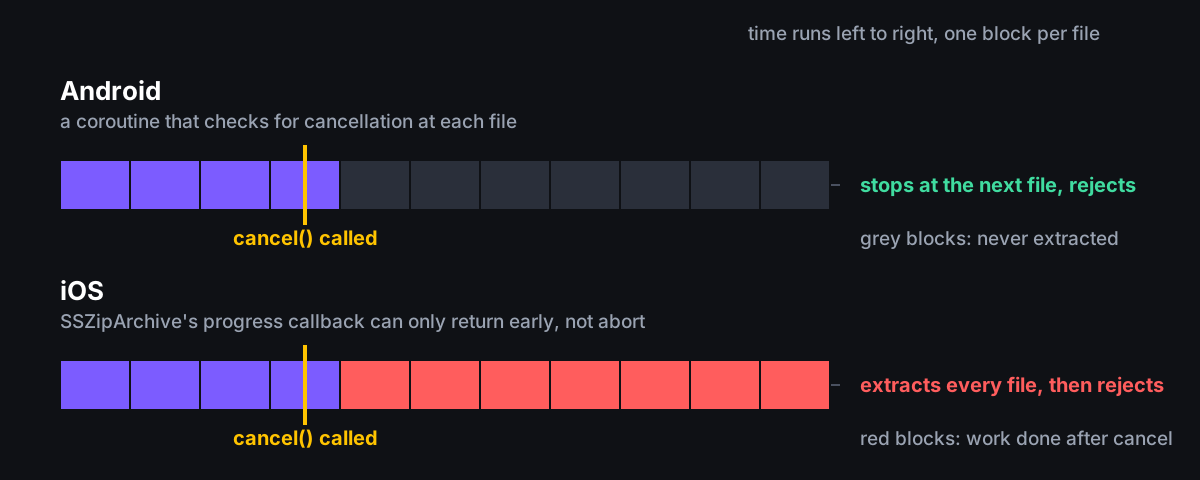
On Android, extraction runs in a coroutine over java.util.zip.ZipInputStream, and cancel() cancels the coroutine’s Job. The loop checks for cancellation at each entry, so await() rejects with “Extraction cancelled” at the next file boundary.
On iOS, extraction is SSZipArchive.unzipFile(atPath:toDestination:progressHandler:). The task sets a shouldCancel flag under a lock, and the per-file progress handler reads it. But that handler has no way to abort the archive; it can only return early. So a cancel on iOS is only acted on after unzipFile has finished the whole archive, at which point the task checks the flag and rejects. The result is correct and the work is not saved. That is the known gap at 0.2.4, and it is a property of SSZipArchive’s API, not of Nitro.
While it runs, the iOS task registers a background task with the system through beginBackgroundTask and ends it on completion or failure, so sending the app to the background mid-archive does not suspend the extraction.
Password archives
Both platforms extract and create password-protected archives, but zipWithPassword does not produce the same encryption on both: the spec’s own doc comment says “AES-256 encryption on Android, standard zip encryption on iOS”. At 0.2.4 an archive created with a password on iOS uses the older, weaker ZIP encryption that SSZipArchive writes by default, not AES. If you need AES on the archives you create, create them on Android or elsewhere for now.
What is tested
The Jest suite in src/__tests__/index.test.ts covers the JavaScript side: that getUnzip() creates the Unzip HybridObject by name, that the four factory methods exist and receive the right arguments, and the shapes of the four result and progress types. Nothing native is under automated test at 0.2.4, and the throughput numbers above are not produced by anything in the repository.
Installation
npm install react-native-nitro-unzip react-native-nitro-modules
cd ios && pod install
Requires React Native 0.75+ and Nitro Modules 0.34+. Docs, including extraction, compression, password handling, cancellation semantics and the API reference generated from the TypeScript spec, are at isaacrowntree.github.io/react-native-nitro-unzip.
Source on GitHub.
The ZIP code was the easy part. What the day taught me is that a native module’s correctness is decided in the build of the app that uses it, that a dependency’s current API is what its generated code expects rather than what its older examples show, and that a cancel flag is only a cancel if the library underneath has somewhere to check it. The iOS cancellation and the iOS password crypto are the two things I would fix next.