Zack Design has published stamp-scanner, a two-device workflow for cataloguing stamp collections. The iPhone is a tethered close-up scanner that fires only when the frame is still and sharp. The Mac runs SAM 3 — Meta’s Segment Anything Model, which cuts the outline of every object out of a photo; here the 3.45 GB facebook/sam3 checkpoint running on Apple’s Metal GPU framework — to separate every stamp on a page, removes duplicate stamps with a perceptual hash (a short fingerprint of what an image looks like, so two photos of the same stamp get nearly the same fingerprint), straightens and white-balances each crop, and hands identification to Qwen3-VL, a local vision-language model that answers questions about an image, served by Ollama. The night before the first commit the pipeline was SAM 2.1-base and took 59 to 69 seconds per page to find two stamps; the worker log after the switch shows 27 stamps saved from one page in 18.3 seconds. Everything lands in one SQLite file (a database in a single file) that the SwiftUI app watches and that any other tool can open.
This post walks through the sharpness gate on the phone (a threshold of 350 on an edge-detail score, not an accelerometer), the SAM 3 text prompt and the mask filters that make it usable, the duplicate detection and why it keeps the higher-quality copy rather than the first one, the white balance that samples the stamp’s own border, the Ollama behaviour that returns nothing at temperature 0, and the orientation model that was abandoned in favour of two buttons.
How the pieces connect
iPhone (ios-app/)                    Mac (mac-app/)                 Python (tools/)
┌───────────────────┐   HTTP over    ┌───────────────────┐   file   ┌─────────────────┐
│ Capture (HEIC)    ├───LAN+Bonjour─▶│ PhoneIngestServer ├──drop───▶│ sam_worker.py   │
│ MotionGate        │                │ (accepts uploads) │          │ SAM 3 + dedup   │
│ Lens picker       │                └───────────────────┘          │ + white balance │
└───────────────────┘                         │                     └────────┬────────┘
                                              │                              │ writes
                                              ▼                              ▼
                                     ┌────────────────────┐         ┌─────────────────────┐
                                     │ SwiftUI library UI │◀──GRDB──│ library.sqlite      │
                                     │ grid · detail      │         │ (~/Library/App Sup) │
                                     │ rotate · identify  │         └──────────▲──────────┘
                                     │ colnect lookup     │                    │ writes
                                     └────────────────────┘                    │
                                                │ spawns                       │
                                                ▼                              │
                                     ┌────────────────────┐                    │
                                     │ orientation_worker │───── Ollama ───────┤
                                     │   (Qwen3-VL)       │                    │
                                     │ colnect_lookup.py  │───── HTTP ─────────┘
                                     └────────────────────┘
The phone photographs a page and uploads it over the local network to a small server inside the Mac app, which drops the file in a folder. A Python worker watches that folder, cuts out the stamps and writes them to the database; the Mac app shows the database and spawns the identification worker when asked.
The phone decides when to shoot
The old design had the phone wait for the accelerometer to settle. It does not; there is no motion-sensor code in the app. MotionGate.swift looks at the preview frames instead, using Core Image, Apple’s image-processing framework: each frame is shrunk to 192 pixels on its long side and compared with the previous one (the scene counts as moving if the average pixel difference is above 3%); a 512-pixel crop from the centre is run through a 3-by-3 Laplacian edge filter, and the spread of that filter’s output is the sharpness score; and the average brightness has to sit between 15% and 90% so a phone lying face-down on the desk (near-black, low variance, easily passes a loose floor) does not fire.
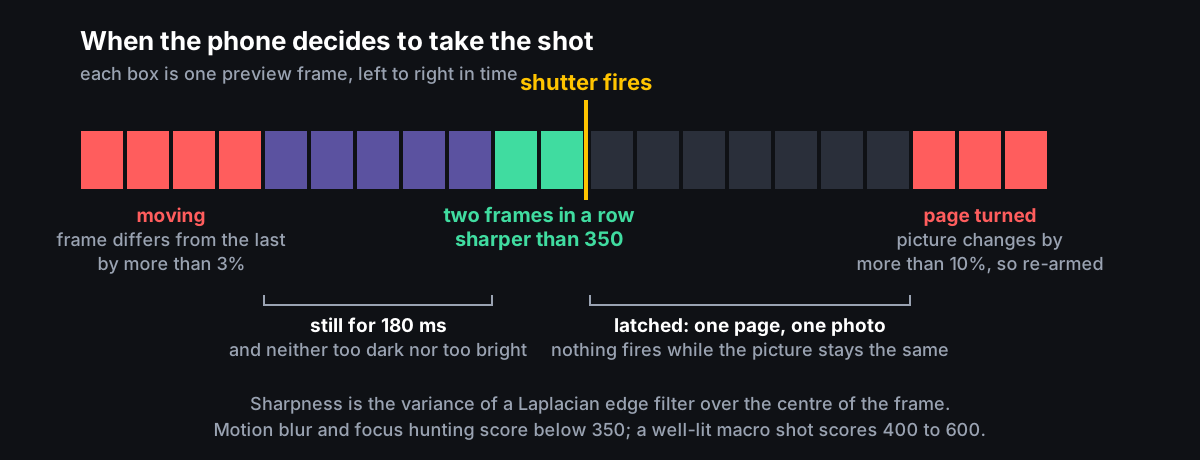
// iPhone preview frames are ~1920×1080 even though the shutter captures
// at 48MP. The Laplacian variance on preview frames maxes out around
// 400–600 with good lighting + macro. 350 gates out motion blur and
// focus-hunting while letting well-lit macro shots fire.
private let blurMin: Float = 350
The camera starts on the 0.5x ultra-wide lens, which is the close-up lens on an iPhone 15 Pro, with autofocus restricted to near subjects, and captures in HEVC (Apple’s compressed photo format, saved as a HEIC file). The file goes to an on-disk outbox and uploads over the local network to POST /submit with a secret in the request header. The phone finds the Mac through Bonjour, Apple’s local-network service discovery, under the name _stampscanner._tcp; the Mac’s PhoneIngestServer listens on port 47000 and drops the file into .run/sam_inbox/ in one atomic step so the worker never sees a half-written file.
Segmenting with a text prompt, and filtering what comes back
tools/sam_worker.py is a background process the Mac app starts as .venv/bin/python tools/sam_worker.py --daemon. It claims each inbox file by renaming it, so two workers cannot process the same one, and runs Ultralytics’ SAM3SemanticPredictor on the Metal GPU with a text prompt describing what to find:
DEFAULT_PROMPT = "perforated postage stamp"
DEFAULT_NEGATIVES = ["envelope", "printed text", "paper fragment"]
DEFAULT_CONF = 0.5
DEFAULT_IOU = 0.6
Only the masks that match the positive prompt are kept. Raw SAM output on an album page still includes slivers and chunks of page, so filter_and_dedup drops any mask that is a thin sliver (aspect ratio under 0.30), that fills less than 45% of its own bounding box, or whose area is under 0.3% or over 95% of the frame; then it merges masks that contain 80% of each other or overlap by more than 55%, ranking them by fill, shape and confidence. Each survivor is cut out with cv2.minAreaRect, the smallest rotated rectangle that encloses it, padded outward by 8% from the centre, straightened by warping that rectangle square, and rotated to portrait if it is wider than tall by more than 5%.
The comparison with the previous night is in the logs, not a benchmark:
| Model | Page | Time | Stamps found |
|---|---|---|---|
| SAM 2.1-base, automatic masks (15 April) | one page | 69.0 s | 2 |
| SAM 2.1-base, automatic masks (15 April) | another page | 59.5 s | 2 |
| SAM 3 with text prompt (16 April) | 21-stamp page | 26.3 s | 21 of 21 |
| SAM 3 with text prompt (16 April) | 27-stamp page | 18.3 s | 27 of 27 |
| SAM 3 with text prompt (16 April) | 15-stamp page | 11.3 s | 15 of 15 |
| SAM 3 with text prompt (16 April) | empty frame | 3.8 s | 0 |
The .gitignore still lists sam2.1*.pt.
Duplicates: keep the better copy, not the first one
Pages get photographed twice, and adjacent frames overlap. Each crop gets a 64-bit perceptual hash from imagehash.phash, stored as a signed 64-bit integer so SQLite can hold it, and the worker compares it with every hashed row; two hashes that differ in six bits or fewer (a Hamming distance of at most 6) count as the same stamp:
for row in rows:
    if hamming(phash, existing_hash) <= MAX_HAMMING:   # MAX_HAMMING = 6
        existing_quality = row[1] * row[2] * row[3]     # conf × cropW × cropH
        if quality > existing_quality:
            return "better", row
        return "worse", row
return "unique", None
A “better” match deletes the older row and its captures directory rather than skipping the new one, so re-shooting a page from closer upgrades the library instead of being rejected. The log records each decision: skip (dup of …, lower quality) or replacing … (higher quality). The live library on my Mac holds 1,731 rows, 242 of them marked duplicateOf by a separate pass the Mac app runs using Apple’s Vision framework image fingerprints.
White balance is done per crop against the crop’s own border, a strip one fifteenth of the shorter side wide. The brightest 5% of border pixels are taken as the white reference and each colour channel is scaled to bring them toward 245 out of 255, with the scale limited to between 0.8 and 1.5. If the reference is darker than 100 in any channel the crop is left alone, because a black-bordered stamp should not be whitened. The docstring says the reference maps to 255; the code targets 245.
One SQLite file, two writers
The worker inserts eleven columns into stamps in ~/Library/Application Support/StampScanner/library.sqlite, with the database in write-ahead-log mode (so a reader and a writer do not block each other) and a 3-second wait when the file is busy. The Mac app opens the same file through GRDB, a Swift SQLite library, and every one of its schema migrations checks db.columns(in: "stamps") before adding a column, because the Python side creates the table independently. The grid did not update as stamps streamed in until DatabaseWatcher.swift put a file-system watcher on library.sqlite-wal; GRDB’s @Query does not notice writes from another process on its own. The Swift side has no ingest logic at all.
What the vision model is and is not good for
orientation_worker.py sends crops to Ollama at http://localhost:11434/api/generate, shrunk to 384 pixels on the long side and encoded as base64 JPEG, with keep_alive: "30m" so the model stays warm between stamps and an explicit unload afterwards so SAM can have the GPU memory back. Two Ollama behaviours are documented in the code because they cost time: Qwen3-VL returns empty output when the output limit num_predict is small, and returns empty output at temperature=0 (the setting that should make it deterministic), reproducible across models, so the worker uses the default temperature and caps output at 2,048 tokens. The Ollama log puts the loaded 4-bit model at 10.9 GiB on an M3 Pro with all 37 layers on the GPU.
Identification works: one prompt that asks for JSON only returns country, year, denomination, colour, subject, series, whether it was used, cancel type, printing and overprint, at about a minute per stamp, written back with a per-stamp UPDATE. The earlier model was Gemma; the commit that switched it says Qwen3-VL was “smaller, faster, more reliable output”, and a stale comment in sam_worker.py still mentions Gemma 4.
Orientation did not work. Asking “what rotation makes this stamp upright, answer 0, 90, 180 or 270” was, in the function’s own docstring, “too slow/unreliable on local hardware”. The function is marked DEPRECATED, 3 of the 1,731 rows in the live library have oriented=1, and orientation is now two rotate buttons on each grid cell, with a per-record notification so a rotation does not re-fetch the whole grid.
The lookup against Colnect, an online stamp catalogue, writes a catalogueRef of Colnect <id> for any identified stamp lacking one, no faster than one request per second. Its first version was wrong; the rewrite matched the official spec’s request signature (HMAC-SHA256 over the path and timestamp joined by the literal characters >|<), verified against the spec’s worked example, and sends a User-Agent longer than 15 characters, which the spec requires.
Why two devices, and why local
The iPhone’s close-up camera and image processor are good at stamp-sized subjects and fast; the average crop in the library is 377 by 509 pixels and the largest 1,294 by 1,959. The Mac has the GPU SAM 3 wants, the memory the vision model wants, and the screen. A stamp collection is personal, and the only outbound call is a catalogue-ID lookup; no image leaves the Mac.
Tests and status
Ran 194 tests in 0.714s
That is the Python suite (.venv/bin/python -m unittest discover tools/tests), covering the identification sanity checks, catalogue matching and the migration script; the Mac app has 12 XCTest cases for the pairing code, the issue detector and the schema round-trip. tools/run_fixture_pipeline.sh runs 14 fixture images through the real worker against a scratch database. The worker sends a heartbeat between every file because the launcher used to kill it during back-to-back jobs, and run.sh kills stale workers on start because a survivor from a previous session runs old code without the single-instance lock and races for the inbox. Full architecture and build instructions are in the README. If you have a collection that deserves better than a spreadsheet, this is a working start.