Zack Design has published shutterdrop, a wireless tether that turns the phone in your pocket into a shutter for your Mac. Tap the camera preview on the phone and the photo lands in ~/Pictures/Shutterdrop/, as a HEIC (Apple’s compressed photo format) from iOS or a JPEG from Android. It does what Capture One’s tethered shooting does for a camera on a USB cable, but over wifi from your iPhone or Android. No cable, no cloud, no account. The whole protocol is three HTTP endpoints; the receiver is one Python file, 585 lines, with zeroconf (the library that announces the receiver on the local network) as its only dependency outside the standard library.
This post walks through what is actually in those 585 lines: why the parser for the upload body is hand-written and splits on a line break followed by the boundary rather than on the boundary alone, how a 6-digit pairing code survives being on a shared wifi (5 attempts, a half-second delay per guess, a 5-minute window), why the file is opened with flags that refuse to overwrite or follow a symbolic link and is renamed into place, how the receiver finds its own network address without sending a packet, and the places where the Android app is honestly behind the iOS one.
Why this exists
I take a lot of product photos for eBay listings, bike parts, electronics, resale. The iPhone has a far better camera than anything attached to the Mac, but “shoot on phone, AirDrop, import” was the slow step in every listing. Existing wireless tether tools want a subscription, route photos through someone else’s cloud, or are tied to a desktop app I don’t use.
Shutterdrop is the smallest thing that removes the step: the receiver writes straight to a folder, so whatever already watches folders (a Finder smart folder, the Hazel automation app, Lightroom auto-import) sees new files appear. I have not measured the delay from tap to file; nothing in the repo does.
The whole protocol is three HTTP routes
GET  /health  → {"ok":true}                          unauthenticated
POST /pair    → {"code":"123456","peerName":"…"}     returns {"secret","peer"}
POST /submit  → multipart/form-data, "photo" part, Bearer auth required
That is the entire do_GET and do_POST in mac-receiver/receiver.py. The server is Python’s ThreadingHTTPServer speaking HTTP/1.0 on purpose: one request per connection, no keep-alive, no chunked encoding, so the request must declare its length up front (a /submit without a Content-Length header gets a 411 “length required”) and the 100 MB body cap is enforced before a byte is read. /health returns only {"ok": true} until the caller is authorised; the peer name and pairing state are added afterwards, so an unpaired device on the wifi learns nothing from it. An unauthorised /submit reads and discards the request body before replying 401 (unauthorised), so the phone sees the 401 instead of a dropped connection.
The receiver announces itself on the local network as _shutterdrop._tcp.local. over Bonjour, Apple’s service-discovery protocol, using zeroconf, IPv4 only. To work out which of its own addresses to announce it opens a UDP socket toward 8.8.8.8:80 and asks the operating system which local address it chose, which never sends a packet; the docstring notes that a VPN that takes over the default route can make this pick the wrong interface, hence the --bind flag. The Bonjour name is cut to 63 bytes and re-decoded ignoring errors, so a multi-byte character split at the cut does not produce an invalid label.
Pairing on a shared network
The long-term secret is 32 random bytes from secrets.token_bytes, base64-encoded, written to ~/.config/shutterdrop/secret with open flags that create the file only if it does not already exist, with owner-only permissions set at creation rather than by a chmod afterwards, which closes the window in which another local user could read it. The pairing code is independent of it:
def open(self) -> str:
    """Open a fresh window and return the new 6-digit code."""
    with self._lock:
        self._code = f"{secrets.randbelow(1_000_000):06d}"
        self._opened_at = time.monotonic()
        self._attempts = 0
        self._locked_until = 0.0
        return self._code
A million possible codes is nothing against a script on the same wifi, so the protection is in try_match: the comparison takes the same time whether or not it matches (secrets.compare_digest), the code is used up on the first match so a leaked code cannot be replayed, every wrong guess counts, and after PAIRING_MAX_ATTEMPTS = 5 the window locks. Each /pair request also sleeps half a second before answering, which is invisible to a person typing and ruinous to a loop. The window itself closes after PAIRING_WINDOW_SECONDS = 5 * 60 without activity. One honest detail: the lockout is also 5 minutes, so it can never outlive the window it protects; in practice a lockout burns the rest of the current window and the operator reopens with ./run.sh --pair.
The /submit check compares the length of the Authorization header first and then compares the whole Bearer … string in constant time against the expected value. On the phone the secret lives in the iOS Keychain (readable after the first unlock) or in Android’s EncryptedSharedPreferences with an AES-256 master key held in the hardware Keystore.
The multipart parser is hand-rolled for one reason
An HTTP file upload is packaged as multipart/form-data: the parts are separated by a boundary string the sender chooses. The obvious way to split the body is on --boundary. A JPEG is arbitrary bytes, and the boundary string can appear inside it; when it does, the naive split truncates the photo. RFC 2046 defines the delimiter as a line break followed by --boundary, so the parser normalises line endings and splits on that.
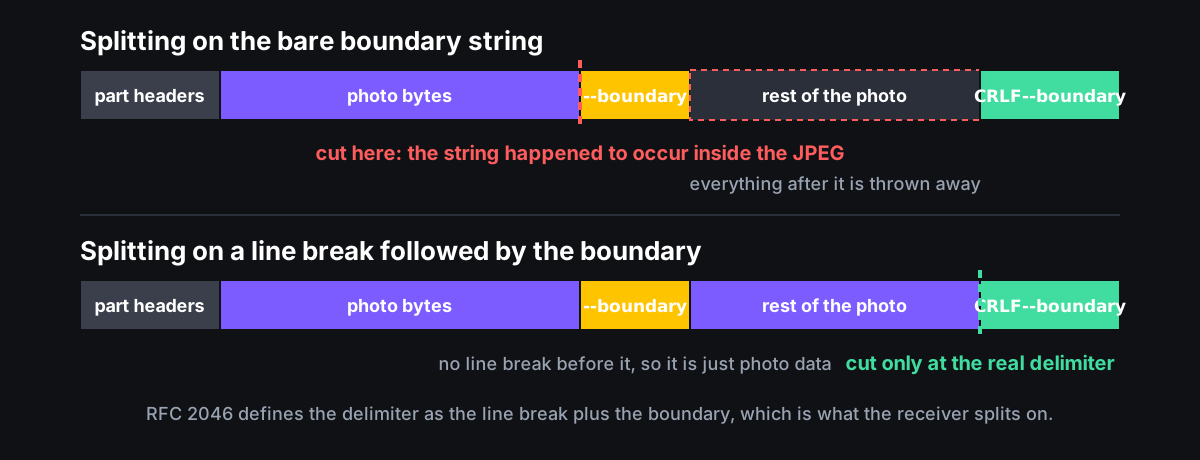
body = _normalise_eol(body)
delim = b"\r\n--" + boundary.encode("ascii")
# The first boundary won't be preceded by CRLF — it can sit at the
# very start of the body. Inject a leading CRLF to make splitting
# uniform.
chunks = (b"\r\n" + body).split(delim)
test_boundary_substring_inside_payload and test_lf_only_line_endings in tests/test_receiver.py pin both halves of that. The filename the phone sends is never used. The extension comes from sniffing the first bytes of the file: FF D8 is JPEG, ftyp followed by heic, heix or mif1 at offset 4 is HEIC, \x89PNG is PNG, and anything else is saved as .jpg.
Writing the file so a half-upload never looks like a photo
tmp_path = staging / f"{job_id}.{ext}.tmp"
final_path = staging / f"{job_id}.{ext}"
flags = os.O_WRONLY | os.O_CREAT | os.O_EXCL | os.O_NOFOLLOW
fd = os.open(str(tmp_path), flags, 0o600)
os.write(fd, data); os.fsync(fd); os.close(fd)
os.replace(tmp_path, final_path)
The job_id is the time in milliseconds plus four random hex characters, so files sort in the order they were taken. The write goes to a .tmp file, is flushed to disk, and is then renamed into place, which means a folder watcher never sees a partial JPEG. O_EXCL refuses to overwrite an existing file, and O_NOFOLLOW refuses to follow a symbolic link someone left in the staging directory, which is what stops a local user redirecting the write somewhere else on disk.
The two phone apps
The iOS app (iOS 17 and later, SwiftUI, built with xcodegen) looks for _shutterdrop._tcp with NWBrowser, resolves the Mac’s address by opening a throwaway connection and reading the endpoint it connected to, with a hard 8-second timeout so a Bonjour entry that cannot be reached cannot hang the Pair button; an IPv6 result gets its network-interface suffix percent-encoded into [fe80::1%25en0]. Capture asks for HEVC when the camera offers it and JPEG otherwise, with quality prioritised over speed. The lens picker sets the zoom on the triple-camera virtual device to 1.0, 2.0 or 6.0, which correspond to the 0.5x, 1x and 3x lenses, and the torch is switched on at full brightness. The outbox is a directory in the app’s cache; every capture is written there first and uploaded with URLSession.upload(for:fromFile:) so the HEIC is never held in memory twice. It flushes when NWPathMonitor reports the network is available, and backs off for 2 seconds after a failure so a Mac answering 401 is not hammered by the network monitor and the pairing code at the same time.
The Android app (Android 8 and later, Compose, CameraX 1.4.1) captures with CAPTURE_MODE_MAXIMIZE_QUALITY, discovers the Mac with NsdManager (using registerServiceInfoCallback on Android 14 and later and the older resolver below it), and exposes the whole-screen tap target to the TalkBack screen reader as a button. It is behind iOS in four ways worth saying plainly: no lens picker, no torch, no network-change trigger or back-off on the outbox (it flushes on pairing and on each new capture), and the upload reads the whole file into memory with file.readBytes() where iOS streams it from disk.
Status
Both apps work end to end against the receiver. The receiver has 38 tests across the multipart parser, the pairing window (lockout, use-once, expiry, a threaded concurrency test), the Bonjour name sanitiser and the extension sniffer:
38 passed in 0.20s
They run in GitHub Actions against Python 3.10 through 3.13 on every push that touches mac-receiver/. The README calls the receiver “~400 lines”; it is 585. The protocol is small enough that writing your own receiver, one that drops into S3 or pipes through pngcrush, is an afternoon. MIT licensed, source on GitHub.
How the pieces connect, and how to run it
Phone (iOS or Android)              Mac (or Linux)
┌───────────────────────┐           ┌────────────────────────┐
│ Camera preview        │  HTTP     │ receiver.py            │   drop
│ Tap-to-capture (HEIC  ├──over────▶│ (Python stdlib +       ├──────▶  ~/Pictures/Shutterdrop/
│  on iOS / JPEG on     │  LAN +    │  zeroconf)             │
│  Android)             │  Bonjour  │ advertises             │
│ Offline outbox        │           │ _shutterdrop._tcp      │
│ Bonjour discovery     │           └────────────────────────┘
└───────────────────────┘
cd mac-receiver
./run.sh                                   # bootstraps a venv, starts server
./run.sh --staging ~/Desktop/inventory     # custom staging folder
./run.sh --pair                            # re-open pairing for a new phone
./run.sh --reset-secret                    # rotate secret + open pairing
Build details and architecture notes are in the README.