
Zack Design has published linework, a small 3D renderer for annotated technical drawings that outputs plain SVG strings. The core in src/linework.ts is 171 lines with zero runtime dependencies. Hand it 3D points, or a glTF, OBJ or STL mesh (three common 3D model formats), and it rotates the geometry, projects it with perspective, sorts it back to front every frame, and returns markup. A public-domain street lantern of 5,394 triangles goes in and about 2,500 strokes come out, one along each edge where the surface bends, rotatable, without WebGL (the browser’s 3D graphics interface) and without a canvas element.
Live demo (drop a 3D model, watch it become a drawing): isaacrowntree.com/linework · Source: github.com/isaacrowntree/linework (MIT)
This post covers why no existing library does this, how render() sorts, how featureEdges() decides which edges of a shaded mesh become lines, how STEP files (the CAD exchange format) work without shipping a CAD geometry engine in the package, and what the 25 tests actually pin down.
Why this exists
I’ve been building a “will this part fit your bike?” planner, a tool that tells you whether a given rear shock, dropper post or ebike motor bolts onto your frame before you spend the money. It grew out of my earlier bike-part-planner engine, and the part that makes it useful is the drawing: an exploded, service-manual-style diagram, every part numbered with a callout balloon that points at a parts list, that you can grab and rotate.
So I needed exploded technical diagrams, rotatable, with dimension lines, callout balloons and a title block. I went looking for a library and expected to find three.
No library does this
The 3D tooling world splits in two and neither half wants this job.
On one side is three.js and WebGL. It is excellent at shaded surfaces, lights, materials and cameras. Everything that makes a technical drawing readable is a fight there: one-pixel strokes, dashed hidden lines, a hierarchy of line weights, and text callouts that have to live in a separate HTML layer on top of the canvas. I would have spent the effort making a renderer stop doing what it is good at.
On the other side is Zdog, the one pseudo-3D library with the right look. Its last npm release was v1.1.3 in January 2022; it sorts shapes by one depth value each, so shapes that pass through one another draw in the wrong order and you nudge their depth offsets by hand until they don’t; and it has no text. Dimension lines and leader text are half of an exploded diagram. A renderer that cannot do text cannot do this.
Nothing in between produces technical illustrations from parameters. So I wrote it.
Rotate, project, sort, paint
The pipeline is the textbook one. Rotate the 3D points about the vertical and horizontal axes; project them with perspective, so that a point’s on-screen scale is f/(f−z) and nearer points draw larger; sort every shape from farthest to nearest (the painter’s algorithm: paint the back first so the front covers it); then write SVG strings. The important word is sort, and the important property is that it happens every frame from the projected depth of every shape, never from a layer order the author supplies. This is the whole of render():
export function render(shapes: Shape[], view: View, parts: Record<string, PartDef> = {}): string {
  const X = xform(view);
  const slots: Slot[] = [];
  const byPart = new Map<string, { svgs: string[]; depths: number[] }>();
  for (const sh of shapes) {
    const e = emit(sh, X);
    if (!e.svg) continue;
    if (sh.part) { /* accumulate into byPart */ } else { slots.push(e); }
  }
  for (const [key, b] of byPart) {
    const depth = b.depths.reduce((a, c) => a + c, 0) / b.depths.length;
    slots.push({ svg: `<g ${parts[key]?.attrs ?? ""}>${b.svgs.join("")}</g>`, depth, part: key });
  }
  slots.sort((a, b) => a.depth - b.depth); // far → near
  return slots.map((s) => s.svg).join("");
}
Shapes that share a part key are averaged into one depth and wrapped in one <g> group, so an animated part moves as a unit. A box’s faces are four-sided polygons, and a face whose corners come out clockwise on screen is facing away from the viewer, so it is skipped (if (sh.cull && area <= 0)) and the back of a box never paints over its front. A disc projects to the correct ellipse for the plane it sits in, which is what wheels and bearing races need. A bias field nudges a shape’s depth by hand for the cases every painter’s renderer has, where two shapes sit in the same plane, and the README says so: three shapes that each overlap the next in a cycle cannot be sorted, so split one of them.
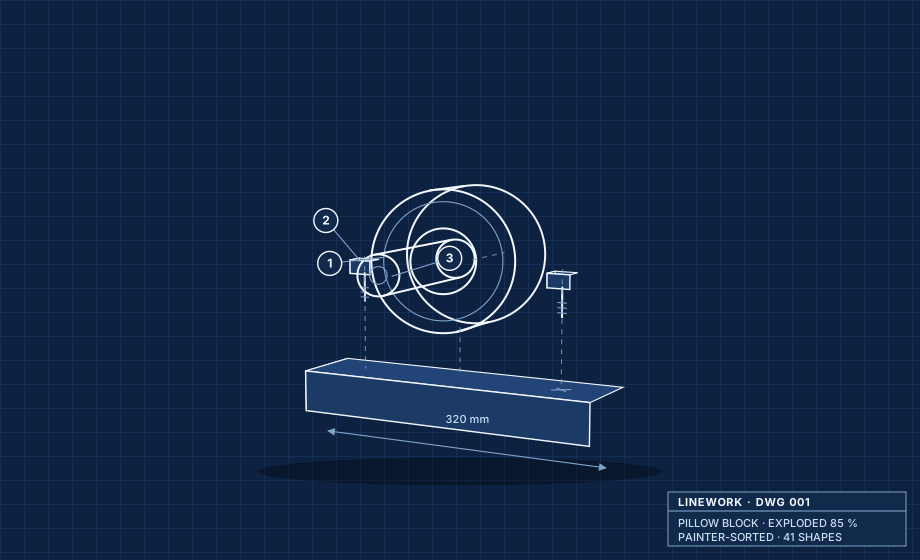
Here is a bearing assembly, exploded. This exact SVG was rendered by the library, in Node, with no client-side JavaScript:
A shaded mesh has no lines
The pillow block was written by hand. The larger unlock is linework/import. A mesh carries no lines; its form lives in where the surface bends, so the drawing has to be recovered from the triangles. featureEdges() does it in three passes:
- Weld vertices by position. Meshes routinely split one geometric edge across two pieces with separately numbered vertices. Each vertex position is rounded to a grid one ten-thousandth of the bounding-box diagonal and mapped to a single representative, so a shared edge is seen as shared and not as two boundaries.
- Collect the face directions at each edge. Each triangle contributes its surface normal (the direction it faces) to its three edges, keyed on the pair of welded vertex ids. Triangles with zero area are skipped; they would otherwise produce false creases.
- Keep the edges a draftsperson would ink. The figure shows the three cases.
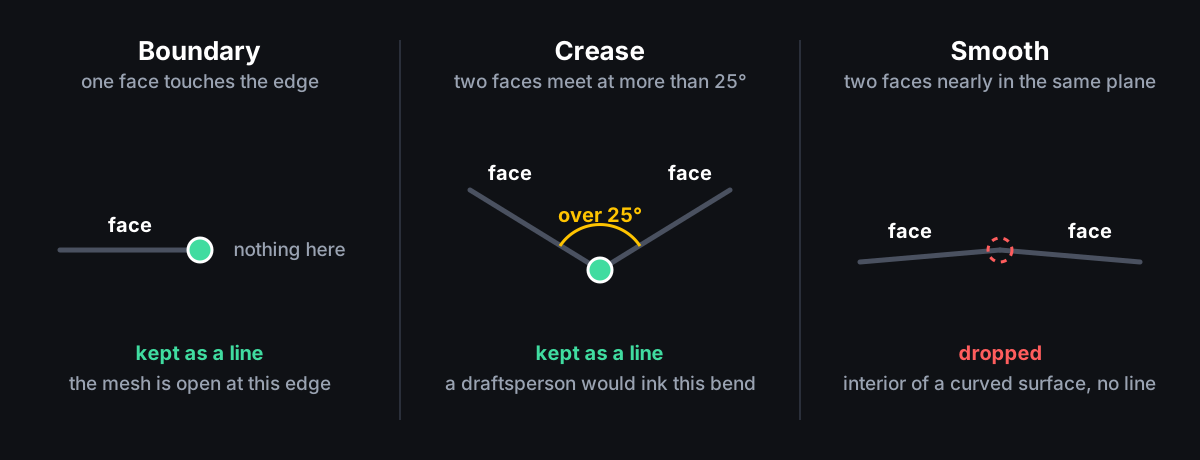
The crease threshold is the angle option, 25° by default. The tests say what that means concretely: a closed cube yields exactly its 12 edges and none of the diagonals across its faces; raising the threshold past 90° drops every interior edge; an open triangle is three boundary edges; vertices at the same position but numbered separately are welded. One call does the whole thing:
import { parseGLB, meshToShapes } from "linework/import";
const meshes = parseGLB(await file.arrayBuffer());   // parseOBJ · parseSTL · fromBufferGeometry
const shapes = meshToShapes(meshes, { angle: 25, fit: { cx: 400, cy: 300, size: 440 } });
parseGLB reads embedded buffers and node transforms; it does not support Draco compression, and it reads geometry only. Here is the lantern, 5,394 triangles of shaded mesh reduced to about 2,500 edges and rendered in Node by scripts/gen-import-demo.mjs:
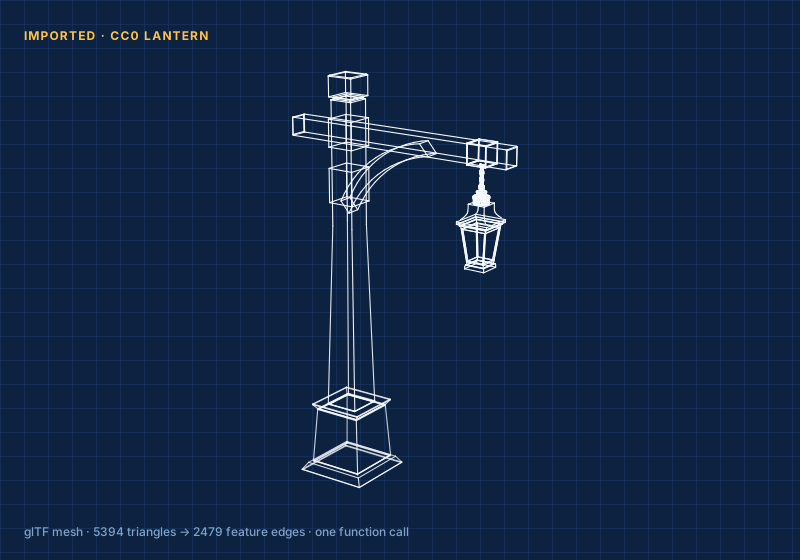
That reframe is why this was worth releasing. “Hand-code a 3D scene” is a small audience. “Bring the model you already have” is a larger one. Drop a .glb on the live demo and it runs in your browser; nothing is uploaded.
STEP files without shipping a CAD engine
STEP and IGES files describe exact mathematical surfaces (boundary representations built from trimmed NURBS patches), not triangles, and turning those into triangles is a job for OpenCASCADE, an open-source CAD geometry engine, not for 171 lines. So linework does not embed one. fromOcct() maps the output of occt-import-js straight into the same Mesh type; the roughly 6 MB WebAssembly build of that engine stays an optional dependency of your app, and linework stays dependency-free. fromBufferGeometry() does the same for a three.js geometry by reading its typed arrays, without importing three.js.
Why SVG strings, specifically
- You style it. The library emits class names you choose and never bakes in a colour, a stroke width or a font. Theme it with CSS variables; restyle it for dark mode; print it.
- Text is text. Callouts and dimensions are real
<text>; a screen reader and a crawler both see them. - It renders on a server.
render()is a pure function from shapes to a string. Both diagrams in this post came out of Node at build time. The live demo runs the samedist/files under your pointer.
Making it nice to author
linework/sketch sits on top of the raw primitives so a scene reads like drafting instead of assembling arrays of numbers. Context blocks set which part, which CSS class and which depth bias everything inside them belongs to:
import { sketch } from "linework/sketch";

const s = sketch({ yaw: 0.5, pitch: 0.16, f: 1500, cx: 460, cy: 320 });

s.box(300, 380, 320, 42, 40, 80);                 // base plate

s.part("housing", 'class="prt"', () => {          // one <g>, one sort unit
  s.cyl([460, 218], 70, 34, -34, "ink");          // bearing body
  s.bias(0.6, () => s.cap([460, 218], 34, 32, "ink"));
});

s.note("320 mm", [460, 452]);                      // paper-space annotation
el.innerHTML = s.render();                         // depth-sorted SVG
Annotations in paper space (fixed to the page rather than to the model) are appended after the sorted scene and never rotate, exactly like the notes on a real drawing; sketch.pt(p, z) projects a model point to the page so a leader line can pin a note to a part. linework/orbit is the drag-to-rotate code as one call: pointer capture, limits on how far the view can turn, batching of redraws to the browser’s animation frame, double-click to reset, and an idle sway that switches off when the user has asked for reduced motion. It is the only entry point that needs a browser.
npm i linework          # ESM, types included, zero runtime deps
npm test                # projection, parallax, sorting, culling, edge extraction
Numbers
| Release | Lines in the core | Lines in the import module | Tests | What the release added |
|---|---|---|---|---|
| v0.1.0 | 171 | none | 13 | hand-authored scenes |
| v0.2.0 | 171 | not recorded | 19 | edge extraction from meshes |
| v0.3.0 | 171 | 349 | 25 | STL, three.js and OpenCASCADE input |
The README quotes about one millisecond to rebuild a scene of a few hundred shapes. That is a figure from the demo, not a benchmark I have recorded, and I have not measured the lantern’s per-frame cost.
The lesson
When a problem looks 3D there is a reflex to reach for the 3D engine and then spend a week teaching it to draw a labelled diagram. The actual need was smaller and more specific than the tool everyone reaches for, and nobody had written the small specific thing because it sits between “serious 3D” and “cute toy”. That gap is where a lot of good little libraries live. This one is MIT on GitHub: take it, theme it, drop in your own model. The bike planner it was built for is next.