One run of a festival produces thousands of photos from several photographers, each of whom wants their own mark on their work, while the event operator wants the sponsor’s mark on all of it. Today that means re-exporting every JPEG whenever a logo changes, then sharing a Dropbox link that expires. Nexxara is Zack Design’s event media platform, and its answer is to never bake a watermark into a file: photos sit untouched in Cloudflare R2 (Cloudflare’s file storage, equivalent to Amazon S3), and a Cloudflare Worker, a small program running in Cloudflare’s data centres at files.nexxara.media, lays up to three overlays onto each photo as it is requested, using the draw option of Cloudflare’s Image Resizing service.
This post covers how that Worker sizes and places overlays, the two Image Resizing behaviours that are not in the documentation (it fetches from the Worker that called it, and it refuses images over 100 megapixels), the vision-model pass that groups photos into scenes, the Durable Object that streams upload and analysis progress to the admin screen, and the Stripe library default that hangs a Worker.
What Nexxara does
Production companies run events. Events have editions: the same festival in November and again in March. Each edition has photographers and videographers uploading, an event manager curating, and attendees who want the photos afterwards.
- Photographers upload straight to R2 using pre-signed upload links (
getSignedUrlinsrc/lib/services/storage-service.ts), so the file bytes never pass through the app. - Event managers curate: keep or drop, organise into collections, reorder by drag and drop (
@dnd-kit), set watermark positions. - Attendees open the gallery from a QR code or a link (the
qrcodelibrary renders it in the edition’s share dialog) and sign in with an emailed one-time link viasupabase.auth.signInWithOtp, so there is no password. - Galleries use
react-photo-albumto lay photos out in rows of equal height, with video alongside photos.
Roles are a Postgres enumerated type, user_role (basic, media, event_manager, admin, with super_admin added later), and every table has row-level security enabled: Postgres itself filters which rows a user can see, rather than the application code. The 40 migrations in supabase/migrations/ declare 89 such policies, written against auth.uid() and the caller’s row in user_profiles. The background queue consumer runs with the service-role key, which bypasses those policies, and is kept as a separate code path for that reason.
Watermarks are drawn when the photo is requested
The gallery never links to a file in R2. It links to the image Worker, with the transformation described in the query string:
https://files.nexxara.media/photos/editions/{id}/{filename}.jpg?width=400&fit=cover&quality=80&editionWatermark=watermarks/{id}/{filename}
The Worker (workers-nexxara/image/index.ts, 329 lines) reads the width, height, quality, fit, format and gravity parameters, then builds cf.image.draw, a list of overlays to draw on top. Three sources feed it: the platform’s own mark, the edition’s mark, and the photographer’s. Each overlay is itself a URL back to the same Worker, requested at twice its target width as a PNG at full quality with sharpening on (format=png, quality=100, sharpen=3, fit=scale-down), so Image Resizing shrinks a sharp source instead of enlarging a soft one.
Sizing is the part that took iteration. Overlays are specified in output pixels, so calculateWatermarkWidth() in watermark-positioning.ts picks a share of the output width based on the photo’s shape:
| Photo shape (width to height) | Overlay width as a share of photo width |
|---|---|
| Wider than 3 to 1 | 4% |
| Wider than 2 to 1 | 5% |
| Wider than 1.5 to 1 | 6% |
| Other landscape, and square | 8% |
| Portrait | 10% |
The result is clamped to at least 80 pixels, at most a quarter of the photo’s width, and never more than twice the overlay’s own source width. When two marks share a corner, the second is placed beside the first at a distance of the first mark’s actual rendered width plus 15 pixels, with 20 pixels of padding from the photo’s edge. An earlier version stepped by a fixed estimate of 70 pixels whether or not the real width was known, and wide marks overlapped; the estimate is now only the fallback when no width is available.
One bug from this layer is worth recording. Image Resizing centres an overlay when none of top, bottom, left or right is set. Our center case set bottom and right, so a “centred” watermark rendered in the bottom-right corner. The fix is an empty case "center": break; with a comment explaining why.
The Worker has 33 unit tests across the configuration and positioning modules and they run in 107 ms.
Two things Image Resizing does that the docs do not say
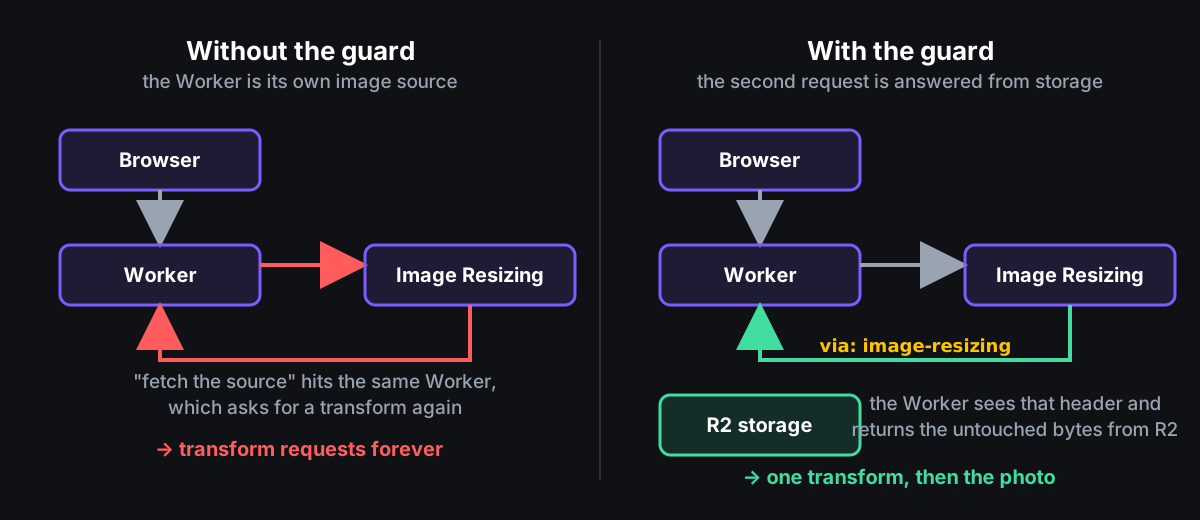
It calls you back. Transforming an image from a Worker means calling fetch(imageUrl, { cf: { image } }), and Image Resizing then fetches the source image from that URL, which is the same Worker. Without a guard that is an endless loop of transform requests. The Worker checks the via request header for image-resizing, which Image Resizing adds to its own fetch, and when it is present serves the untouched bytes from R2 with no transform.
It has a size ceiling, and every version of the photo fails. Image Resizing rejects inputs over 100 megapixels with ERROR 9413: Could not resize the image: The image is too large. A stitched panorama of 23,957 by 4,416 pixels is 105.8 megapixels. Because every request goes through a transform, every version of that photo, including the plain URL with no parameters at all, came back as a 403 Forbidden, and the gallery drew a broken-image placeholder. The Worker now recognises that specific error message and serves the original file untransformed, adding an X-Nexxara-Transform: bypassed-oversized response header so the fallback is visible in the browser’s developer tools. The format=json request, which asks Image Resizing for the image’s dimensions rather than its pixels, is deliberately excluded from the fallback: the queue worker recovers an oversized photo’s dimensions from that very error message, and returning image bytes there would leave oversized panoramas with no dimensions at all.
Full-resolution downloads had a related problem: overlays are sized in output pixels, and with no width in the request the Worker did not know the output size, so watermarks came out tiny on big files. The app now passes the stored dimensions as iw and ih; failing that, the Worker asks Image Resizing for them with format=json. The gallery always sends a width, so it never has to ask.
On the Next.js side, imageLoader.ts rounds the width that next/image computes up to the next multiple of 500 pixels (a 750-pixel request becomes 1,000; 1,200 becomes 1,500), so the edge cache sees a handful of sizes per photo instead of one per screen size. An earlier loader overwrote the width the gallery had already chosen, which served a thumbnail about 280 pixels wide as an image about 1,000 pixels wide.
Grouping photos into scenes with a vision model
Each upload puts one message per file on the photo-processing-queue. The consumer takes up to ten messages at a time, waits at most 30 seconds to fill a batch, retries a failed message three times, and then parks it on a separate dead-letter queue (photo-processing-dlq) for inspection. It extracts EXIF, the metadata a camera writes into each file, with exifr, then runs a vision pass on Workers AI, Cloudflare’s hosted models. The first version ran ResNet-50, an image-classification model; it was removed within three days of the first commit in favour of a single vision model. Today @cf/llava-hf/llava-1.5-7b-hf writes a caption for a downsized copy of each photo (sending the original returns Workers AI error 3006, “Request too large”), and @cf/meta/llama-4-scout-17b-16e-instruct handles the text tasks. Writes are guarded by ai_analyzed_at, so a message delivered twice cannot overwrite a photo that has already been analysed; force: true on the message bypasses the guard for a deliberate re-run. Password-protected galleries skip the vision pass entirely.
Bracketing, which groups a burst of shots or a whole scene into one unit, goes by timestamp first. The rule-based splitter in ai-smart-bracketing-service.ts starts a new bracket when more than 30 minutes have passed since the previous photo, or more than an hour since the bracket began, provided the current bracket has reached its minimum size. The model is told the same rule in its prompt: a gap of two hours or more always starts a new bracket.
The mistake in this pipeline was time zones. The EXIF DateTimeOriginal field is a wall-clock time with no zone attached; OffsetTimeOriginal, when present, says which zone that wall clock belongs to, and turning the pair into a universal instant means subtracting the offset. The first implementation added it instead, which put every photo from a shoot ten hours ahead of UTC ten hours into the future and fed nonsense into the grouping. Capture times are now stored as true UTC instants, with the zone resolved in order from the photo’s own offset tag, then the edition’s time zone, then the uploading user’s, then UTC, and recompute_exif_date_taken(edition_id) re-derives them from the stored EXIF data when either setting changes.
A live progress bar for uploads
An admin watching a large upload wants a progress bar, not a refresh button. ProgressActor is a Durable Object: a single instance of a small program that Cloudflare runs in exactly one place, with its own storage, so several users can share live state through it. There is one per edition (idFromName("edition:{uuid}"), and a malformed id gets a 404 rather than falling through to a shared default instance). The queue consumer and the upload routes POST typed events to it (upload:progress, ai:complete, bracket:started and nine others); a small function in state-manager.ts folds each event into the current state, the state is saved to the object’s storage, and the new state is broadcast over WebSocket to every admin browser tab connected to it.
The first version used the @cloudflare/actors beta and kept the open connections in an in-memory Set. It was rewritten on the WebSocket hibernation API, calling this.ctx.acceptWebSocket(server) so the runtime owns the connections, because an in-memory set does not survive the object being put to sleep between messages, and a broadcast after waking went to nobody. A second bug in the same object: the upload state was a JavaScript Map, and both storage.put() and the JSON.stringify used for broadcasting turn a Map into an empty {}, so every saved state and every message carried zero uploads. It is a plain object now, and a test round-trips an upload through JSON to prove it.
The WebSocket path is intercepted in worker/index.ts before OpenNext (the adapter that runs Next.js on Workers) sees the request, because a WebSocket connection cannot pass through the Next.js router. Only WebSocket upgrades and GET requests are accepted there; the code that produces events talks to the Durable Object directly, so nobody outside the Worker can forge progress for an edition.
The Stripe default that hangs a Worker
Tips and subscriptions go through Stripe, the payments provider. new Stripe(key) uses the library’s Node.js HTTP client, and in the Workers runtime that client never returns: checkout.sessions.create hung, and the POST that starts a tip checkout stayed pending forever. Every Stripe construction now passes httpClient: Stripe.createFetchHttpClient(), and webhook signature checks use constructEventAsync with Stripe.createSubtleCryptoProvider(), because the synchronous Node.js crypto path is not available on Workers either. The library documents both helpers; it does not fail loudly when you leave them out.
Video: reading the keyframes before playback
Videos are inspected with mp4box, a library that reads the structure of MP4 files, before they are shown: the keyframes route parses the file’s index (the moov atom), collects the timestamps of the frames that can be decoded on their own, and those drive the scrubbing slider in the video editor, with Cloudflare Media Transformations (/cdn-cgi/media/) producing the preview frames. Video bytes are served by the Worker entrypoint rather than a Next.js route, because Next.js and OpenNext strip the Content-Length header from streamed responses, and a download cut off halfway then looks identical to a complete one.
The stack, in one place
Next.js on Cloudflare Workers via OpenNext, as a single Worker with a custom entrypoint (worker/index.ts) that adds the queue consumer, the Durable Object, the video stream and three scheduled jobs (subscription expiry every hour, storage recalculation daily at 02:00 UTC, and R2 orphan cleanup daily at 03:30 UTC). Supabase for Postgres, sign-in and row-level security. Cloudflare R2 for media and for OpenNext’s page cache. Workers AI for vision and text. Stripe for tips and subscriptions, react-photo-album for the gallery layout, mp4box for reading video files. The image Worker is deployed separately from workers-nexxara/image, with placement.mode = "smart", which lets Cloudflare run it near the services it calls rather than near the user. The app has 418 unit tests; the image Worker has 33.
Beta
Nexxara is in closed beta with production companies and event photographers. If you run events, shoot events, or coordinate photographers across multiple editions, request access on the site — we would genuinely love to hear what you need from it.