Zack Design has published Dolphone, phone software for the Flipper One. The Flipper One is Flipper Devices’ upcoming pocket Linux computer, the bigger sibling of the Flipper Zero, with a slot inside for a 5G modem. Fit one, and Dolphone makes it ring: calls, texts and picture messages, emergency alerts, contacts and a call log, with Bluetooth headsets, the headphone jack and the built-in speaker.
It was built to one rule: add to Flipper’s interface, never replace it. The Flipper One already has a menu system called FlipCTL, with its own fonts, its own way of drawing lists, and a fixed meaning for each of its five buttons. Dolphone’s screens are ordinary FlipCTL apps that keep all of that, so answering a call feels like using any other part of the device.
Underneath, it’s one daemon with a command line and a D-Bus API, and that’s the part that goes furthest. Calls over the mobile network and over the internet, texts, picture messages and group texts, emergency alerts, call forwarding and balance codes, Bluetooth, KDE Connect on a laptop: all of it can be driven by a script, and none of it can be abused by one without a press on the device. As far as I can tell that makes it the broadest scriptable phone stack on Linux. That claim, like everything else here, is pending the hardware test at the end.
This post covers:
- what it does, and what “the Flipper’s own buttons” means on a 256×144 screen;
- how a call gets from the modem to the screen;
- stand-ins good enough that Linux’s own modem tool can’t tell;
- a 25-second freeze with three separate causes;
- ten reviews, and the security holes they found;
- what only real firmware can answer;
- a slow-device test, and what it shook out;
- the one question it can’t answer yet.
MIT licensed. The panel apps link the Slint toolkit under the GPL, so those builds are GPL-3.0.
Source → github.com/isaacrowntree/dolphone · Docs → isaacrowntree.com/dolphone
A phone on five buttons
The Flipper One’s screen is 256 by 144 pixels in shades of grey behind an orange backlight. Below it are five soft keys whose meaning never changes: Escape backs out, View shows information or switches view, Edit edits, Run does the main thing, and the middle one is Power, which belongs to the system. Beside them are a D-pad, a Back key, an app-switcher key, a push-to-talk key and a small touchpad.
That’s enough for a phone, as long as each key keeps its job:
| Escape | View | Edit | Run | PTT | |
|---|---|---|---|---|---|
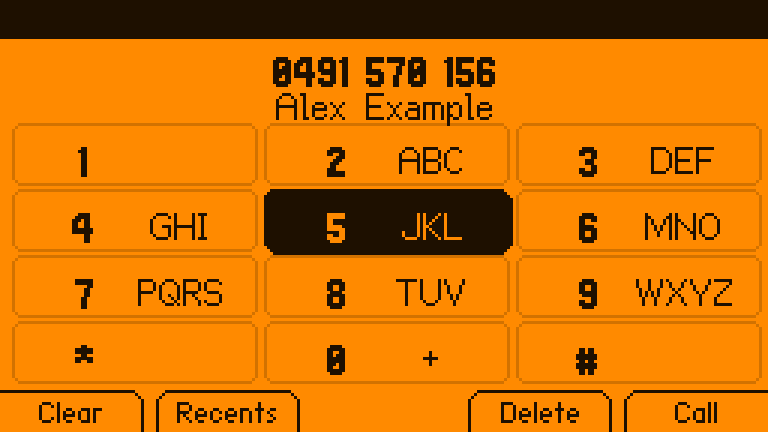
| Keypad | clear, exit | recent calls | delete a digit | call | |
| Ringing | decline | caller details | reply with a text | answer | silence the ringer |
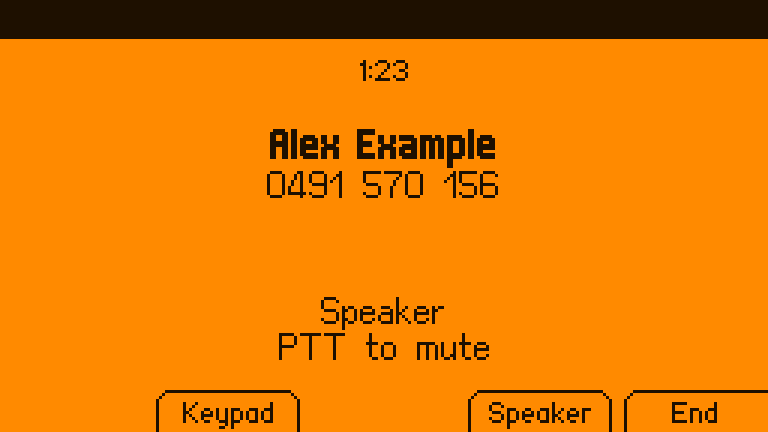
| In a call | in-call keypad | speaker / headset / Bluetooth | end | mute | |
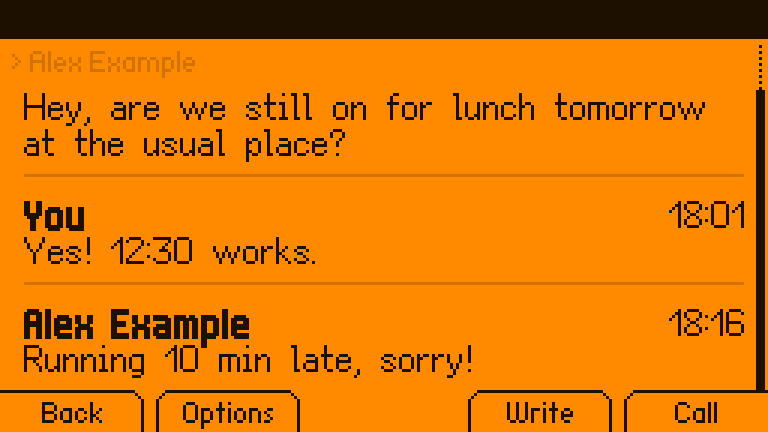
| A text | back | options | write | call them |
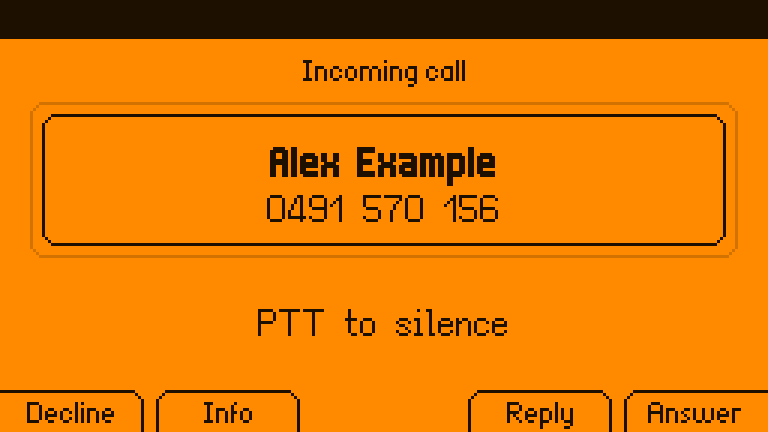
Back leaves the app, as it does everywhere on the Flipper, and the call carries on; the app-switcher key brings it back. A few things are there because a small screen makes them easy to get wrong. Keys are ignored for 0.4 seconds after a call appears, so a press meant for whatever was on screen can’t answer it. End is ignored for 1.5 seconds after answering, so the same nervous press can’t hang up. A long press on 0 types +.
Texts use FlipCTL’s own on-screen keyboard. Before anything is sent there’s a preview that says what it will cost: “1 text, 99 left”, or “3 texts (emoji or accents: 70 per text)”. A single emoji is enough to shrink every part of a text from 160 characters to 70.
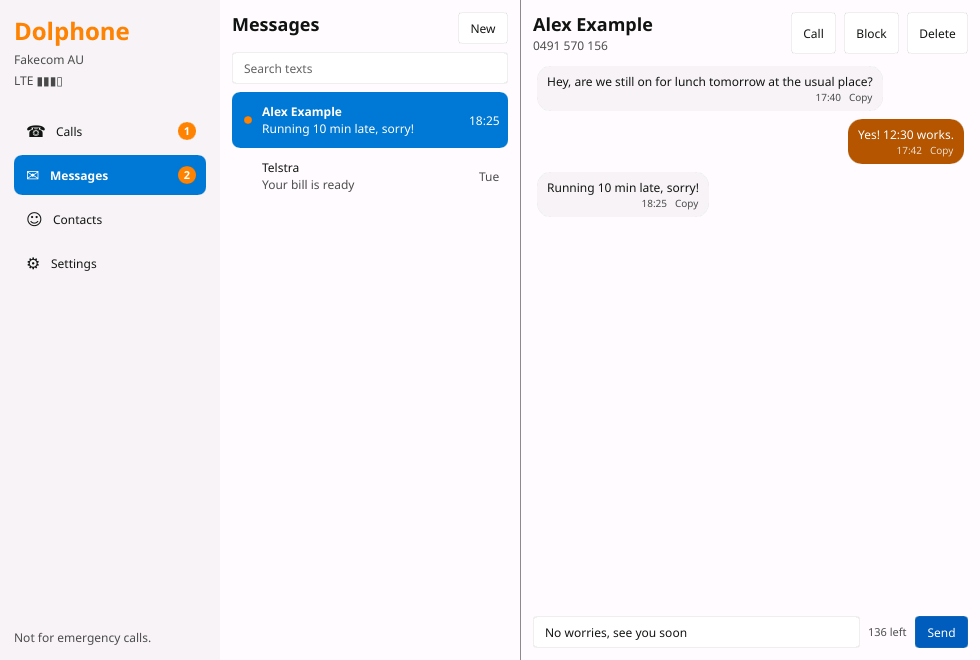
When the Flipper is plugged into a monitor (it has a desktop mode), there’s a desktop app for the same phone, with a dial pad, conversations, contacts and settings. Notifications have Answer and Decline buttons, a tray icon shows missed calls and unread texts, and clicking a phone number in a browser opens the dial pad with it filled in. Answer a call on the desktop and it’s answered on the panel too, because both are just windows onto the same thing.
The rest of what a phone does is there too:
- calls over the internet through a SIP account, for when there’s no signal, with texts over SIP and the ability to hold one network’s call while you answer the other’s;
- picture messages and group texts, through mmsd-tng: a group conversation is one thread, and a reply goes to everyone;
- emergency alerts, shown full screen and sounded even on silent;
- carrier codes from the keypad: call forwarding (
**21*…#), caller ID (#31#), call waiting, and balance checks; - contacts copied from your current phone over Bluetooth, with no account and no sign-in;
- a laptop that shows the phone’s texts and calls through KDE Connect, and can reply;
- privacy: a warning when the network forces the modem down to 2G, a switch to refuse 2G, and a message store that can be encrypted with its key sealed to the machine.
One program owns the phone
Linux already has a standard program for talking to cellular modems, ModemManager. Everything Dolphone does goes through one daemon of its own, phoned. It is the only program that asks ModemManager for calls and texts, the only one that moves call audio around, and the only one that keeps the message history. The panel apps, the desktop app, the command line and your scripts all just ask phoned.
When a call comes in, phoned checks the number isn’t blocked and starts the ringer. It tells FlipCTL to bring the Dialer to the front, so the call appears even if you were in another app, and posts a notification if a desktop is running. When the call connects, it links the modem’s audio to whichever output is in use: the speaker (through an echo canceller, so the other person doesn’t hear themselves), the headphone jack, or a Bluetooth headset. A headset plugged in mid-call takes the call over; unplugging it hands the call back to the speaker.
Scripts get the same calls, with limits. A program can text or dial, but it waits for a press on the device; a standing grant (“this program may text these numbers, four times an hour, for 30 days”) is allowed once, on the device, and premium numbers can never be granted. Reading messages needs its own grant, and every outside request goes in an audit log.
phonectl send --wait 0491570156 "build finished"   # waits for a press on the device, then for the network
phonectl otp --from 0491570156 --wait 60           # prints the code from the next text (needs a read grant)
phonectl --json watch                              # every event, one JSON object per line
Stand-ins good enough to fool the real tool
The Flipper One isn’t shipping yet, and nothing here has a modem in it. So Dolphone comes with fake-mm: a stand-in that takes ModemManager’s place and pretends to have one modem on a network called “Fakecom AU”. A script plays the other end of the line:
phonectl fake ring 0491570156             # someone calls
phonectl fake sms 0491570156 "running late"
phonectl fake answer                      # the far end picks up an outgoing call
phonectl fake signal 30 5G
It copies ModemManager closely enough that mmcli, ModemManager’s own command-line tool, lists it, reads its signal and places calls on it. FlipCTL’s status bar shows its signal bars too. It even answers AT commands the way a Quectel modem’s manual says it should, and refuses them the way ModemManager does when it isn’t in debug mode. Beside it there’s fake-mmsd, which plays mmsd-tng for picture messages, and a second copy of baresip, which plays the far end of an internet call.
FlipCTL itself, the real thing built from Flipper’s code, runs in a Linux virtual machine on a Mac, and its built-in browser view shows the Flipper’s screen and buttons. Ring the fake modem and the Dialer appears on that screen by itself; click the device’s Run key in the browser and the call connects.
Twenty-five seconds of nothing
The first time a call was answered that way, the screen didn’t change. The call was connected (the timer said so), but the Dialer still showed it ringing, and pressing Run again tried to answer a call that was already live.
The cause was buried under three others. When a call connects, phoned asks PipeWire, Linux’s audio system, what outputs exist, using its pw-dump tool. That question took up to 25 seconds, and while it waited, nothing else phoned had to say got out, including “the call is connected”.
| What made it slow | Why |
|---|---|
| The background service was sandboxed | On a per-user service, any sandboxing option puts the program in a separate user namespace, and PipeWire’s tools then wait out a 25-second timeout. All of them had to go. |
pw-dump’s output went into a pipe |
The same dump took 8 seconds into a pipe and 18 milliseconds into a file. It writes to a file now. |
| RTKit couldn’t run in the virtual machine | PipeWire asks a helper for real-time priority. That helper can’t start inside OrbStack’s containers, so every request hung until it gave up. The dev setup now disables it, and only there. |
The real fix was the fourth step: nothing slow runs where it can hold up a call any more. Audio work happens on its own threads with a time limit, and the test suite now checks that the “call connected” message arrives promptly, not just eventually.
Ten reviews, and what they found
Before publishing, ten separate reviews looked at Dolphone from different sides: an everyday phone user, the hacker crowd the Flipper is made for, people who’ve built phone software for Linux before (PinePhone, Librem 5, postmarketOS), accessibility, texting, phone features, desktop integration, reliability, privacy, and whether it actually feels like a phone on a screen this small.
The most useful thing they found was that the code didn’t match the README. The README said other programs couldn’t read your texts. In fact:
- the “new message” announcement, which every program on the system can hear, carried the whole text, one-time codes included;
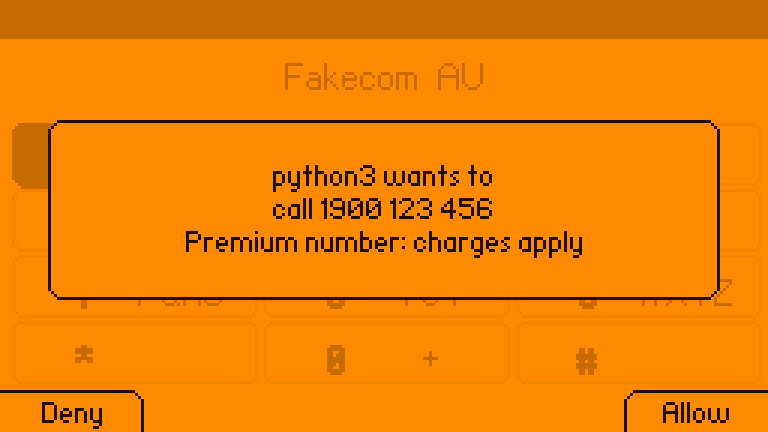
- anything could pretend to be the desktop’s notification system, and so press “Allow” on its own request to text a premium number;
- any program could answer a call, which turns a device that answers calls it was sent into a room microphone.
All of that is fixed. Messages and the call log only go to Dolphone’s own apps, or to a program you’ve allowed to read them. Announcements no longer contain any text. A notification can never allow anything. Answering, routing audio, pairing headsets and changing settings are limited to Dolphone’s own apps, while anything may hang up. Texting or dialling from a script still works, but it waits for a press on the device, and a premium number waits even when you dialled it yourself.
They found ordinary bugs too: picture messages arrived as blank texts, a text that reached the modem but couldn’t be saved was deleted anyway, call-forwarding codes were sent as if they were balance checks, and a modem resetting mid-call left a call on screen that would never end. Those are fixed, and nearly everything else the reviews asked for has since been built: picture messages, forwarding codes that really forward, internet calls, emergency alerts, speed dial, a Today screen, KDE Connect, an encrypted store. Then twenty more reviews went over the finished code, each from one side: an attacker running as the same user, an attacker on the network, Rust robustness, concurrency, data integrity, Debian packaging, modem bring-up, audio, emergency calling, telephony standards, numbers outside Australia, accessibility, the scripting API, the tests themselves, onboarding, FlipCTL’s conventions, licensing, battery use, failure recovery and privacy. Between them they listed about 190 findings. Some were small. Some were not: the SIM’s PIN-change code went out to the network as if it were a balance check, carrying the PIN with it; New Zealand’s 111 asked for confirmation like a short code; a folder named like an AppImage mount was enough to pass as Dolphone’s own app; and a request to text a million numbers, sixty times an hour, forever, would have shown on the panel as “wants to text without asking”. Those are fixed, and so are nearly all the rest. What’s left is in the roadmap, and most of it needs either the hardware or a change upstream.
What only real firmware can answer
Some of a phone’s setup lives inside the modem. On a Quectel modem, call audio only reaches Linux if the modem offers a USB sound card, VoLTE has to be switched on, and the modem has to pick the carrier’s profile from the SIM. Dolphone checks all three and sets them with one press:
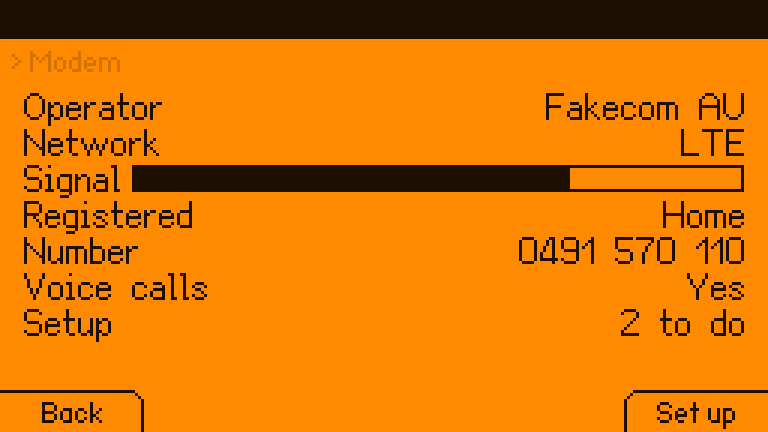
phonectl modem setup           # USB audio, VoLTE, carrier profile: ok or change
phonectl modem setup apply     # waits for a press on the device; the modem restarts
Two things about that are worth saying plainly. The commands come from Quectel’s application note for its LTE modules and from Quectel staff on its forum. None of them is in the public AT manual for the RM520N, the modem Flipper’s documents name. They’re the right first guess, and their answers on real firmware are the first thing the hardware test records.
Second, ModemManager only passes AT commands from a program like Dolphone when it runs in debug mode, which also makes its log more detailed. ModemManager hides numbers and texts in some of those log lines, but not in AT traffic. So the install asks before turning it on. Yes is the default only on a Flipper One, where call audio depends on it, and sudo dolphone-modem-access off turns it off again.
A slow-device test
The development machine is a fast Mac; the Flipper One is a small ARM board that will also be running its own interface, a modem and Wi-Fi. Timing bugs that never show up on the Mac are exactly the ones that show up there. So the whole end-to-end suite was run again with every CPU core in the virtual machine pinned at 100%, as a stand-in for a slow, busy device, to find out what only goes wrong when everything takes longer. It found five things:
- A timeout looked like the modem leaving. If asking ModemManager for the modem timed out,
phonedtreated that as the modem being unplugged, and ended its calls. On a busy phone that’s a dropped call. A failed question now leaves things as they were. - A hangup could end the wrong internet call. Acting on a SIP call takes two commands (pick the call, then act on it), and two calls’ commands could interleave. They go one at a time now.
- baresip crashed, with a core dump. The backtrace pointed into baresip 1.1.0’s own audio-file player, which starts its playback thread before marking it as running. Free the player quickly enough (a short call on a slow machine) and the thread runs on memory that’s already gone. Only the tests used that player; real calls go through PipeWire, and the tests now play into ALSA’s null device instead.
- Bluetooth stalled Phone Settings. With BlueZ installed but unable to start, every question to it waited out the system’s 25-second attempt to start it.
phonednow only asks a BlueZ that is actually running. otp --waitcould miss the code if the text arrived while it was still connecting.
The tests themselves were part of the problem too: they slept a fixed time and then checked, and on a slow device “a fixed time” is a guess. They now wait for the state they expect, with a deadline. After the fixes, three runs in a row at full load passed every check.
What the tests check
The end-to-end suite runs fake-mm, fake-mmsd, a SIP far end, phoned and the command-line tool together, and plays through what a phone does, in 242 checks:
- calls that ring, are answered, missed, declined, held and swapped, over the mobile network and over SIP;
- texts and picture messages arriving, threading, getting marked read and being cleared off the modem; group texts and replies to them;
- forwarding, caller-ID and call-waiting codes, and the modem’s setup;
- a script trying to text, dial, answer, read messages, send a picture and change settings, and being stopped or made to wait each time;
- an encrypted store that can’t be read without its key, stays locked when the key can’t be had, and leaves new texts on the SIM until it can;
- a SIM7600 modem’s serial call audio, bridged through real PipeWire in both directions.
Five more tests drive the panel apps and the desktop app through their real input against a live phoned, ten check KDE Connect against the real KDE Connect daemon, and 214 unit tests cover the rest. The screens are drawn headlessly in the tests and saved as images (every screenshot in this post came from there), and their layout is checked against the panel’s fonts. What the tests can’t check is the part with real radio waves in it.
The question it can’t answer yet
Dolphone has never made a real call. The modem Flipper’s documents use, the Quectel RM520N-GL, has no wired connection for call audio; the pins for it are only on a European version of the module. Call audio would have to come over USB, through the sound-card mode the setup above turns on. If that works, everything above works. If it doesn’t, Dolphone becomes a very good texting app.
docs/HARDWARE.md is the test: five checks, run with that modem and a Flipper-compatible Rockchip board, with what counts as a pass for each. Reporting a failure is as useful as reporting a pass. The same checks are how the other machines Dolphone has profiles for get from “untested” to “tested”: a Raspberry Pi, a ClockworkPi uConsole, a PinePhone, a Librem 5, a laptop with a modem.
Try it
You don’t need a Flipper One. On an Apple Silicon Mac with OrbStack:
git clone https://github.com/isaacrowntree/dolphone && cd dolphone
scripts/dev-setup.sh                      # an arm64 Debian 13 machine with FlipCTL built
orb -m f1 scripts/run-dev.sh              # then open http://f1.orb.local:8899/
orb -m f1 phonectl fake ring 0491570156   # and watch it ring
On the Flipper One itself, or any Debian 13 machine with a modem, there’s a Debian package.
Dolphone is unofficial; Flipper Devices didn’t make it. It isn’t suitable for emergency calls: it never blocks 000, 112 or 911, but carry a real phone. Issues and pull requests are welcome, most of all from anyone with an M.2 modem and a board to run the hardware test on.
Header photo by Brooke Balentine on Unsplash.